
Join the Conversation
- Find Answers
- :
- Using Splunk
- :
- Splunk Search
- :
- How do I display negative values through geostats?
- Subscribe to RSS Feed
- Mark Topic as New
- Mark Topic as Read
- Float this Topic for Current User
- Bookmark Topic
- Subscribe to Topic
- Mute Topic
- Printer Friendly Page
- Mark as New
- Bookmark Message
- Subscribe to Message
- Mute Message
- Subscribe to RSS Feed
- Permalink
- Report Inappropriate Content

Hello,
I'm busy mapping temperatures for locations around the world and in some cases the value is negative. Unfortunately negative values are not displayed in the map through the geostats command, so I was wondering how to enable them? I've tried setting the marker sizes so that it is the same for all values:
<option name="mapping.markerLayer.markerMaxSize">10</option>
<option name="mapping.markerLayer.markerMinSize">10</option>
But this only makes positive values the same size, negative values are still missing...
Any ideas?
Thank you!
Andrew
- Mark as New
- Bookmark Message
- Subscribe to Message
- Mute Message
- Subscribe to RSS Feed
- Permalink
- Report Inappropriate Content


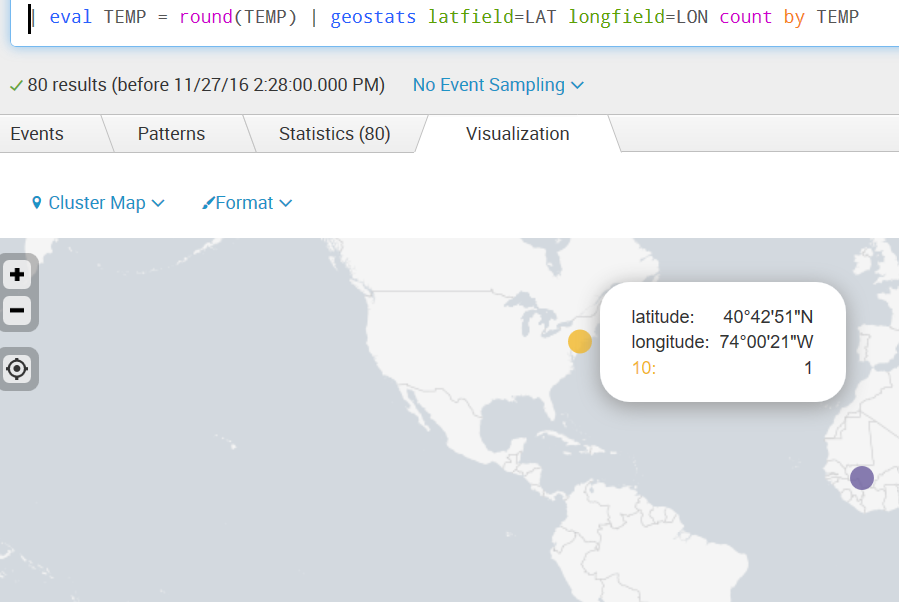
That would make the value the number of cities underneath the marker with that temperature, and would make the label the temperature.

- Mark as New
- Bookmark Message
- Subscribe to Message
- Mute Message
- Subscribe to RSS Feed
- Permalink
- Report Inappropriate Content
- Mark as New
- Bookmark Message
- Subscribe to Message
- Mute Message
- Subscribe to RSS Feed
- Permalink
- Report Inappropriate Content
This is great! The negative value now appears, thank you so much! I can't make this comment the answer... is there a way for you to move it to be an answer?
- Mark as New
- Bookmark Message
- Subscribe to Message
- Mute Message
- Subscribe to RSS Feed
- Permalink
- Report Inappropriate Content
Try this:
base search | eval category = case(TEMP < 0, "freezing", TEMP < 15, "cold", TEMP < 25, "temperate", TEMP < 35, "hot", true(), "boiling")
| geostats latfield=LAT longfield=LON count by category
- Mark as New
- Bookmark Message
- Subscribe to Message
- Mute Message
- Subscribe to RSS Feed
- Permalink
- Report Inappropriate Content
You could round to whole degrees, and do a count by TEMP... then colour all reasonable values accordingly.
As long as the negative temperature is considered a value and not a split-by field, this visualization will attempt to draw a pie slice of negative area. Geometry doesn't do that.
- Mark as New
- Bookmark Message
- Subscribe to Message
- Mute Message
- Subscribe to RSS Feed
- Permalink
- Report Inappropriate Content
I'm not sure what you mean by "round to whole degrees. and do a count by TEMP" . Wouldn't this still make every value 1?
- Mark as New
- Bookmark Message
- Subscribe to Message
- Mute Message
- Subscribe to RSS Feed
- Permalink
- Report Inappropriate Content
Hey Martin,
This makes it visible since it's a count (a positive value) and not the temperature (negative value). I'd like to have the marker so that when I put by cursor on it, it shows the temperature and not the count.
Is this possible you think?
- Mark as New
- Bookmark Message
- Subscribe to Message
- Mute Message
- Subscribe to RSS Feed
- Permalink
- Report Inappropriate Content
The marker is a pie chart of your various temperature categories, with the temperature used as the size of that category's slice. If you have a negative temperature, you're drawing a pie slice of negative size.
Zoom way out, to let two markers merge into one - you should see the pie.
- Mark as New
- Bookmark Message
- Subscribe to Message
- Mute Message
- Subscribe to RSS Feed
- Permalink
- Report Inappropriate Content
Maybe it's just me, but I cannot picture a pie slice or marker with a negative-sized area.
KelvinFTW
- Mark as New
- Bookmark Message
- Subscribe to Message
- Mute Message
- Subscribe to RSS Feed
- Permalink
- Report Inappropriate Content
I know what you mean, but I don't want the marker to expand or contract based on the value being displayed. I want it to be a constant size despite being a positive or negative value.

Join the Splunk Community Slack to learn, troubleshoot, and make connections with fellow Splunk practitioners in real time!
Join Splunk User Groups to connect and learn in-person by region or remotely by topic or industry.
Meet the .conf26 AI Agent Buildathon Winners
Trusted Autonomy in the SOC: A Maturity Journey
Supercharging Windows Security Detection Performance: Introducing Hybrid Field ...
