
Join the Conversation
- Find Answers
- :
- Using Splunk
- :
- Splunk Search
- :
- Re: How can i create new fields with data from two...
- Subscribe to RSS Feed
- Mark Topic as New
- Mark Topic as Read
- Float this Topic for Current User
- Bookmark Topic
- Subscribe to Topic
- Mute Topic
- Printer Friendly Page
- Mark as New
- Bookmark Message
- Subscribe to Message
- Mute Message
- Subscribe to RSS Feed
- Permalink
- Report Inappropriate Content

I need to break out log data from two separate multi-value fields into single value fields. Here is what data looks like:
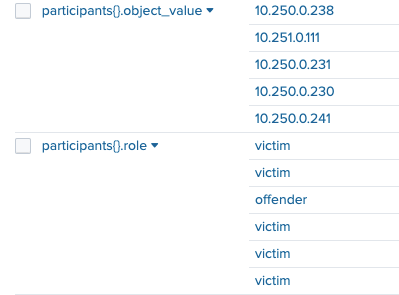
Each line of data from "participants{}.object_value" corresponds to the line in "participants{}.role" and I would like named victims and offender fields. I dont understand how to use the mv commands to expand the data from two different fields and then combine them into new fields.
- Mark as New
- Bookmark Message
- Subscribe to Message
- Mute Message
- Subscribe to RSS Feed
- Permalink
- Report Inappropriate Content


Once multi-value fields are expanded, any relationship among them is lost. They need to be combined into a new field before expansion.
...
| eval new_field = mvzip("participants{}.object_value", "participants{}.role")
| mvexpand new_field
| eval new_field = split(new_field, ",")
| eval object_value = mvindex(new_field, 0), role = mvindex(new_field, 1)
The mvzip function combines two multi-value fields, separating them with a comma. The split function later on breaks the field on the comma. If you have more than two fields to combine, use nested mvzip functions.
| eval new_field = mvzip(field1, mvzip(field2, mvzip(field3, field4)))
If this reply helps you, Karma would be appreciated.
- Mark as New
- Bookmark Message
- Subscribe to Message
- Mute Message
- Subscribe to RSS Feed
- Permalink
- Report Inappropriate Content
Once multi-value fields are expanded, any relationship among them is lost. They need to be combined into a new field before expansion.
...
| eval new_field = mvzip("participants{}.object_value", "participants{}.role")
| mvexpand new_field
| eval new_field = split(new_field, ",")
| eval object_value = mvindex(new_field, 0), role = mvindex(new_field, 1)
The mvzip function combines two multi-value fields, separating them with a comma. The split function later on breaks the field on the comma. If you have more than two fields to combine, use nested mvzip functions.
| eval new_field = mvzip(field1, mvzip(field2, mvzip(field3, field4)))
If this reply helps you, Karma would be appreciated.
- Mark as New
- Bookmark Message
- Subscribe to Message
- Mute Message
- Subscribe to RSS Feed
- Permalink
- Report Inappropriate Content
Thank you this worked and did what I needed
- Mark as New
- Bookmark Message
- Subscribe to Message
- Mute Message
- Subscribe to RSS Feed
- Permalink
- Report Inappropriate Content
I will give this a shot to see what I get. thx

Join the Splunk Community Slack to learn, troubleshoot, and make connections with fellow Splunk practitioners in real time!
Join Splunk User Groups to connect and learn in-person by region or remotely by topic or industry.
Tuning Edge Processor in Hybrid Mode: What Limits Each Data Path
Best Practices: Splunk auto adjust pipeline queue
Request for Professional Development: Attending .conf26
