
Join the Conversation
- Find Answers
- :
- Using Splunk
- :
- Splunk Search
- :
- Re: How can I sort the split columns in this pivot...
- Subscribe to RSS Feed
- Mark Topic as New
- Mark Topic as Read
- Float this Topic for Current User
- Bookmark Topic
- Subscribe to Topic
- Mute Topic
- Printer Friendly Page
- Mark as New
- Bookmark Message
- Subscribe to Message
- Mute Message
- Subscribe to RSS Feed
- Permalink
- Report Inappropriate Content

Hello
I have a dataset that I created along with a pivot table. the table has a split column called RR_Score which is an eval field in the dataset. This field evals a field called score and creates criticality as Critical, High, Medium, Low, Nominal and None. I want it sorted in that order specifically BUT I cannot do that, it only sorts alphabetically. I tried eval'ing a new field called
sortingSequence that does this:
case(RR_Score="Critical", 1, RR_Score="High", 2, RR_Score="Medium", 3, RR_Score="Low", 4, RR_Score="Nominal", 5, RR_Score="None", 6,1=1, 0)
However it doesn't sort in regular search nor in pivot, I don't want to display the field either. just want to order the RR_Score fields.
The search looks something like this:
| pivot RiskEvalData RiskEvalData count(info_name) AS "Count of Vendor" SPLITROW info_owner_subsidiary AS Subsidiary SPLITROW info_owner_deptTechnical AS "Technical Dept" SPLITROW info_owner_deptBusiness AS LOB SPLITCOL RR_Score SORT 1000 sortingSequence ROWSUMMARY 1 COLSUMMARY 1 NUMCOLS 100 SHOWOTHER 1
I have attached a screenshot of the pivot table.
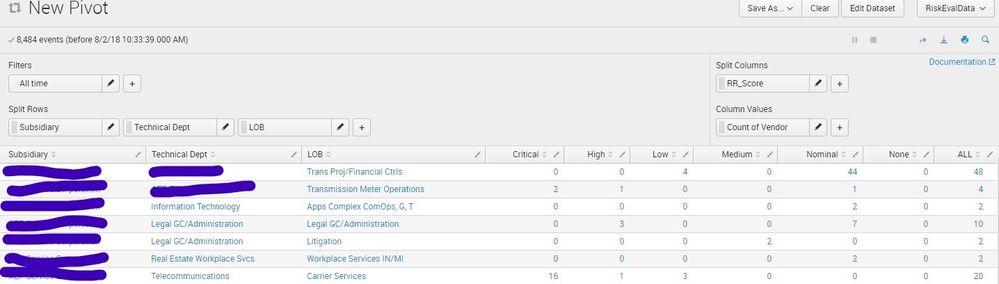
Any thought how I can get the RR_Score fields sorted properly?
Thanks as always!
- Mark as New
- Bookmark Message
- Subscribe to Message
- Mute Message
- Subscribe to RSS Feed
- Permalink
- Report Inappropriate Content

You can try thi, If the values for field RR_Score are fixed and you always want all columns to be present.
| pivot RiskEvalData RiskEvalData count(info_name) AS "Count of Vendor" SPLITROW info_owner_subsidiary AS Subsidiary SPLITROW info_owner_deptTechnical AS "Technical Dept" SPLITROW info_owner_deptBusiness AS LOB SPLITCOL RR_Score SORT 1000 sortingSequence ROWSUMMARY 1 COLSUMMARY 1 NUMCOLS 100 SHOWOTHER 1
| table Subsidiary  "Technical Dept" LOB Critical High Medium Low Nominal None ALL
- Mark as New
- Bookmark Message
- Subscribe to Message
- Mute Message
- Subscribe to RSS Feed
- Permalink
- Report Inappropriate Content
You can try thi, If the values for field RR_Score are fixed and you always want all columns to be present.
| pivot RiskEvalData RiskEvalData count(info_name) AS "Count of Vendor" SPLITROW info_owner_subsidiary AS Subsidiary SPLITROW info_owner_deptTechnical AS "Technical Dept" SPLITROW info_owner_deptBusiness AS LOB SPLITCOL RR_Score SORT 1000 sortingSequence ROWSUMMARY 1 COLSUMMARY 1 NUMCOLS 100 SHOWOTHER 1
| table Subsidiary  "Technical Dept" LOB Critical High Medium Low Nominal None ALL
- Mark as New
- Bookmark Message
- Subscribe to Message
- Mute Message
- Subscribe to RSS Feed
- Permalink
- Report Inappropriate Content
For the win!
That was it. For some reason I didn't think about tabling again. Thanks again!
- Mark as New
- Bookmark Message
- Subscribe to Message
- Mute Message
- Subscribe to RSS Feed
- Permalink
- Report Inappropriate Content

@tkwaller_2 - if your issue has been solved, please accept the answer that solved it. Feel free to upvote any answers or comments that you found particularly helpful as well, on your own or other people's questions.



Join the Splunk Community Slack to learn, troubleshoot, and make connections with fellow Splunk practitioners in real time!
Join Splunk User Groups to connect and learn in-person by region or remotely by topic or industry.
Announcing Modern Navigation: A New Era of Splunk User Experience
Analytics Workspace removal in Splunk 10.6
Vibe-coding, AI, and Splunkcraft: Highlights from the .conf26 Builder Bar
