
Turn on suggestions
Auto-suggest helps you quickly narrow down your search results by suggesting possible matches as you type.
Splunk Search
×
Join the Conversation
Without signing in, you're just watching from the sidelines. Sign in or Register to connect, share, and be part of the Splunk Community.
- Find Answers
- :
- Using Splunk
- :
- Splunk Search
- :
- Re: Timechart splunk
Options
- Subscribe to RSS Feed
- Mark Topic as New
- Mark Topic as Read
- Float this Topic for Current User
- Bookmark Topic
- Subscribe to Topic
- Mute Topic
- Printer Friendly Page
- Mark as New
- Bookmark Message
- Subscribe to Message
- Mute Message
- Subscribe to RSS Feed
- Permalink
- Report Inappropriate Content

Amir
Engager
07-21-2022
01:27 AM
Hey All
I have this search, and I want two results on my visualization. I want to see both "Method" and "User". What is missing here
index=XXX sourcetype="XXX:XXX:message" data.logName="projects/*/logs/cloudaudit.googleapis.com%2Factivity" data.resource.labels.project_id IN (*) AND (
data.resource.type IN(*) (data.protoPayload.methodName IN ("*update*","*patch*","*insert*" ) AND data.protoPayload.authorizationInfo{}.permission IN ("*update*","*insert*"))
OR (data.resource.type IN(*) (data.protoPayload.methodName IN ("*create*", "*insert*") AND data.protoPayload.authorizationInfo{}.permission="*create*"))
OR (data.resource.labels.project_id IN (*) AND data.resource.type IN(*) data.protoPayload.methodName IN (*delete*)))
| eval name1='data.protoPayload.authorizationInfo{}.resourceAttributes.name'
| eval name2='data.protoPayload.authorizationInfo{}.resource'
| eval Name=if(name1="-", name2,name1)
|search Name!="-"
| rename data.protoPayload.methodName as Method, data.resource.type as "Resource Type", data.protoPayload.authorizationInfo{}.permission as Permission, data.timestamp as Time, data.protoPayload.authenticationInfo.principalEmail as User, data.protoPayload.requestMetadata.callerIp as "Caller IP"
| timechart count by Method
1 Solution
- Mark as New
- Bookmark Message
- Subscribe to Message
- Mute Message
- Subscribe to RSS Feed
- Permalink
- Report Inappropriate Content

ITWhisperer

SplunkTrust
07-21-2022
02:40 AM
Try changing to line graph, set the format to zero or connect (not gap), then switch back to column chart
- Mark as New
- Bookmark Message
- Subscribe to Message
- Mute Message
- Subscribe to RSS Feed
- Permalink
- Report Inappropriate Content
Amir
Engager
07-21-2022
03:28 AM
@ITWhisperer Amazing thanks a lot.
Just another question, if i want to search users that ends in @xxx.com
I still want to use the same search but want to sort it to only users that ends with @xxx.com
- Mark as New
- Bookmark Message
- Subscribe to Message
- Mute Message
- Subscribe to RSS Feed
- Permalink
- Report Inappropriate Content
ITWhisperer
SplunkTrust
07-21-2022
01:51 AM
Does something like this work for you?
| bin span=30m _time
| stats count by _time Method User
| eventstats sum(count) as Method_count by _time Method
| eventstats sum(count) as User_count by _time User
| eval {Method}=Method_count
| eval {User}=User_count
| fields - count *_count Method User
| timechart values(*) as *- Mark as New
- Bookmark Message
- Subscribe to Message
- Mute Message
- Subscribe to RSS Feed
- Permalink
- Report Inappropriate Content
Amir
Engager
07-21-2022
02:27 AM
Hey looks much better now.
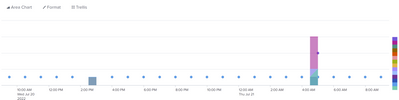
Can I make it nicer in somehow, the vizualization?
- Mark as New
- Bookmark Message
- Subscribe to Message
- Mute Message
- Subscribe to RSS Feed
- Permalink
- Report Inappropriate Content
ITWhisperer
SplunkTrust
07-21-2022
02:40 AM
Try changing to line graph, set the format to zero or connect (not gap), then switch back to column chart


Got questions? Get answers!
Join the Splunk Community Slack to learn, troubleshoot, and make connections with fellow Splunk practitioners in real time!
Meet up IRL or virtually!
Join Splunk User Groups to connect and learn in-person by region or remotely by topic or industry.
Get Updates on the Splunk Community!
Meet Splunk Observability Studio: AI-Assisted OpenTelemetry Instrumentation Without ...
Instrumentation is usually the last step or even an afterthought when building out a project. The feature ...
Federated Search for Cisco Security and Analytics Logging (SAL) is now GA on Splunk ...
Federated Search for Cisco Security Analytics and Logging (SAL) is now generally available as part of the ...
Your Path to AgenticOps: AI Experiences for Every Splunk Practitioner
Your Path to AgenticOps: AI Experiences for Every Splunk Practitioner
Join us for a demo-driven look at how ...
