
Turn on suggestions
Auto-suggest helps you quickly narrow down your search results by suggesting possible matches as you type.
Splunk Search
×
Join the Conversation
Without signing in, you're just watching from the sidelines. Sign in or Register to connect, share, and be part of the Splunk Community.
- Find Answers
- :
- Using Splunk
- :
- Splunk Search
- :
- Re: Grouping (Range?) HTTP Status codes
Options
- Subscribe to RSS Feed
- Mark Topic as New
- Mark Topic as Read
- Float this Topic for Current User
- Bookmark Topic
- Subscribe to Topic
- Mute Topic
- Printer Friendly Page
- Mark as New
- Bookmark Message
- Subscribe to Message
- Mute Message
- Subscribe to RSS Feed
- Permalink
- Report Inappropriate Content

dbcase
Motivator
04-20-2017
11:26 AM
Hi,
I have queries that I'd like to group HTTP Status codes together... (i.e. anything 200-299, or 300-399, or 400-499, or 500-599) . I have a dropdown that prompts the user to select
 <input type="dropdown" token="http_code" searchWhenChanged="true">
        <label>Select Http Status Code Range:</label>
        <default>200</default>
        <choice value="200">200 - 299</choice>
        <choice value="300">300 - 399</choice>
        <choice value="400">400 - 499</choice>
        <choice value="500">500 - 599</choice>

      </input>
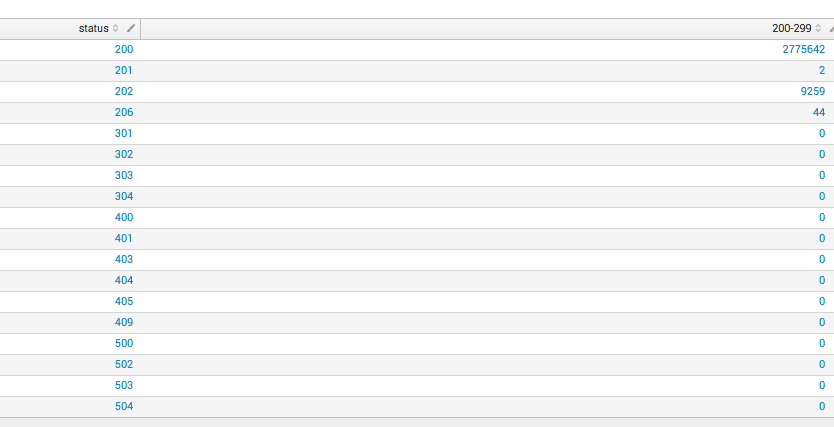
but I'm not sure how to get the query working. This is what I have it it kinda works but it still returns other codes even thought the value is zero
index=itscom source=*access* |rex "HTTP\S+ (?<status>\d+)"|stats count(eval(searchmatch("status=2*"))) as "200-299" by status

1 Solution
- Mark as New
- Bookmark Message
- Subscribe to Message
- Mute Message
- Subscribe to RSS Feed
- Permalink
- Report Inappropriate Content

somesoni2
Revered Legend
04-20-2017
11:56 AM
Try this
index=itscom source=*access* |rex "HTTP\S+ (?<status>\d+)"
| bucket status span=100 | eval status=mvindex(split(status,"-"),0)."-".(tonumber(mvindex(split(status,"-"),1))-1)
| stats count by status
- Mark as New
- Bookmark Message
- Subscribe to Message
- Mute Message
- Subscribe to RSS Feed
- Permalink
- Report Inappropriate Content
somesoni2
Revered Legend
04-20-2017
11:56 AM
Try this
index=itscom source=*access* |rex "HTTP\S+ (?<status>\d+)"
| bucket status span=100 | eval status=mvindex(split(status,"-"),0)."-".(tonumber(mvindex(split(status,"-"),1))-1)
| stats count by status
- Mark as New
- Bookmark Message
- Subscribe to Message
- Mute Message
- Subscribe to RSS Feed
- Permalink
- Report Inappropriate Content
dbcase
Motivator
04-20-2017
12:05 PM
Wow, tat is pretty good! It doesn't seem to get the 500-599 ones though.
- Mark as New
- Bookmark Message
- Subscribe to Message
- Mute Message
- Subscribe to RSS Feed
- Permalink
- Report Inappropriate Content
dbcase
Motivator
04-20-2017
12:09 PM
nevermind, my fat fingers can't type so well 🙂
- Mark as New
- Bookmark Message
- Subscribe to Message
- Mute Message
- Subscribe to RSS Feed
- Permalink
- Report Inappropriate Content
somesoni2
Revered Legend
04-20-2017
12:08 PM
Lets try this than
index=itscom source=*access* |rex "HTTP\S+ (?\d+)"
 | bucket status span=100 | eval status=mvindex(split(status,"-"),0)."-".(tonumber(mvindex(split(status,"-"),0))+99)
 | stats count by status

Got questions? Get answers!
Join the Splunk Community Slack to learn, troubleshoot, and make connections with fellow Splunk practitioners in real time!
Meet up IRL or virtually!
Join Splunk User Groups to connect and learn in-person by region or remotely by topic or industry.
Get Updates on the Splunk Community!
Persistent Queue at TcpOut — One of Splunk's Most Practical Features
Splunk introduced persistent queueing at the tcpout layer as one of the most practical resilience features in ...
Build resilience for the agentic era: Join us at Splunk Go San Jose
AI is changing how organizations build, operate, and secure digital services. As teams adopt AI agents and ...
Manage Edge Processor pipelines end to end with APIs
This guide uses the Data Management APIs to create an Edge Processor, onboard one instance, deploy a pipeline ...
