
Join the Conversation
- Find Answers
- :
- Using Splunk
- :
- Splunk Search
- :
- Flagged Risky Commands- Why is Splunk no longer re...
- Subscribe to RSS Feed
- Mark Topic as New
- Mark Topic as Read
- Float this Topic for Current User
- Bookmark Topic
- Subscribe to Topic
- Mute Topic
- Printer Friendly Page
- Mark as New
- Bookmark Message
- Subscribe to Message
- Mute Message
- Subscribe to RSS Feed
- Permalink
- Report Inappropriate Content
Flagged Risky Commands- Why is Splunk no longer recognizing command?

We have this dashboard that recently started alerting us on a risky command. We were using the fit command.
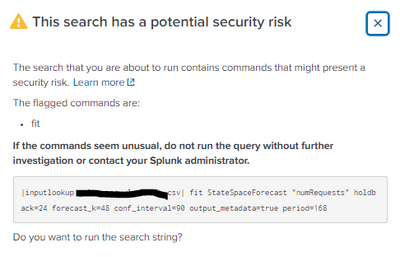
I followed the docs and added the following line to the newly created commands.conf that i had put in the apps local folder to push.
[fit]
is_risky = false
According to the docs, i assumed that this would just disable the warning for using that command. After i put it into the specified apps local folder, /export/opt/splunk/etc/shcluster/apps/<app-name>/local, I pushed the bundle and it seemed to have put it in the apps default folder on the search heads. But the biggest issue here is that once i pushed that bundle, splunk doesn't recognize the fit.py file any more. I tested putting that commands.conf in the apps default folder, same thing. I tested this a few times, and while im glad that the bundle pushes were working, im a bit confused as to why splunk no longer recognizes that command even though im only using the is_risky=false, which should only stop the warning.
Any help on this matter would be appreciated. Thank you. And if you could also answer as to why the local file in the app's directory is pushing to the apps default folder on the search heads, that would be a bonus. Thank you.
- Mark as New
- Bookmark Message
- Subscribe to Message
- Mute Message
- Subscribe to RSS Feed
- Permalink
- Report Inappropriate Content

If you add the stanza [fit] is_risky=false to /opt/splunk/etc/shcluster/apps/Splunk_ML_Toolkit/local/commands.conf on the SHC deployer, then apply the bundle to the SHC members, it seems to have resolved the problem of Splunk not finding fit.py.
- Mark as New
- Bookmark Message
- Subscribe to Message
- Mute Message
- Subscribe to RSS Feed
- Permalink
- Report Inappropriate Content
Had a similar issue. After adding "[fit] is_risky = false" to commands.conf, Splunk complained that it could not find fit.py when executing the fit command from within my app. However, it could find fit.py if I ran the fit command within the MLTK app.


Join the Splunk Community Slack to learn, troubleshoot, and make connections with fellow Splunk practitioners in real time!
Join Splunk User Groups to connect and learn in-person by region or remotely by topic or industry.
SOC4Kafka - New Kafka Connector Powered by OpenTelemetry
Rounding off the Splunk Dashboard Contest
A Four Part Event Series: AI + Observability: AI Agents, LLMs, Apps, & Infrastructure
