
Join the Conversation
- Find Answers
- :
- Using Splunk
- :
- Splunk Search
- :
- Re: Filling in missing '_time' rows (without using...
- Subscribe to RSS Feed
- Mark Topic as New
- Mark Topic as Read
- Float this Topic for Current User
- Bookmark Topic
- Subscribe to Topic
- Mute Topic
- Printer Friendly Page
- Mark as New
- Bookmark Message
- Subscribe to Message
- Mute Message
- Subscribe to RSS Feed
- Permalink
- Report Inappropriate Content

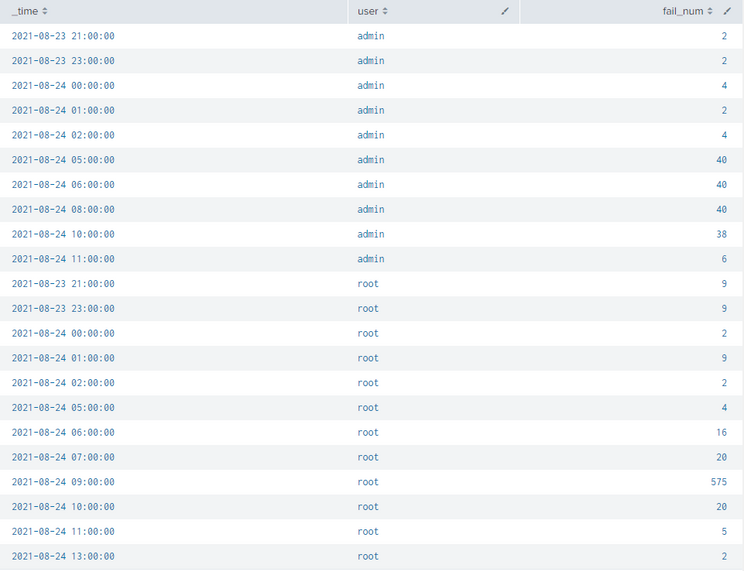
I want to know how I can incrementally go through and add missing times (hours) per user across a number of users. Also the fail_num for those times should be '0'. I've thought of using foreach, but I'm not sure this is the route to go here.
Above is a result showing only 2 users from the query I'm making in one of my previous posts ("Detecting-Spikes-Anomalies-in-Failed-Logins-over-time").
For cases where the fail_num was 0 no entry was made and therefore I have no row for that timeslot. When I use trendline to analyze this it won't work because it doesn't have enough points of data to compute the moving average. I cannot use timechart to do this.
So, if there is a more programmatic way to add rows that are missing in by using regex or some more efficient method, then someone please enlighten me on this. I can't use timechart to fill these in because it breaks other things in my query. I've thought of using foreach, but I'm not sure this is the route to go here.
If you're wondering why I can't use timechart it makes it impossible for me to do the analysis unless 3d dimensional analysis or something exists in Splunk...sadly I'm not mathematically or programmatically gifted enough to think up such a solution.
- Mark as New
- Bookmark Message
- Subscribe to Message
- Mute Message
- Subscribe to RSS Feed
- Permalink
- Report Inappropriate Content


I'm not sure what the user field here means but I'd try something with gentimes.
Something like:
<your_query>| append [ gentimes start="2021/08/21:10:38:00" end="2021/09/21:10:38:00" increment=1h
| fields starttime
| rename starttime as _time
| eval fail_num=0
| eval user="root" ]
| stats sum(fail_num) as fail_num values(user) as user by _time
- Mark as New
- Bookmark Message
- Subscribe to Message
- Mute Message
- Subscribe to RSS Feed
- Permalink
- Report Inappropriate Content
OK. It wasn't clear from the original posting what you're doing with the users (there were uniqe time values so I assumed the users were non-overlapping).
If you mean that for every user you can have a separate sequence of dates, instead of | eval user="root" you can do
| users=mvappend("user1","user2","user3"...) | mvexpand users
(of course you'd add | eval fail_num=0 after that)
Then at the end you'd stats not by _time but by _time and user.
Is this more what you need?
- Mark as New
- Bookmark Message
- Subscribe to Message
- Mute Message
- Subscribe to RSS Feed
- Permalink
- Report Inappropriate Content
I'll try that out. In my full query though I'm querying thousands of different user names so I would have to find a way to do the mvappend for each distinct user. In other words, I would have to automate that almost like a for loop over an array of all the users that are returned by the search.
- Mark as New
- Bookmark Message
- Subscribe to Message
- Mute Message
- Subscribe to RSS Feed
- Permalink
- Report Inappropriate Content
Ahhh, so you'd probably have to try other approach like using subsearch | stats values or something similar.
- Mark as New
- Bookmark Message
- Subscribe to Message
- Mute Message
- Subscribe to RSS Feed
- Permalink
- Report Inappropriate Content
Oh man, I found a very ugly solution (can't pass a multivalue result fields from subsearch in any other way; if anyone knows a workaround I'd be grateful to know).
Let's assume I get my users from a winevents index.
To create my list of all the times with users I'd do something like that:
| gentimes start=1 end=1000
| fields starttime
| eval id=1
| join id
  [ search index=winevents
    | stats values(user) as users
    | fields users
    | mvexpand users
    | transpose 0
    | eval id=1 ]
| fields - id column
| foreach row*
   [eval users=mvappend(users,'<<FIELD>>')]
| fields starttime users
| mvexpand users
Of course at the end you'd have to append it with this additional count field equalling zero and sum with your original search.
Yes, I know this solution is very ugly - it contains mv combining/splitting as well as transposition and is horribly ugly overall. But it seems to work 😉
- Mark as New
- Bookmark Message
- Subscribe to Message
- Mute Message
- Subscribe to RSS Feed
- Permalink
- Report Inappropriate Content
I'm not sure what the user field here means but I'd try something with gentimes.
Something like:
<your_query>| append [ gentimes start="2021/08/21:10:38:00" end="2021/09/21:10:38:00" increment=1h
| fields starttime
| rename starttime as _time
| eval fail_num=0
| eval user="root" ]
| stats sum(fail_num) as fail_num values(user) as user by _time
- Mark as New
- Bookmark Message
- Subscribe to Message
- Mute Message
- Subscribe to RSS Feed
- Permalink
- Report Inappropriate Content
I guess the only problem then would be how to do that for every user.

Join the Splunk Community Slack to learn, troubleshoot, and make connections with fellow Splunk practitioners in real time!
Join Splunk User Groups to connect and learn in-person by region or remotely by topic or industry.
Make Your Machine Data AI-Ready in Splunk
Splunk Asynchronous Forwarding Explained
How to Monitor AI Agents with Splunk Agent Observability
