
Join the Conversation
- Find Answers
- :
- Using Splunk
- :
- Splunk Search
- :
- Re: Failed to find Windows Event Log
- Subscribe to RSS Feed
- Mark Topic as New
- Mark Topic as Read
- Float this Topic for Current User
- Bookmark Topic
- Subscribe to Topic
- Mute Topic
- Printer Friendly Page
- Mark as New
- Bookmark Message
- Subscribe to Message
- Mute Message
- Subscribe to RSS Feed
- Permalink
- Report Inappropriate Content

Hello
I'm trying to injest event from this Microsoft event viewer:
[WinEventLog://Microsoft-Windows-TerminalServices-ClientActiveXCore/Microsoft-Windows-TerminalServices-RDPClient/Operational]
disabled = 0
renderXml = 1
sourcetype = XmlWinEventLog
index = ad
My issue is, that the name of the event log the whole path is and not just "Operational" like the others.

Because of that I will get an error in Splunk:
ERROR ExecProcessor [5076 ExecProcessor] - message from ""C:\Program Files\SplunkUniversalForwarder\bin\splunk-winevtlog.exe"" splunk-winevtlog - WinEventMon::configure: Failed to find Event Log with channel name='Microsoft-Windows-TerminalServices-ClientActiveXCore/Microsoft-Windows-TerminalServices-RDPClient/Operational'
Is there a way to escape the "/" before Operational?
Thank you very much in advice.
- Mark as New
- Bookmark Message
- Subscribe to Message
- Mute Message
- Subscribe to RSS Feed
- Permalink
- Report Inappropriate Content


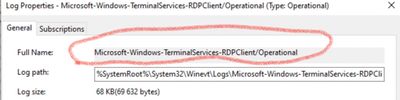
Yes, your stanza name is too long. Loose the first part.
You can verify it with powershell
Check with what -LogName value you'll get results. It's way easier than blindly (re)configuring splunk inputs/
- Mark as New
- Bookmark Message
- Subscribe to Message
- Mute Message
- Subscribe to RSS Feed
- Permalink
- Report Inappropriate Content
You need this value as channel name
- Mark as New
- Bookmark Message
- Subscribe to Message
- Mute Message
- Subscribe to RSS Feed
- Permalink
- Report Inappropriate Content
I already have this in my stanza:
[WinEventLog://Microsoft-Windows-TerminalServices-ClientActiveXCore/Microsoft-Windows-TerminalServices-RDPClient/Operational]
disabled = 0
renderXml = 1
sourcetype = XmlWinEventLog
index = ad
whitelist3=1024
But I always going to get this error, even if I put the '\' escape before "Operational" or after
12-20-2021 09:08:21.416 +0100 ERROR ExecProcessor [21652 ExecProcessor] - message from ""C:\Program Files\SplunkUniversalForwarder\bin\splunk-winevtlog.exe"" splunk-winevtlog - WinEventMon::configure: Failed to find Event Log with channel name='Microsoft-Windows-TerminalServices-ClientActiveXCore/Microsoft-Windows-TerminalServices-RDPClient/Operational'
- Mark as New
- Bookmark Message
- Subscribe to Message
- Mute Message
- Subscribe to RSS Feed
- Permalink
- Report Inappropriate Content
Yes, your stanza name is too long. Loose the first part.
You can verify it with powershell
Check with what -LogName value you'll get results. It's way easier than blindly (re)configuring splunk inputs/
- Mark as New
- Bookmark Message
- Subscribe to Message
- Mute Message
- Subscribe to RSS Feed
- Permalink
- Report Inappropriate Content
this command was my solution:
Get-WinEvent -FilterHashTable @{ LogName = "Microsoft-Windows-TerminalServices-RDPClient/Operational"; ID = 1024 }There is no "TerminalServices-ClientActiveXCore" in the PowerShell results. This also why Splunk told me all the time "failed to find ...." Thank you!
- Mark as New
- Bookmark Message
- Subscribe to Message
- Mute Message
- Subscribe to RSS Feed
- Permalink
- Report Inappropriate Content
Is there anyone else that can help me, please?
- Mark as New
- Bookmark Message
- Subscribe to Message
- Mute Message
- Subscribe to RSS Feed
- Permalink
- Report Inappropriate Content

The escape character is '\'.
If this reply helps you, Karma would be appreciated.
- Mark as New
- Bookmark Message
- Subscribe to Message
- Mute Message
- Subscribe to RSS Feed
- Permalink
- Report Inappropriate Content
Already tried, but it didn't work.. 😞

Join the Splunk Community Slack to learn, troubleshoot, and make connections with fellow Splunk practitioners in real time!
Join Splunk User Groups to connect and learn in-person by region or remotely by topic or industry.
Index This | What travels the world but is also stuck in place?
Discover New Use Cases: Unlock Greater Value from Your Existing Splunk Data
Continue Your Journey: Join Session 2 of the Data Management and Federation Bootcamp ...
