
Turn on suggestions
Auto-suggest helps you quickly narrow down your search results by suggesting possible matches as you type.
Splunk Search
×
Join the Conversation
Without signing in, you're just watching from the sidelines. Sign in or Register to connect, share, and be part of the Splunk Community.
- Find Answers
- :
- Using Splunk
- :
- Splunk Search
- :
- Extract certain keyword from column
Options
- Subscribe to RSS Feed
- Mark Topic as New
- Mark Topic as Read
- Float this Topic for Current User
- Bookmark Topic
- Subscribe to Topic
- Mute Topic
- Printer Friendly Page
- Mark as New
- Bookmark Message
- Subscribe to Message
- Mute Message
- Subscribe to RSS Feed
- Permalink
- Report Inappropriate Content
Extract certain keyword from column

timyong80
Explorer
06-23-2016
02:02 AM
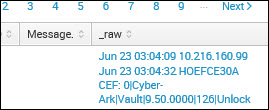
- There are two lines of info in a column but it appears that there's no whitespace or whatsoever in between those lines. I would only want to extract the bottom line and output the result into a new column called 'Target' but the rex command that I have just refused to pull that info on the second line. I have tested the command in the Regex online simulator and it works but in the real Splunk environment, it doesn't seem to be able to extract it.
| rex field=Account_Name "\n.+(?)$"

- I would like to extract the server name (HOEFCE30A) from the _raw column but if I use rex, there's no unique value to identify where Splunk should start to pull that info since the beginning part of the column is date and time which changes every time.
| rex "xxx=(?<"Server">.+) CEF"

Any help would be greatly appreciated. Thank you very much! 🙂
- Mark as New
- Bookmark Message
- Subscribe to Message
- Mute Message
- Subscribe to RSS Feed
- Permalink
- Report Inappropriate Content

sundareshr
Legend
06-23-2016
10:15 AM
Try this for the Account_Name
rex field=Account_Name "[\t\n\s](\w+)"
AND, this for Server
rex field=_raw "\d\d:\d\d:\d\d\s(?<server>\w+)"



Got questions? Get answers!
Join the Splunk Community Slack to learn, troubleshoot, and make connections with fellow Splunk practitioners in real time!
Meet up IRL or virtually!
Join Splunk User Groups to connect and learn in-person by region or remotely by topic or industry.
Get Updates on the Splunk Community!
Guided Onboarding with Auto-schema Is Now Generally Available
We are excited to announce the General Availability of Guided Onboarding with Auto-Schematization ...
ATTENTION: We’re Moving! (AGAIN!)
The Splunk Community Slack is undergoing a system migration to keep our workspace secure and ...
Deep Dive: Optimizing Telemetry Pipelines in Splunk Observability Cloud
In this session, we will peel back the layers of Splunk Observability Cloud’s cost-optimization features. ...
