
Join the Conversation
- Find Answers
- :
- Using Splunk
- :
- Splunk Search
- :
- Converting from KB to GB
- Subscribe to RSS Feed
- Mark Topic as New
- Mark Topic as Read
- Float this Topic for Current User
- Bookmark Topic
- Subscribe to Topic
- Mute Topic
- Printer Friendly Page
- Mark as New
- Bookmark Message
- Subscribe to Message
- Mute Message
- Subscribe to RSS Feed
- Permalink
- Report Inappropriate Content

Hi All,
i have search that brings data from C and D Drives and results are in KB so i want to convert those fields to GB.
index="main" host="hc1xrds01" Name="C:" OR Name="D:" FreeSpace |eval FreeSpace = round((FreeSpace/1024/1024/1024), 2)
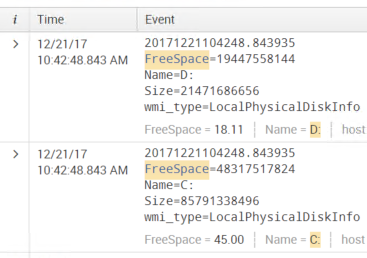
I still have fields after the conversion in kbs.and even after eval i get another "FreeSpace" field with GB the other FreeSpace taht is highligted is still in KB.how do i change all that to GB?not just the FreeSpace,size and Raw as well which i believe is the top value.
do i have to change the way i get the data?
Thanks Alot

- Mark as New
- Bookmark Message
- Subscribe to Message
- Mute Message
- Subscribe to RSS Feed
- Permalink
- Report Inappropriate Content

Hey
What you have written is correct
Evaluation functions does not change your raw data.It just creates a new field which you can use it further for analysis.
index="main" host="hc1xrds01" Name="C:" OR Name="D:" FreeSpace |eval FreeSpace_in_GB = round((FreeSpace/1024/1024/1024), 2)
FreeSpace_in_GB is the new field created by this search. Use this field for your analysis and not the one which you see FreeSpace.
Let me know if it helps you!
- Mark as New
- Bookmark Message
- Subscribe to Message
- Mute Message
- Subscribe to RSS Feed
- Permalink
- Report Inappropriate Content
That worked thanks.so i wanto make a dashboard from these results but i am having hard time .when i select visualization the data it shows is cropped and not showing all the drives.can you help me with that?if i need to create another thread for it,i can do it.Thanks for all the help
index="main" host="hc1aptr3sv" Name="C:" OR Name="D:" FreeSpace | eval FreeSpace_in_GB = round((FreeSpace/1024/1024/1024), 2)|eval Size_in_GB = round((Size/1024/1024/1024),2)|table host,Name,Size_in_GB,FreeSpace_in_GB| dedup Name

- Mark as New
- Bookmark Message
- Subscribe to Message
- Mute Message
- Subscribe to RSS Feed
- Permalink
- Report Inappropriate Content
Hey
What you have written is correct
Evaluation functions does not change your raw data.It just creates a new field which you can use it further for analysis.
index="main" host="hc1xrds01" Name="C:" OR Name="D:" FreeSpace |eval FreeSpace_in_GB = round((FreeSpace/1024/1024/1024), 2)
FreeSpace_in_GB is the new field created by this search. Use this field for your analysis and not the one which you see FreeSpace.
Let me know if it helps you!
- Mark as New
- Bookmark Message
- Subscribe to Message
- Mute Message
- Subscribe to RSS Feed
- Permalink
- Report Inappropriate Content

Your eval statement creates a new search time field. The raw data is not altered. What you see on the top is your actual raw data. To avoid confusion, name your new field different
|eval FreeSpace_GB = round((FreeSpace/1024/1024/1024)

Join the Splunk Community Slack to learn, troubleshoot, and make connections with fellow Splunk practitioners in real time!
Join Splunk User Groups to connect and learn in-person by region or remotely by topic or industry.
Observability Simplified: Combining User Experience, Application Performance & ...
Event Series May & June: From Network Visibility to Service Intelligence
Global Splunk User Group Events: May + June 2026
