
Join the Conversation
- Find Answers
- :
- Using Splunk
- :
- Splunk Search
- :
- Re: Combining multiple CPU percentage instances to...
- Subscribe to RSS Feed
- Mark Topic as New
- Mark Topic as Read
- Float this Topic for Current User
- Bookmark Topic
- Subscribe to Topic
- Mute Topic
- Printer Friendly Page
- Mark as New
- Bookmark Message
- Subscribe to Message
- Mute Message
- Subscribe to RSS Feed
- Permalink
- Report Inappropriate Content

So I have CPU data from template for Citrix XenApp addon gathering CPU metrics. Each line on the graph is populated from two fields
- %_Processor_Time (0-100 value)
- instance (name of the processes chrome#1,chrome#2,iexplore#13, etc.)
Referencing this method its a similar goal but the fields are not as straight forward merging counts of two values. I'm trying to do something similar with the eval I essentially want to do with wildcards be able to lump all the processor stats for a given application into a single field to report on. So in the example below instead of having an average for each instance name I want to do something like the illustrated below.

| eval source=if(source=="chrome*","chromeTotal",source)
- Mark as New
- Bookmark Message
- Subscribe to Message
- Mute Message
- Subscribe to RSS Feed
- Permalink
- Report Inappropriate Content
Ultimately used sed for the apps I was interested in on the field name "instance"
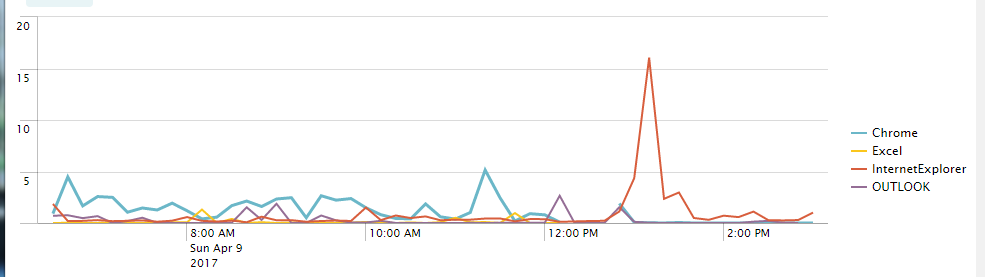
search stuffGoesHere
    | rex field=instance mode=sed "s/^chrome(!?.*)/Chrome/g"
    | rex field=instance mode=sed "s/^iexplore(!?.*)/InternetExplorer/g"
    | rex field=instance mode=sed "s/^EXCEL(!?.*)/Excel/g"
    | timechart avg(%_Processor_Time) AS "Avg. % Processor Time" BY instance
- Mark as New
- Bookmark Message
- Subscribe to Message
- Mute Message
- Subscribe to RSS Feed
- Permalink
- Report Inappropriate Content
Ultimately used sed for the apps I was interested in on the field name "instance"
search stuffGoesHere
    | rex field=instance mode=sed "s/^chrome(!?.*)/Chrome/g"
    | rex field=instance mode=sed "s/^iexplore(!?.*)/InternetExplorer/g"
    | rex field=instance mode=sed "s/^EXCEL(!?.*)/Excel/g"
    | timechart avg(%_Processor_Time) AS "Avg. % Processor Time" BY instance
- Mark as New
- Bookmark Message
- Subscribe to Message
- Mute Message
- Subscribe to RSS Feed
- Permalink
- Report Inappropriate Content

Thanks for posting your solution. Please "accept" your answer to show the problem is solved, and upvote any other answers you found particularly helpful.
- Mark as New
- Bookmark Message
- Subscribe to Message
- Mute Message
- Subscribe to RSS Feed
- Permalink
- Report Inappropriate Content

Your solution should work to do JUST the totals so I am assuming that you are asking how to do BOTH. To do BOTH, do this:
Your original search here
| eval source=case(match(source, "^chrome"),    "chromeTotal",
                   match(source, "^iexplore*"), "ieTotal",
                   true(), source)
| multireport
    [ timechart avg(%_Processor_Time) BY instance ]
    [ timechart avg(%_Processor_Time) BY source]
| stats values(*) AS * BY _time
- Mark as New
- Bookmark Message
- Subscribe to Message
- Mute Message
- Subscribe to RSS Feed
- Permalink
- Report Inappropriate Content
That is neat, I wasn't aware of the multireport function. I had trouble getting the eval case statement working so I ended up using sed on the "instance" field for the values of the apps I was after.
| search someStuffHere
| rex field=instance mode=sed "s/^chrome(!?.)/Chrome/g"
| rex field=instance mode=sed "s/^iexplore(!?.)/InternetExplorer/g"
| rex field=instance mode=sed "s/^EXCEL(!?.*)/Excel/g"
| timechart avg(%_Processor_Time) AS "Avg. % Processor Time" BY instance
Regex example https://regex101.com/r/2diOwz/5
instance=chrome %_Processor_Time=17.8
instance=chrome#32 %_Processor_Time=3.5
instance=chrome#2 %_Processor_Time=40.0
instance=chrome#543 %_Processor_Time=0.0




Join the Splunk Community Slack to learn, troubleshoot, and make connections with fellow Splunk practitioners in real time!
Join Splunk User Groups to connect and learn in-person by region or remotely by topic or industry.
A Four-Part Event Series: Full Stack Observability For the AI Era
SOC4Kafka - New Kafka Connector Powered by OpenTelemetry
Event Series: Level up your SOC: Advancing with Splunk Enterprise Security
