
Join the Conversation
- Find Answers
- :
- Using Splunk
- :
- Splunk Search
- :
- Re: Add sum events in separate column
- Subscribe to RSS Feed
- Mark Topic as New
- Mark Topic as Read
- Float this Topic for Current User
- Bookmark Topic
- Subscribe to Topic
- Mute Topic
- Printer Friendly Page
- Mark as New
- Bookmark Message
- Subscribe to Message
- Mute Message
- Subscribe to RSS Feed
- Permalink
- Report Inappropriate Content

it is my search
host="splunk.local"|bucket _time span=1mon | stats count by event

my question is :
To sum the total number of events per month in a seprate field
but when i use this query
host="splunk.local"|bucket _time span=1mon | stats count by event | stats sum(count) as total
the event field disappear i want to have event and count and the total field in my search.
i try this
host="splunk.local"|bucket _time span=1mon | stats count by event| eventstats sum(count) as total|table event total
but it shows the result in all the column, not just on row
how can i solve my problem?
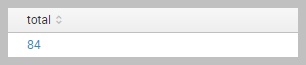
tanx
- Mark as New
- Bookmark Message
- Subscribe to Message
- Mute Message
- Subscribe to RSS Feed
- Permalink
- Report Inappropriate Content

@khanlarloo, you have following options
Option 1: Use addcoltotals command to calculate column total
<YourBaseSearchWithIndexAndSourcetype> host="splunk.local"
| addcoltotals labelfield=event label=Total
PS: Since you are not showing _time in your stats I don't think you need |bucket _time span=1mon, and in case you do, timechart would be a better command
Option 2: Use addtotals command to calculate column total using row=f col=t
<YourBaseSearchWithIndexAndSourcetype> host="splunk.local"
| addcoltotals row=f col=t labelfield=event label=Total
Option 3: If you are on Splunk 6.5 or greater you can use Simple XML Chart configuration option totalsRow set to true
<option name="totalsRow">true</option>
Following is a run anywhere dashboard based on Splunk _internal index which elaborates all three options:
<dashboard>
  <label>Total Of Field values</label>
  <row>
    <panel>
      <title>Option 1 : SimpleXML option totalsRow = true</title>
      <table>
        <search>
          <query>index=_internal sourcetype=splunkd
| stats count by component
| sort - count
| head 10
</query>
          <earliest>-24h@h</earliest>
          <latest>now</latest>
          <sampleRatio>1</sampleRatio>
        </search>
        <option name="count">20</option>
        <option name="dataOverlayMode">none</option>
        <option name="drilldown">none</option>
        <option name="percentagesRow">false</option>
        <option name="rowNumbers">false</option>
        <option name="totalsRow">true</option>
        <option name="wrap">true</option>
      </table>
    </panel>
  </row>
  <row>
    <panel>
      <title>Option 2 : addcoltotals command</title>
      <table>
        <search>
          <query>index=_internal sourcetype=splunkd
| stats count by component
| sort - count
| head 10
| addcoltotals labelfield=component label=Total</query>
          <earliest>-24h@h</earliest>
          <latest>now</latest>
          <sampleRatio>1</sampleRatio>
        </search>
        <option name="count">20</option>
        <option name="dataOverlayMode">none</option>
        <option name="drilldown">none</option>
        <option name="percentagesRow">false</option>
        <option name="refresh.display">progressbar</option>
        <option name="rowNumbers">false</option>
        <option name="wrap">true</option>
      </table>
    </panel>
  </row>
  <row>
    <panel>
      <title>Option 3 : addtotals command</title>
      <table>
        <search>
          <query>index=_internal sourcetype=splunkd
| stats count by component
| sort - count
| head 10
| addtotals row=f col=t labelfield=component label=Total</query>
          <earliest>-24h@h</earliest>
          <latest>now</latest>
          <sampleRatio>1</sampleRatio>
        </search>
        <option name="count">20</option>
        <option name="dataOverlayMode">none</option>
        <option name="drilldown">none</option>
        <option name="percentagesRow">false</option>
        <option name="refresh.display">progressbar</option>
        <option name="rowNumbers">false</option>
        <option name="wrap">true</option>
      </table>
    </panel>
  </row>
</dashboard>
| makeresults | eval message= "Happy Splunking!!!"
- Mark as New
- Bookmark Message
- Subscribe to Message
- Mute Message
- Subscribe to RSS Feed
- Permalink
- Report Inappropriate Content
@khanlarloo, you have following options
Option 1: Use addcoltotals command to calculate column total
<YourBaseSearchWithIndexAndSourcetype> host="splunk.local"
| addcoltotals labelfield=event label=Total
PS: Since you are not showing _time in your stats I don't think you need |bucket _time span=1mon, and in case you do, timechart would be a better command
Option 2: Use addtotals command to calculate column total using row=f col=t
<YourBaseSearchWithIndexAndSourcetype> host="splunk.local"
| addcoltotals row=f col=t labelfield=event label=Total
Option 3: If you are on Splunk 6.5 or greater you can use Simple XML Chart configuration option totalsRow set to true
<option name="totalsRow">true</option>
Following is a run anywhere dashboard based on Splunk _internal index which elaborates all three options:
<dashboard>
  <label>Total Of Field values</label>
  <row>
    <panel>
      <title>Option 1 : SimpleXML option totalsRow = true</title>
      <table>
        <search>
          <query>index=_internal sourcetype=splunkd
| stats count by component
| sort - count
| head 10
</query>
          <earliest>-24h@h</earliest>
          <latest>now</latest>
          <sampleRatio>1</sampleRatio>
        </search>
        <option name="count">20</option>
        <option name="dataOverlayMode">none</option>
        <option name="drilldown">none</option>
        <option name="percentagesRow">false</option>
        <option name="rowNumbers">false</option>
        <option name="totalsRow">true</option>
        <option name="wrap">true</option>
      </table>
    </panel>
  </row>
  <row>
    <panel>
      <title>Option 2 : addcoltotals command</title>
      <table>
        <search>
          <query>index=_internal sourcetype=splunkd
| stats count by component
| sort - count
| head 10
| addcoltotals labelfield=component label=Total</query>
          <earliest>-24h@h</earliest>
          <latest>now</latest>
          <sampleRatio>1</sampleRatio>
        </search>
        <option name="count">20</option>
        <option name="dataOverlayMode">none</option>
        <option name="drilldown">none</option>
        <option name="percentagesRow">false</option>
        <option name="refresh.display">progressbar</option>
        <option name="rowNumbers">false</option>
        <option name="wrap">true</option>
      </table>
    </panel>
  </row>
  <row>
    <panel>
      <title>Option 3 : addtotals command</title>
      <table>
        <search>
          <query>index=_internal sourcetype=splunkd
| stats count by component
| sort - count
| head 10
| addtotals row=f col=t labelfield=component label=Total</query>
          <earliest>-24h@h</earliest>
          <latest>now</latest>
          <sampleRatio>1</sampleRatio>
        </search>
        <option name="count">20</option>
        <option name="dataOverlayMode">none</option>
        <option name="drilldown">none</option>
        <option name="percentagesRow">false</option>
        <option name="refresh.display">progressbar</option>
        <option name="rowNumbers">false</option>
        <option name="wrap">true</option>
      </table>
    </panel>
  </row>
</dashboard>
| makeresults | eval message= "Happy Splunking!!!"
- Mark as New
- Bookmark Message
- Subscribe to Message
- Mute Message
- Subscribe to RSS Feed
- Permalink
- Report Inappropriate Content
tanx for your reply i do it and it works.




Join the Splunk Community Slack to learn, troubleshoot, and make connections with fellow Splunk practitioners in real time!
Join Splunk User Groups to connect and learn in-person by region or remotely by topic or industry.
SOC4Kafka - New Kafka Connector Powered by OpenTelemetry
Event Series: Level up your SOC: Advancing with Splunk Enterprise Security
Announcing Modern Navigation: A New Era of Splunk User Experience
