
Join the Conversation
- Find Answers
- :
- Premium Solutions
- :
- Splunk ITSI
- :
- Status over Time Multi-Value Alert Not working as ...
- Subscribe to RSS Feed
- Mark Topic as New
- Mark Topic as Read
- Float this Topic for Current User
- Bookmark Topic
- Subscribe to Topic
- Mute Topic
- Printer Friendly Page
- Mark as New
- Bookmark Message
- Subscribe to Message
- Mute Message
- Subscribe to RSS Feed
- Permalink
- Report Inappropriate Content

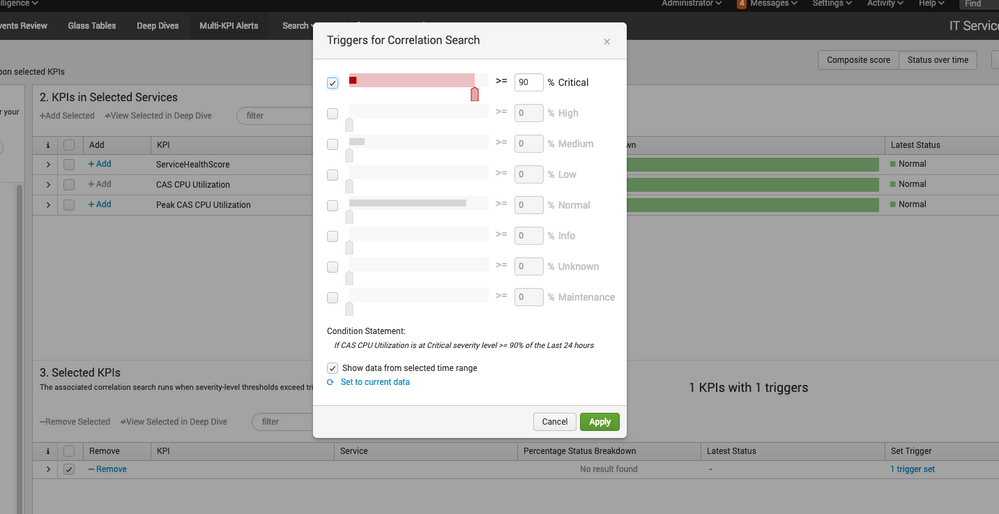
Perhaps I am just misunderstanding the concept behind Status over Time but I set a KPI to trigger if it is at Critical 90% of the time for the last 24 hours and when I open it to set that 90% (see screenshot) it shows that in the last 24 hours it was WELL below 90% but this notable event triggers over and over again non-stop almost.
Am I misunderstanding the concept behind an alert that triggers if the KPI is at Critical 90% of the last 60 mins?
- Mark as New
- Bookmark Message
- Subscribe to Message
- Mute Message
- Subscribe to RSS Feed
- Permalink
- Report Inappropriate Content

I am assuming you want to have the Notable Event when the condition has been Critical for ~21.5 hours of a 24 hour period. From your description that seems to be correct.
The real trouble with the multi-kpi editor seems to be related to a bug when it creates the actual search syntax. To see what I mean, click on the search you have created under the 'Correlation Searches' menu item under 'Configure'
Under "Actions' click Edit 'by Correlation Search Editor'.
Open that search by clicking 'Run Search' under the "Search" box.
Notice the line that says
| stats count as occurances latest(*) as * by alert_severity itsi_kpi_id itsi_service_id
occurances is spelled with an "a", but later a macro is called with a parameter of occurrence
| getPercentage(alert_period, occurrence)
That value doesn't exist.
That macro expands and is indeed looking for a value that would have been provided by the occurances variable created in the earlier stats statement, and additionally is core to the whole point of your intended multi-kpi search.
I have gotten around this by editing the search syntax and adding the statement
|eval occurrence=occurances
right after the stats statement that created the occurances variable.
Lets this run and I believe this will resolve your constant alerting condition.
Hope this was clear, feel free to ask for clarification.
- Mark as New
- Bookmark Message
- Subscribe to Message
- Mute Message
- Subscribe to RSS Feed
- Permalink
- Report Inappropriate Content


Hi guys, thanks a lot for finding this. I've filed a bug and it should be fixed in the next ITSI release.
- Mark as New
- Bookmark Message
- Subscribe to Message
- Mute Message
- Subscribe to RSS Feed
- Permalink
- Report Inappropriate Content
I am assuming you want to have the Notable Event when the condition has been Critical for ~21.5 hours of a 24 hour period. From your description that seems to be correct.
The real trouble with the multi-kpi editor seems to be related to a bug when it creates the actual search syntax. To see what I mean, click on the search you have created under the 'Correlation Searches' menu item under 'Configure'
Under "Actions' click Edit 'by Correlation Search Editor'.
Open that search by clicking 'Run Search' under the "Search" box.
Notice the line that says
| stats count as occurances latest(*) as * by alert_severity itsi_kpi_id itsi_service_id
occurances is spelled with an "a", but later a macro is called with a parameter of occurrence
| getPercentage(alert_period, occurrence)
That value doesn't exist.
That macro expands and is indeed looking for a value that would have been provided by the occurances variable created in the earlier stats statement, and additionally is core to the whole point of your intended multi-kpi search.
I have gotten around this by editing the search syntax and adding the statement
|eval occurrence=occurances
right after the stats statement that created the occurances variable.
Lets this run and I believe this will resolve your constant alerting condition.
Hope this was clear, feel free to ask for clarification.



Join the Splunk Community Slack to learn, troubleshoot, and make connections with fellow Splunk practitioners in real time!
Join Splunk User Groups to connect and learn in-person by region or remotely by topic or industry.
SOC4Kafka - New Kafka Connector Powered by OpenTelemetry
Rounding off the Splunk Dashboard Contest
A Four Part Event Series: AI + Observability: AI Agents, LLMs, Apps, & Infrastructure
