
Join the Conversation
- Find Answers
- :
- Splunk Products
- :
- Splunk Enterprise
- :
- Re: Search Factor is Not MeT
- Subscribe to RSS Feed
- Mark Topic as New
- Mark Topic as Read
- Float this Topic for Current User
- Bookmark Topic
- Subscribe to Topic
- Mute Topic
- Printer Friendly Page
- Mark as New
- Bookmark Message
- Subscribe to Message
- Mute Message
- Subscribe to RSS Feed
- Permalink
- Report Inappropriate Content

Good afternoon
I hva e splunk srchitecture:
1 seach
2 indexers in cluster
1 master node/License Server
1 Moniotoring Console/Deploymen server
2 Heavy forwarders
SF=2
RF=2
I added a new indexer to cluster, after that tryed to change the RF and SF, both to 3, but when i change the values from splunk web in the master node and restart the instance, th aplatform show me the nex message:

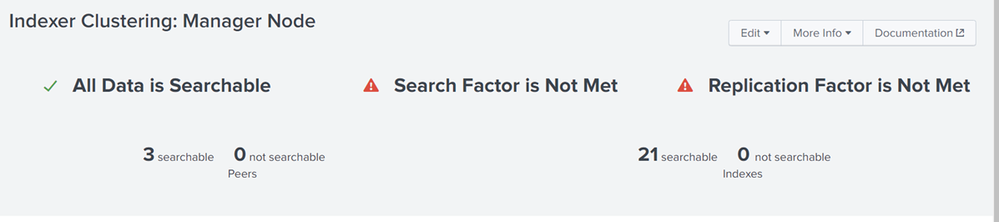
then, I did rollabck, return SF=2 and RF=2, and evetrything normal, but the bucket status shows
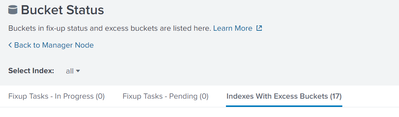
I need to change the SF and RF and I need to know if this will fix the iisues with the indexes
Regards
- Mark as New
- Bookmark Message
- Subscribe to Message
- Mute Message
- Subscribe to RSS Feed
- Permalink
- Report Inappropriate Content


Hi @evinasco08,
It may take some time for third indexer get replicated copies from other indexers and make them searchable. Did you wait enough time for this operations to finish? It is normal your search and replication factors are not met because cluster has only two copies of some buckets while migration. You could monitor this process on Bucket Status page. You should have seen a lot of pending buckets. Cluster would be a complete state after these fix-ups completed.
After rollback to RF=2 and SF=2 excess buckets are normal because cluster manager was trying to replicate buckets to match RF=3, SF=3 state, when you rollback these third copies became excess. If you want to keep RF=2, SF=2 you can simply/safely remove excess bucket from Bucket Status page.
Setting RF and SF equal to indexer count is not a best practice. Because if any of your indexers experience problem or restart your cluster will not be able to reach complete state because missing enough peers.
I advise keeping RF=2 and SF=2 with 3 indexers.
- Mark as New
- Bookmark Message
- Subscribe to Message
- Mute Message
- Subscribe to RSS Feed
- Permalink
- Report Inappropriate Content
Hi @evinasco08,
You can check this document;
https://docs.splunk.com/Documentation/Splunk/9.2.0/Indexer/Clusterstates
- Mark as New
- Bookmark Message
- Subscribe to Message
- Mute Message
- Subscribe to RSS Feed
- Permalink
- Report Inappropriate Content
Hi @evinasco08 ,
Yes that's normal and correct.
Sorry for my typo, I edited my reply
I advise keeping RF=2 and SF=2 with 3 indexers.
- Mark as New
- Bookmark Message
- Subscribe to Message
- Mute Message
- Subscribe to RSS Feed
- Permalink
- Report Inappropriate Content
@scelikok last queston, ¿Do you have support documentation where splunk indicate that setting RF and SF equal to indexer count is not a best practice?
- Mark as New
- Bookmark Message
- Subscribe to Message
- Mute Message
- Subscribe to RSS Feed
- Permalink
- Report Inappropriate Content
Hi @evinasco08,
It may take some time for third indexer get replicated copies from other indexers and make them searchable. Did you wait enough time for this operations to finish? It is normal your search and replication factors are not met because cluster has only two copies of some buckets while migration. You could monitor this process on Bucket Status page. You should have seen a lot of pending buckets. Cluster would be a complete state after these fix-ups completed.
After rollback to RF=2 and SF=2 excess buckets are normal because cluster manager was trying to replicate buckets to match RF=3, SF=3 state, when you rollback these third copies became excess. If you want to keep RF=2, SF=2 you can simply/safely remove excess bucket from Bucket Status page.
Setting RF and SF equal to indexer count is not a best practice. Because if any of your indexers experience problem or restart your cluster will not be able to reach complete state because missing enough peers.
I advise keeping RF=2 and SF=2 with 3 indexers.
- Mark as New
- Bookmark Message
- Subscribe to Message
- Mute Message
- Subscribe to RSS Feed
- Permalink
- Report Inappropriate Content
@scelikok thank you,
Then, is it normal that the RF and SF appears like "is Not MeT" untill finish to replicate the buckets?, thus, the master node would show "Search Factor is Met" and " Replication Factor is Met". that is correct? besides, you advise to me apply RF=2 and SF=3, but the replication Factor cannot be less than Search Factor.


Join the Splunk Community Slack to learn, troubleshoot, and make connections with fellow Splunk practitioners in real time!
Join Splunk User Groups to connect and learn in-person by region or remotely by topic or industry.
Event Series: Level up your SOC: Advancing with Splunk Enterprise Security
Announcing Modern Navigation: A New Era of Splunk User Experience
SOC4Kafka - New Kafka Connector Powered by OpenTelemetry
