
Join the Conversation
- Find Answers
- :
- Splunk Products
- :
- Splunk Enterprise
- :
- How to find _time when select distinct?
- Subscribe to RSS Feed
- Mark Topic as New
- Mark Topic as Read
- Float this Topic for Current User
- Bookmark Topic
- Subscribe to Topic
- Mute Topic
- Printer Friendly Page
- Mark as New
- Bookmark Message
- Subscribe to Message
- Mute Message
- Subscribe to RSS Feed
- Permalink
- Report Inappropriate Content

Hello Everyone,
I have a table like this:
| _time | value1 | value2 |
| 30/12/2021 06:30 | 12.1 | 25.2 |
| 30/12/2021 06:00 | 12.1 | 25.2 |
| 30/12/2021 05:30 | 11.2 | 26.4 |
| 30/12/2021 05:00 | 11.2 | 26.4 |
| 30/12/2021 04:30 | 12.1 | 24.5 |
| 30/12/2021 04:00 | 10.6 | 29.5 |
| 30/12/2021 03:30 | 10.6 | 29.5 |
| 30/12/2021 03:00 | 10.6 | 35.2 |
I want to select distinct of value 1 and get the corresponding _time and value2.
When I do: |stats values(*) as * by value1, it returns only value1 and value2, no include _time
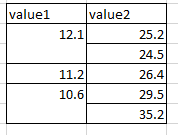
But I do want to see the _time.
Do you have any solution please?
Thanks,
Julia
- Mark as New
- Bookmark Message
- Subscribe to Message
- Mute Message
- Subscribe to RSS Feed
- Permalink
- Report Inappropriate Content


_time is normally an epoch time i.e. number of seconds since 1/1/1970. When Splunk displays it, it will convert it to a formatted string. However, when you collect a number (more than 1) of _time values in a multivalue field with the values() or list() aggregate functions, it no longer does this for you. To get around this, you could convert _time to a string before hand
|eval time=strftime(_time,"%F %T")
|stats list(*) as * by value1- Mark as New
- Bookmark Message
- Subscribe to Message
- Mute Message
- Subscribe to RSS Feed
- Permalink
- Report Inappropriate Content
Fields beginning with _ are not matched to * - values only contains unique values and are sorted lexicographically - try something like this
|stats list(*) as * list(_time) as _time by value1
- Mark as New
- Bookmark Message
- Subscribe to Message
- Mute Message
- Subscribe to RSS Feed
- Permalink
- Report Inappropriate Content
Thanks @ITWhisperer .
Now I find the _time.
However, when value1 matches with several value2, _time is displayed in the form of timestamps. When 1 value1 matches with 1 value2, _time is displayed as a date time normally, fyi.
Do you have any idea?
Julia.
- Mark as New
- Bookmark Message
- Subscribe to Message
- Mute Message
- Subscribe to RSS Feed
- Permalink
- Report Inappropriate Content
_time is normally an epoch time i.e. number of seconds since 1/1/1970. When Splunk displays it, it will convert it to a formatted string. However, when you collect a number (more than 1) of _time values in a multivalue field with the values() or list() aggregate functions, it no longer does this for you. To get around this, you could convert _time to a string before hand
|eval time=strftime(_time,"%F %T")
|stats list(*) as * by value1- Mark as New
- Bookmark Message
- Subscribe to Message
- Mute Message
- Subscribe to RSS Feed
- Permalink
- Report Inappropriate Content
it works, thanks for your help and your clear explaination!

Join the Splunk Community Slack to learn, troubleshoot, and make connections with fellow Splunk practitioners in real time!
Join Splunk User Groups to connect and learn in-person by region or remotely by topic or industry.
Why Splunk Customers Should Attend Cisco Live 2026 Las Vegas
What Is the Name of the USB Key Inserted by Bob Smith? (BOTS Hint, Not the Answer)
Automating Threat Operations and Threat Hunting with Recorded Future
