
Join the Conversation
- Find Answers
- :
- Splunk Products
- :
- Splunk Enterprise
- :
- Re: If "null" command
- Subscribe to RSS Feed
- Mark Topic as New
- Mark Topic as Read
- Float this Topic for Current User
- Bookmark Topic
- Subscribe to Topic
- Mute Topic
- Printer Friendly Page
- Mark as New
- Bookmark Message
- Subscribe to Message
- Mute Message
- Subscribe to RSS Feed
- Permalink
- Report Inappropriate Content
Help with if "null" command

Hi splunkers,
I want to use "null" command in below query. If the message is "null" then it should replace with the below message otherwise it should only display the already extracted message.
| eval message= if(Actor="superman","super hero", if(Actor="emma watson","model"))Thanks.
- Mark as New
- Bookmark Message
- Subscribe to Message
- Mute Message
- Subscribe to RSS Feed
- Permalink
- Report Inappropriate Content

Give this a try
| eval message= coalesce(message,case(Actor="superman","super hero",Actor="emma watson","model", true(),"NA"))- Mark as New
- Bookmark Message
- Subscribe to Message
- Mute Message
- Subscribe to RSS Feed
- Permalink
- Report Inappropriate Content
Thanks for your quick response @somesoni2
could you please also provide the spl using "isnull" ?
Really appreciate your support.
- Mark as New
- Bookmark Message
- Subscribe to Message
- Mute Message
- Subscribe to RSS Feed
- Permalink
- Report Inappropriate Content
| eval message= if(isnotnull(message),message,case(Actor="superman","super hero",Actor="emma watson","model", true(),"NA"))- Mark as New
- Bookmark Message
- Subscribe to Message
- Mute Message
- Subscribe to RSS Feed
- Permalink
- Report Inappropriate Content


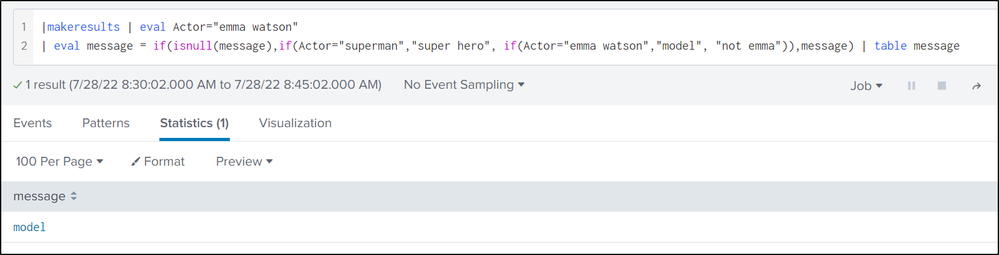
Hi @super_saiyan ... please check this isnull():
|makeresults | eval Actor="emma watson"
| eval message = if(isnull(message),if(Actor="superman","super hero", if(Actor="emma watson","model", "not emma")),message) | table message
- Mark as New
- Bookmark Message
- Subscribe to Message
- Mute Message
- Subscribe to RSS Feed
- Permalink
- Report Inappropriate Content
I am getting error while using the below SPL Query
Could you please help me with that ?

appreciate your help.
- Mark as New
- Bookmark Message
- Subscribe to Message
- Mute Message
- Subscribe to RSS Feed
- Permalink
- Report Inappropriate Content
Hi @super_saiyan .. your "if" format was wrong.. pls check this..
|makeresults | eval Actor="emma watson" | eval message = if(isnull(message, null(),if(Actor="superman","super hero", if(Actor="emma watson","model", "not emma")) | table message
could you pls check this and update us with some more details:
>>> If the message is "null" then it should replace with the below message.
>>> otherwise it should only display the already extracted message.


Join the Splunk Community Slack to learn, troubleshoot, and make connections with fellow Splunk practitioners in real time!
Join Splunk User Groups to connect and learn in-person by region or remotely by topic or industry.
A Four-Part Event Series: Full Stack Observability For the AI Era
SOC4Kafka - New Kafka Connector Powered by OpenTelemetry
Event Series: Level up your SOC: Advancing with Splunk Enterprise Security
