
Join the Conversation
- Find Answers
- :
- Splunk Products
- :
- Splunk Enterprise Security
- :
- Re: Missing buttons on ES "Configure Navigation" p...
- Subscribe to RSS Feed
- Mark Topic as New
- Mark Topic as Read
- Float this Topic for Current User
- Bookmark Topic
- Subscribe to Topic
- Mute Topic
- Printer Friendly Page
- Mark as New
- Bookmark Message
- Subscribe to Message
- Mute Message
- Subscribe to RSS Feed
- Permalink
- Report Inappropriate Content

I'm trying to follow the "Customize the Menu Bar" steps in https://docs.splunk.com/Documentation/ES/5.0.0/Admin/Customizemenubar, but I seem to be missing the buttons described in the article. Specifically, I'm not seeing "Add a New View" or "Add a New Collection" menus. Am I doing something wrong here?
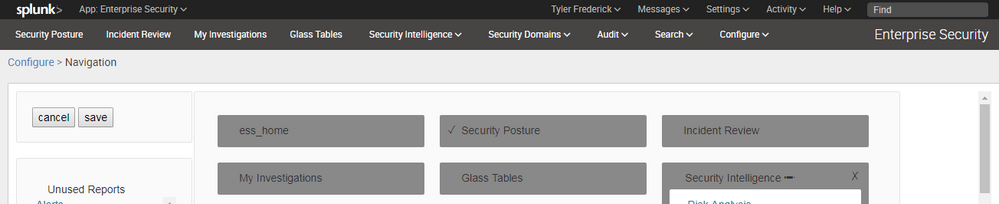
Running ES 4.5.1 on Splunk 6.5.2.

- Mark as New
- Bookmark Message
- Subscribe to Message
- Mute Message
- Subscribe to RSS Feed
- Permalink
- Report Inappropriate Content


@tfrederick74656 the product changed in 4.6.x and later to have a different navigation editor. If you upgrade ES, you'll be able to use the navigation editor described in the documentation. In the user guide for 4.5.x docs you'll find the navigation editor docs for your version.
- Mark as New
- Bookmark Message
- Subscribe to Message
- Mute Message
- Subscribe to RSS Feed
- Permalink
- Report Inappropriate Content
@tfrederick74656 the product changed in 4.6.x and later to have a different navigation editor. If you upgrade ES, you'll be able to use the navigation editor described in the documentation. In the user guide for 4.5.x docs you'll find the navigation editor docs for your version.
- Mark as New
- Bookmark Message
- Subscribe to Message
- Mute Message
- Subscribe to RSS Feed
- Permalink
- Report Inappropriate Content
Thank you for the info - that was indeed the issue. I ended up finding the proper navigation documentation for 4.5.1 here in case anybody else is looking: http://docs.splunk.com/Documentation/ES/4.5.1/User/ManageSearches#Navigation
- Mark as New
- Bookmark Message
- Subscribe to Message
- Mute Message
- Subscribe to RSS Feed
- Permalink
- Report Inappropriate Content
You were faster than me, and I wrote those! Thanks for posting it for reference 🙂

Join the Splunk Community Slack to learn, troubleshoot, and make connections with fellow Splunk practitioners in real time!
Join Splunk User Groups to connect and learn in-person by region or remotely by topic or industry.
[Puzzles] Solve, Learn, Repeat: Matching cron expressions
Design, Compete, Win: Submit Your Best Splunk Dashboards for a .conf26 Pass
May 2026 Splunk Expert Sessions: Security & Observability
