
Join the Conversation
- Find Answers
- :
- Splunk Products
- :
- Splunk Enterprise Security
- :
- Re: Exclude results from tstats
- Subscribe to RSS Feed
- Mark Topic as New
- Mark Topic as Read
- Float this Topic for Current User
- Bookmark Topic
- Subscribe to Topic
- Mute Topic
- Printer Friendly Page
- Mark as New
- Bookmark Message
- Subscribe to Message
- Mute Message
- Subscribe to RSS Feed
- Permalink
- Report Inappropriate Content

I have a correlation search created. However, I want to exclude files from being alerted upon. I have an lookup file created that has a list of files to be excluded, however when I call that lookup file to exclude the files, the search results will exclude the whole host and affected files, not just the singular file I want excluded.
My tstats search:
| tstats values(Symantec_ICDX.device_public_ip) values(Symantec_ICDX.user_name) values(Symantec_ICDX.file.name) values(Symantec_ICDX.threat.name) values(Symantec_ICDX.type) values(Symantec_ICDX.file.sha2) as Symantec_ICDX.file.sha2 values(Symantec_ICDX.file.path) from datamodel=Symantec_ICDX by Symantec_ICDX.device_name
| rename Symantec_ICDX.device_name as dest, values(Symantec_ICDX.device_public_ip) as dest_ip, values(Symantec_ICDX.user_name) as user, values(Symantec_ICDX.file.name) as file_name, values(Symantec_ICDX.threat.name) as threat_name, values(Symantec_ICDX.type) as type, Symantec_ICDX.file.sha2 as file_hash, values(Symantec_ICDX.file.path) as file_path
Results of tstat search:
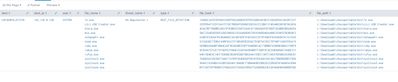
New tstats search with putting in ruby.exe into the lookup file.
| tstats values(Symantec_ICDX.device_public_ip) values(Symantec_ICDX.user_name) values(Symantec_ICDX.file.name) values(Symantec_ICDX.threat.name) values(Symantec_ICDX.type) values(Symantec_ICDX.file.sha2) as Symantec_ICDX.file.sha2 values(Symantec_ICDX.file.path) from datamodel=Symantec_ICDX by Symantec_ICDX.device_name
| rename Symantec_ICDX.device_name as dest, values(Symantec_ICDX.device_public_ip) as dest_ip, values(Symantec_ICDX.user_name) as user, values(Symantec_ICDX.file.name) as file_name, values(Symantec_ICDX.threat.name) as threat_name, values(Symantec_ICDX.type) as type, Symantec_ICDX.file.sha2 as file_hash, values(Symantec_ICDX.file.path) as file_path
| search NOT [| inputlookup exclusions.csv | fields file_name]
| search dest=COFGOOPAL2572TW
Results:

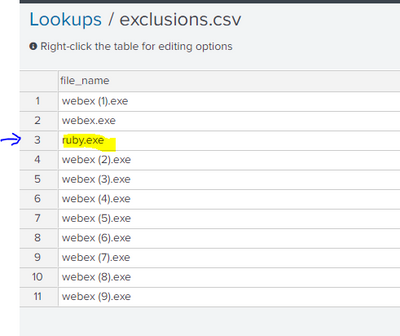
Lookup file:
- Mark as New
- Bookmark Message
- Subscribe to Message
- Mute Message
- Subscribe to RSS Feed
- Permalink
- Report Inappropriate Content


I'd try making exclusions part of tstats.
| tstats values(Symantec_ICDX.device_public_ip) values(Symantec_ICDX.user_name) values(Symantec_ICDX.file.name) values(Symantec_ICDX.threat.name) values(Symantec_ICDX.type) values(Symantec_ICDX.file.sha2) as Symantec_ICDX.file.sha2 values(Symantec_ICDX.file.path) from datamodel=Symantec_ICDX
where NOT [| inputlookup exclusions.csv | fields file_name | rename file_name as "Symantec_ICDX.file.name" | format]
by Symantec_ICDX.device_name
| rename Symantec_ICDX.device_name as dest, values(Symantec_ICDX.device_public_ip) as dest_ip, values(Symantec_ICDX.user_name) as user, values(Symantec_ICDX.file.name) as file_name, values(Symantec_ICDX.threat.name) as threat_name, values(Symantec_ICDX.type) as type, Symantec_ICDX.file.sha2 as file_hash, values(Symantec_ICDX.file.path) as file_path
If this reply helps you, Karma would be appreciated.
- Mark as New
- Bookmark Message
- Subscribe to Message
- Mute Message
- Subscribe to RSS Feed
- Permalink
- Report Inappropriate Content
That worked perfectly, thank you.
- Mark as New
- Bookmark Message
- Subscribe to Message
- Mute Message
- Subscribe to RSS Feed
- Permalink
- Report Inappropriate Content
I'd try making exclusions part of tstats.
| tstats values(Symantec_ICDX.device_public_ip) values(Symantec_ICDX.user_name) values(Symantec_ICDX.file.name) values(Symantec_ICDX.threat.name) values(Symantec_ICDX.type) values(Symantec_ICDX.file.sha2) as Symantec_ICDX.file.sha2 values(Symantec_ICDX.file.path) from datamodel=Symantec_ICDX
where NOT [| inputlookup exclusions.csv | fields file_name | rename file_name as "Symantec_ICDX.file.name" | format]
by Symantec_ICDX.device_name
| rename Symantec_ICDX.device_name as dest, values(Symantec_ICDX.device_public_ip) as dest_ip, values(Symantec_ICDX.user_name) as user, values(Symantec_ICDX.file.name) as file_name, values(Symantec_ICDX.threat.name) as threat_name, values(Symantec_ICDX.type) as type, Symantec_ICDX.file.sha2 as file_hash, values(Symantec_ICDX.file.path) as file_path
If this reply helps you, Karma would be appreciated.

Join the Splunk Community Slack to learn, troubleshoot, and make connections with fellow Splunk practitioners in real time!
Join Splunk User Groups to connect and learn in-person by region or remotely by topic or industry.
Event Series May & June: From Network Visibility to Service Intelligence
Global Splunk User Group Events: May + June 2026
Why Splunk Customers Should Attend Cisco Live 2026 Las Vegas
