
Join the Conversation
- Find Answers
- :
- Apps & Add-ons
- :
- Splunk Development
- :
- Splunk Dev
- :
- Re: How to implement a logic when the page is load...
- Subscribe to RSS Feed
- Mark Topic as New
- Mark Topic as Read
- Float this Topic for Current User
- Bookmark Topic
- Subscribe to Topic
- Mute Topic
- Printer Friendly Page
- Mark as New
- Bookmark Message
- Subscribe to Message
- Mute Message
- Subscribe to RSS Feed
- Permalink
- Report Inappropriate Content

How to implement a logic when the page is loaded
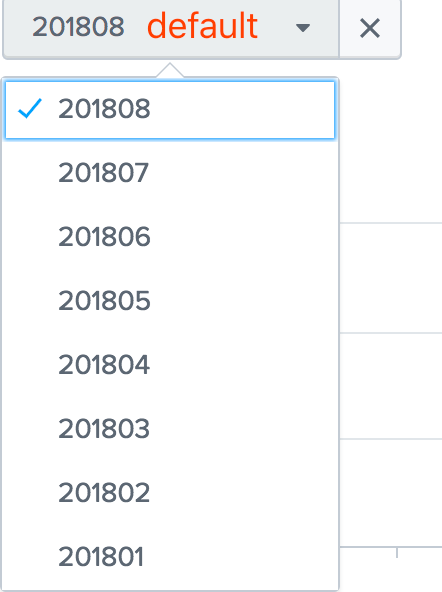
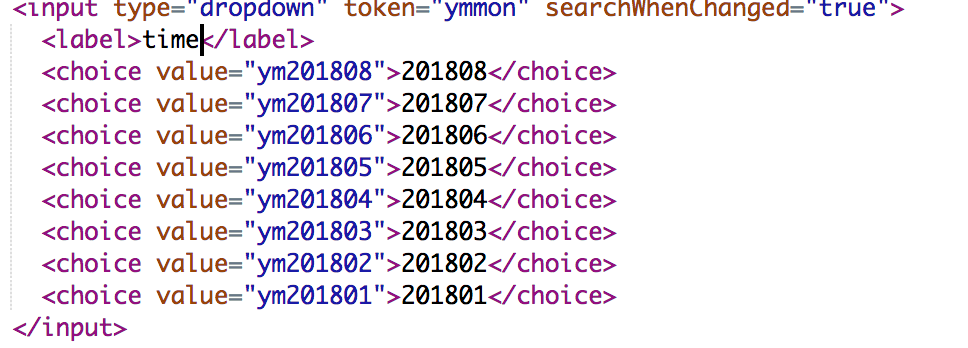
When the page is loaded, the drop-down box displays the last month of the month by default.
Now, if it's August, the drop-down box will display 201807 by default.
Now, if it's September, the drop-down box will display 201808 by default, and so on.
code xml
- Mark as New
- Bookmark Message
- Subscribe to Message
- Mute Message
- Subscribe to RSS Feed
- Permalink
- Report Inappropriate Content

@flzhang132,
Just add a page load token using init and set default and initialValue to that
<form>
  <init>
    <eval token="prev_month">strftime(relative_time(now(),"-1mon"),"%Y%m")</eval>
  </init>
  <fieldset submitButton="false">
    <input type="dropdown" token="ymmon">
      <label>Date</label>
      <choice value="ym201801">201801</choice>
      <choice value="ym201802">201802</choice>
      <choice value="ym201803">201803</choice>
      <choice value="ym201804">201804</choice>
      <choice value="ym201805">201805</choice>
      <choice value="ym201806">201806</choice>
      <choice value="ym201807">201807</choice>
      <choice value="ym201808">201808</choice>
      <choice value="ym201809">201809</choice>
      <choice value="ym201810">201810</choice>
      <default>$prev_month$</default>
      <initialValue>$prev_month$</initialValue>
    </input>
  </fieldset>
</form>
What goes around comes around. If it helps, hit it with Karma 🙂
- Mark as New
- Bookmark Message
- Subscribe to Message
- Mute Message
- Subscribe to RSS Feed
- Permalink
- Report Inappropriate Content

@flzhang132 <init> section is available post Splunk Enterprise 6.5 which works only with Simple XML Dashboards, so documenting a workaround of using independent search with search event handler. (PS: prior to Splunk Enterprise 6.5 they were <preview> and <finalized> instead of <progress> and <done> from 6.5 onward).
  <search>
    <query>| makeresults
| eval prev_month=strftime(relative_time(now(),"-1mon@mon"),"%Y%m")
    </query>
    <done>
      <set token="prev_month">$result.prev_month$</set>
    </done>
  </search>
Please refer to using <eval> to set token using relative_time() will use Client Time Zone: http://docs.splunk.com/Documentation/Splunk/latest/Viz/tokens#Define_token_filtering_and_formatting
1) With independent <search> you should be able to perform complicated searches to fetch result to set required token.
2) You should also add depends attribute with the default value token to the <input> to ensure that it is displayed only when the default value is set.
Following is a run anywhere example:
<form>
  <label>Initialize form variables on load</label>
  <search>
    <query>| makeresults
| eval prev_month=strftime(relative_time(now(),"-1mon@mon"),"%Y%m")
    </query>
    <done>
      <set token="prev_month">$result.prev_month$</set>
    </done>
  </search>
   <fieldset submitButton="false">
     <input type="dropdown" token="ymmon" depends="$prev_month$">
       <label>Date</label>
       <choice value="ym201801">201801</choice>
       <choice value="ym201802">201802</choice>
       <choice value="ym201803">201803</choice>
       <choice value="ym201804">201804</choice>
       <choice value="ym201805">201805</choice>
       <choice value="ym201806">201806</choice>
       <choice value="ym201807">201807</choice>
       <choice value="ym201808">201808</choice>
       <choice value="ym201809">201809</choice>
       <choice value="ym201810">201810</choice>
       <default>$prev_month$</default>
       <initialValue>$prev_month$</initialValue>
     </input>
   </fieldset>
   <row>
     <panel>
       <html>
         <div>prev_month: $prev_month$</div>
       </html>
     </panel>
   </row>
 </form>
| makeresults | eval message= "Happy Splunking!!!"
- Mark as New
- Bookmark Message
- Subscribe to Message
- Mute Message
- Subscribe to RSS Feed
- Permalink
- Report Inappropriate Content
@flzhang132,
Just add a page load token using init and set default and initialValue to that
<form>
  <init>
    <eval token="prev_month">strftime(relative_time(now(),"-1mon"),"%Y%m")</eval>
  </init>
  <fieldset submitButton="false">
    <input type="dropdown" token="ymmon">
      <label>Date</label>
      <choice value="ym201801">201801</choice>
      <choice value="ym201802">201802</choice>
      <choice value="ym201803">201803</choice>
      <choice value="ym201804">201804</choice>
      <choice value="ym201805">201805</choice>
      <choice value="ym201806">201806</choice>
      <choice value="ym201807">201807</choice>
      <choice value="ym201808">201808</choice>
      <choice value="ym201809">201809</choice>
      <choice value="ym201810">201810</choice>
      <default>$prev_month$</default>
      <initialValue>$prev_month$</initialValue>
    </input>
  </fieldset>
</form>
What goes around comes around. If it helps, hit it with Karma 🙂




Join the Splunk Community Slack to learn, troubleshoot, and make connections with fellow Splunk practitioners in real time!
Join Splunk User Groups to connect and learn in-person by region or remotely by topic or industry.
SOC4Kafka - New Kafka Connector Powered by OpenTelemetry
Rounding off the Splunk Dashboard Contest
A Four Part Event Series: AI + Observability: AI Agents, LLMs, Apps, & Infrastructure
