
Join the Conversation
- Find Answers
- :
- Splunk Products
- :
- Splunk Cloud Platform
- :
- Re: Power Bi integration with Splunk
- Subscribe to RSS Feed
- Mark Topic as New
- Mark Topic as Read
- Float this Topic for Current User
- Bookmark Topic
- Subscribe to Topic
- Mute Topic
- Printer Friendly Page
- Mark as New
- Bookmark Message
- Subscribe to Message
- Mute Message
- Subscribe to RSS Feed
- Permalink
- Report Inappropriate Content
How to Power Bi integration with Splunk- Getting Error

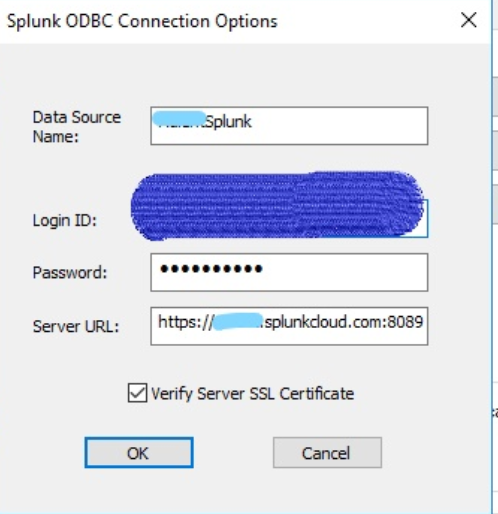
We are trying to achieve Power BI integration with Splunk. We have Power BI installed on windows machine and we also installed ODBC driver to connect to Splunk.
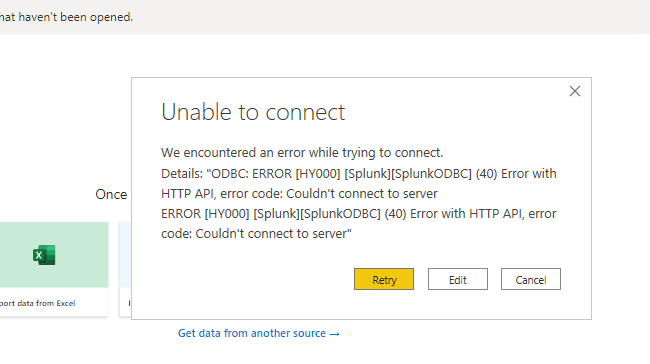
As part of configuration we added credentials (same with which we connect to our splunk cloud instance) and URL in Power BI Get Data options but we are getting below error:
"Details: "ODBC: ERROR [HY000] [Splunk][SplunkODBC] (40) Error with HTTP API, error code: Couldn't connect to serverERROR [HY000] [Splunk][SplunkODBC] (40) Error with HTTP API, error code: Couldn't connect to server"
I am attaching connection screenshot and error screenshot. Please let me know if we can add any more information.
Please try to help on same as this will ease reporting to great extent 🙂
- Mark as New
- Bookmark Message
- Subscribe to Message
- Mute Message
- Subscribe to RSS Feed
- Permalink
- Report Inappropriate Content
Probably proxy server (or firewall).
Typically proxy server because the ODBC driver is not proxy aware like your internet browser is.
This is why others mentioned configure the proxy without explanation.
The typical solution is to add an environmental variable that the ODBC driver can see.
I would recommend testing it using the following process:
- At the command line (in Windows) enter setx http_proxy <proxy_ip>:<proxy_port> (example setx http_proxy 132.50.12.1:443)
- Restart your ODBC Program (ex, PowerBi)
- Retest your connection
If it fails, add the https_proxy the same way. If it succeeds, add it the system permanently.
Ref# Configure the proxy server - Splunk Documentation
# libcurl - programming tutorial
# Set up proxy using http_proxy & https_proxy environment variable in Linux? | GoLinuxCloud
# windows - Command line to remove an environment variable from the OS-level configuration - Stack Ove...
- Mark as New
- Bookmark Message
- Subscribe to Message
- Mute Message
- Subscribe to RSS Feed
- Permalink
- Report Inappropriate Content

@saurabhtathode Have you installed ODBC drivers on the server?
Drivers needs to be downloaded and place in driver's directory under the Power BI app? My guess.
- Mark as New
- Bookmark Message
- Subscribe to Message
- Mute Message
- Subscribe to RSS Feed
- Permalink
- Report Inappropriate Content
I am experiencing the same problem. Was there any resolution to this one?
- Mark as New
- Bookmark Message
- Subscribe to Message
- Mute Message
- Subscribe to RSS Feed
- Permalink
- Report Inappropriate Content
@ekretsch Have you installed ODBC drivers on the server?


Join the Splunk Community Slack to learn, troubleshoot, and make connections with fellow Splunk practitioners in real time!
Join Splunk User Groups to connect and learn in-person by region or remotely by topic or industry.
SOC4Kafka - New Kafka Connector Powered by OpenTelemetry
Event Series: Level up your SOC: Advancing with Splunk Enterprise Security
Announcing Modern Navigation: A New Era of Splunk User Experience
