
Join the Conversation
- Find Answers
- :
- Splunk Administration
- :
- Admin Other
- :
- Security
- :
- Re: Optiv Threat Intel fields
- Subscribe to RSS Feed
- Mark Topic as New
- Mark Topic as Read
- Float this Topic for Current User
- Bookmark Topic
- Subscribe to Topic
- Mute Topic
- Printer Friendly Page
- Mark as New
- Bookmark Message
- Subscribe to Message
- Mute Message
- Subscribe to RSS Feed
- Permalink
- Report Inappropriate Content

Hello friends.
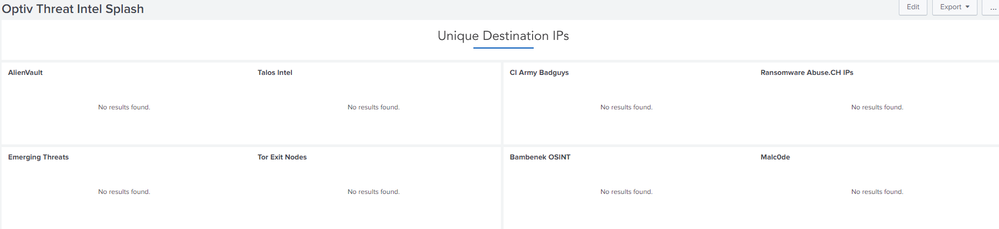
I've recently installed optiv threat intel on my splunk indexer on my home network - trying to make it use logs from my DNS (Pihole).
I currently just get this:
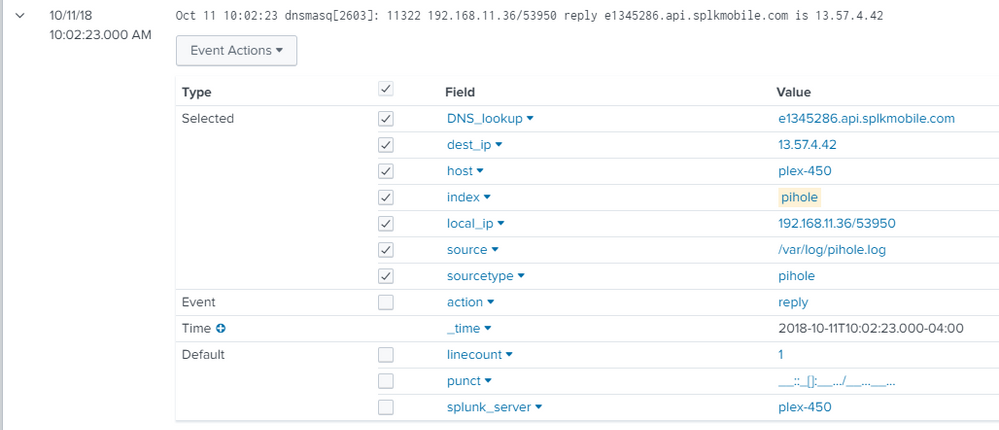
Here's an example of a log entry in how I have the fields defined.
I'm trying to ascertain if I've set it up incorrectly, or if I just don't have any malicious activity on my network and "no news is good news."
I'm relatively new to splunk - but I can run searches for top and rare for the dest_ip field - so I at least think I have the fields setup correctly. Any light someone could cast on this would be much appreciated.


- Mark as New
- Bookmark Message
- Subscribe to Message
- Mute Message
- Subscribe to RSS Feed
- Permalink
- Report Inappropriate Content

App author here,
You need to install the companion app, Optiv_TA_threat. See the included Readme pdf for detailed instructions. Post here if you get stuck. The companion app is the one that actually pulls the feeds from the internets.
- Mark as New
- Bookmark Message
- Subscribe to Message
- Mute Message
- Subscribe to RSS Feed
- Permalink
- Report Inappropriate Content
App author here,
You need to install the companion app, Optiv_TA_threat. See the included Readme pdf for detailed instructions. Post here if you get stuck. The companion app is the one that actually pulls the feeds from the internets.
- Mark as New
- Bookmark Message
- Subscribe to Message
- Mute Message
- Subscribe to RSS Feed
- Permalink
- Report Inappropriate Content
Thanks so much for your reply.
I got the add on app installed - I didn't realize it was required, missed that in the readme.
I'm still sitting on "no results found" - the heart of my question I guess is, is "no results found" code for "it's not working" or is it code for "there's no malicious traffic" (or both?)
Thanks so much for your time.
- Mark as New
- Bookmark Message
- Subscribe to Message
- Mute Message
- Subscribe to RSS Feed
- Permalink
- Report Inappropriate Content
The app pulls the threat feeds down 4x per day. has the app been running that long? also check the troubleshooting tab
- Mark as New
- Bookmark Message
- Subscribe to Message
- Mute Message
- Subscribe to RSS Feed
- Permalink
- Report Inappropriate Content
That must have been it! The splash page is populating with data now. Thanks so much Derek!
One last question if you have the time - 
The large dashes above each section are where an alert would be displayed if an ip or domain shows up in my DNS logs, right?

A Season of Skills: New Splunk Courses to Light Up Your Learning Journey
Announcing the Migration of the Splunk Add-on for Microsoft Azure Inputs to ...
Splunk Observability for AI
