
Join the Conversation
- Find Answers
- :
- Splunk Administration
- :
- Admin Other
- :
- Security
- :
- Re: How to remove users from Splunk registered by ...
- Subscribe to RSS Feed
- Mark Topic as New
- Mark Topic as Read
- Float this Topic for Current User
- Bookmark Topic
- Subscribe to Topic
- Mute Topic
- Printer Friendly Page
- Mark as New
- Bookmark Message
- Subscribe to Message
- Mute Message
- Subscribe to RSS Feed
- Permalink
- Report Inappropriate Content

Hi everyone, I need to remover users that leave the company. I´ve already remove them from company AD, but the remains on the Splunk Cloud.
Someone know how can I delete/remove them from Splunk Cloud ?
Thank you.
Clecimar
- Mark as New
- Bookmark Message
- Subscribe to Message
- Mute Message
- Subscribe to RSS Feed
- Permalink
- Report Inappropriate Content

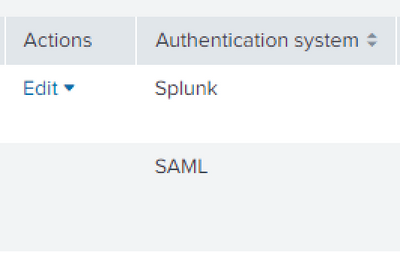
GUI doesn't support deleting users created with SAML. I can edit internal users. I guess it's an expected, yet inconvenient behavior from Splunk's side.
- Mark as New
- Bookmark Message
- Subscribe to Message
- Mute Message
- Subscribe to RSS Feed
- Permalink
- Report Inappropriate Content


Go to Settings->Users. For each user no longer in SAML, select Edit->Delete. There is no automated process. Go to https://ideas.splunk.com to suggest one or to vote for an existing idea.
If this reply helps you, Karma would be appreciated.
- Mark as New
- Bookmark Message
- Subscribe to Message
- Mute Message
- Subscribe to RSS Feed
- Permalink
- Report Inappropriate Content
Hi everyone.
This didn´t work for me. Even I remove the user from AD, it remains on Splunk and I haven´t the option to remove it as you suggest.
Would be a integration issue ?
Thank you.
Clecimar
- Mark as New
- Bookmark Message
- Subscribe to Message
- Mute Message
- Subscribe to RSS Feed
- Permalink
- Report Inappropriate Content
You account may have insufficient permissions to delete users. I believe you need the edit_user capability.
If this reply helps you, Karma would be appreciated.
- Mark as New
- Bookmark Message
- Subscribe to Message
- Mute Message
- Subscribe to RSS Feed
- Permalink
- Report Inappropriate Content

I am in a role that has "edit_user" selected, and I too can not delete a SAML user.
- Mark as New
- Bookmark Message
- Subscribe to Message
- Mute Message
- Subscribe to RSS Feed
- Permalink
- Report Inappropriate Content

I was able to find solution for this.
You can delete the user with REST Call if you have Admin level access.
This worked fine for me.
curl -k -u test_user:<PWD> --request DELETE https://stackname.splunkcloud.com:8089/services/admin/SAML-user-role-map/<username>
- Mark as New
- Bookmark Message
- Subscribe to Message
- Mute Message
- Subscribe to RSS Feed
- Permalink
- Report Inappropriate Content

Although removing through REST probably works I find it easier to do it this way:
- edit the configuration file in SPLUNK_INSTALL_DIR\etc\system\local\authentication.conf
- Naviate to Settings > Authentication methods > reload authentication configuration
- Mark as New
- Bookmark Message
- Subscribe to Message
- Mute Message
- Subscribe to RSS Feed
- Permalink
- Report Inappropriate Content
GUI doesn't support deleting users created with SAML. I can edit internal users. I guess it's an expected, yet inconvenient behavior from Splunk's side.
- Mark as New
- Bookmark Message
- Subscribe to Message
- Mute Message
- Subscribe to RSS Feed
- Permalink
- Report Inappropriate Content
Great!
This is the kind of answer I was looking for. Thank to understand my question.
Clecimar
- Mark as New
- Bookmark Message
- Subscribe to Message
- Mute Message
- Subscribe to RSS Feed
- Permalink
- Report Inappropriate Content
No, I´m administrator.
I´m going to open a case on support.
Thank you.
Clecimar
- Mark as New
- Bookmark Message
- Subscribe to Message
- Mute Message
- Subscribe to RSS Feed
- Permalink
- Report Inappropriate Content
Did you get any response from splunk support for this issue?
I am also Splunk admin & I don't see an option to remove deactivated SAML user from UI.
It's not feasible to request support request every time a user is deactivated.


Join the Splunk Community Slack to learn, troubleshoot, and make connections with fellow Splunk practitioners in real time!
Join Splunk User Groups to connect and learn in-person by region or remotely by topic or industry.
SOC4Kafka - New Kafka Connector Powered by OpenTelemetry
Event Series: Level up your SOC: Advancing with Splunk Enterprise Security
Announcing Modern Navigation: A New Era of Splunk User Experience
