
Join the Conversation
- Find Answers
- :
- Splunk Administration
- :
- Admin Other
- :
- Installation
- :
- Issues when upgrading to Splunk 9.0
- Subscribe to RSS Feed
- Mark Topic as New
- Mark Topic as Read
- Float this Topic for Current User
- Bookmark Topic
- Subscribe to Topic
- Mute Topic
- Printer Friendly Page
- Mark as New
- Bookmark Message
- Subscribe to Message
- Mute Message
- Subscribe to RSS Feed
- Permalink
- Report Inappropriate Content

Hi all,
We are upgrading one of our environments from Splunk 8.2.0 to Splunk 9.0. We have an issue once we tried to upgrade the indexers, where the Splunk upgrade process got stuck at this point:
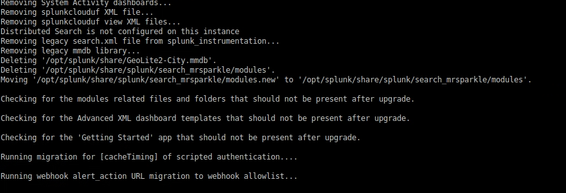
I was looking onn the internet, but I cannot see anything related to this issue. Can someone help me with this?
Many thanks in advance.
Best regards.
- Mark as New
- Bookmark Message
- Subscribe to Message
- Mute Message
- Subscribe to RSS Feed
- Permalink
- Report Inappropriate Content
The upgrade finally worked propertly. It looks like that step where it stops, checks the whole /opt/splunk folder, so having in mind the size of the data indexed, it takes almost 30 min in complete that step.
- Mark as New
- Bookmark Message
- Subscribe to Message
- Mute Message
- Subscribe to RSS Feed
- Permalink
- Report Inappropriate Content
The upgrade finally worked propertly. It looks like that step where it stops, checks the whole /opt/splunk folder, so having in mind the size of the data indexed, it takes almost 30 min in complete that step.


Join the Splunk Community Slack to learn, troubleshoot, and make connections with fellow Splunk practitioners in real time!
Join Splunk User Groups to connect and learn in-person by region or remotely by topic or industry.
Where Innovation Takes Flight: The Splunk4Aviation Flight Sim Lands at .conf26
Turn Cisco Telemetry Into Action with Cisco Data Fabric, powered by the Splunk ...
Persistent Queue at TcpOut — One of Splunk's Most Practical Features
