
Join the Conversation
- Find Answers
- :
- Splunk Administration
- :
- Admin Other
- :
- Installation
- :
- How do I Install/configure IT essentials Work and ...
- Subscribe to RSS Feed
- Mark Topic as New
- Mark Topic as Read
- Float this Topic for Current User
- Bookmark Topic
- Subscribe to Topic
- Mute Topic
- Printer Friendly Page
- Mark as New
- Bookmark Message
- Subscribe to Message
- Mute Message
- Subscribe to RSS Feed
- Permalink
- Report Inappropriate Content
How do I Install/configure IT essentials Work and remove unneeded components?

Hello
I have a question about installing and configuring IT Essentials Works 4.11.3 and removing some of the out of the box functions in a windows environment.
History:
We currently have Splunk running on a windows 2012 server that is being decommissioned. So we are looking at moving it to a new MS 2019 server.
One of the apps we used in the past was Windows add on infrastructure and we noticed that it has been "decommissioned" for lack of a better word and replaced with IT essentials works.
We noticed after installing the add-on there were many functions that out of the box we will never need, eg: VMWare, Nix, etc.... We wish to focus on the Windows components of IT essentials and remove the rest.
Because of the many components of IT essentials ( eg: DA_ITSI_EUEM.... DA_ITSI_LB.... SA_ITSI_ATSA.... etc)
It is unclear what is the best approach to remove the unnecessary components.
We were unable to find any data online or in the answers as to how to best approach this.
Any information that can be provided would be beneficial
Thank you
Dan
Is there anyone that has edited the IT essentials add on to use just what they need and remove the unnecessary components for efficiency?
- Mark as New
- Bookmark Message
- Subscribe to Message
- Mute Message
- Subscribe to RSS Feed
- Permalink
- Report Inappropriate Content

Just wanted to bump this one - saw there were no replies and keen to get an answer myself. The impact of all these unnecessary components has been significant.
Thanks!
- Mark as New
- Bookmark Message
- Subscribe to Message
- Mute Message
- Subscribe to RSS Feed
- Permalink
- Report Inappropriate Content
Good Morning
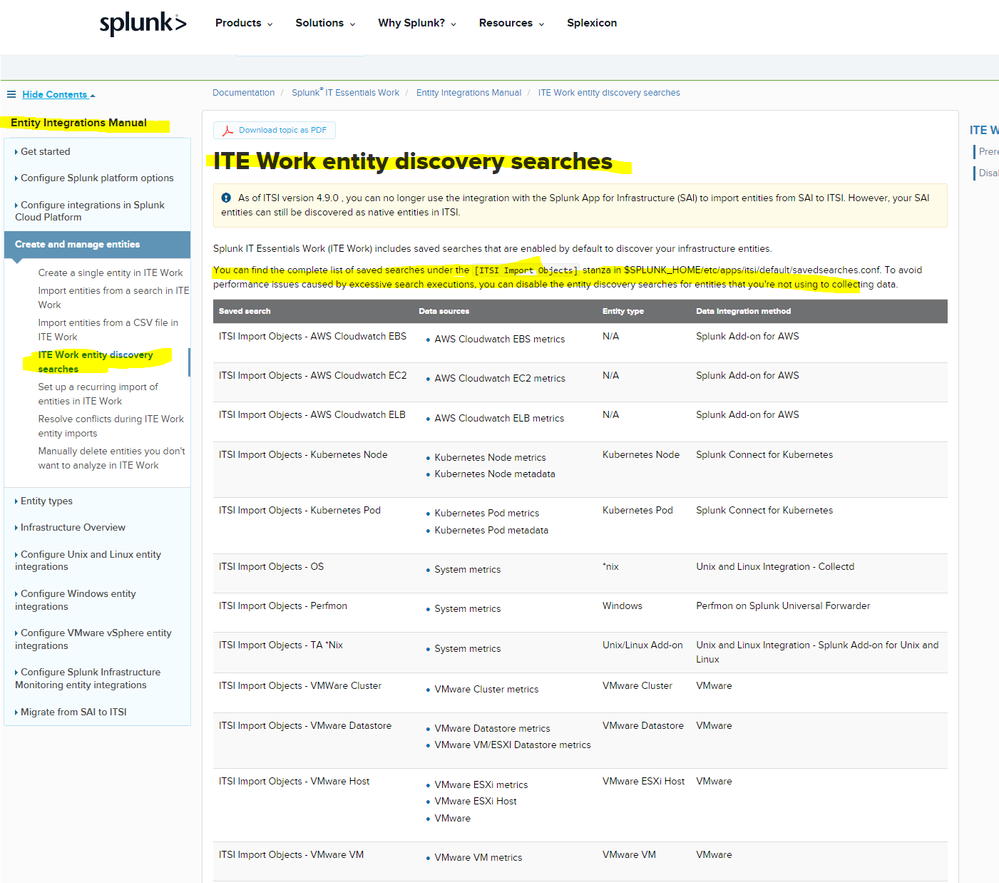
The only reference I could find to assist in avoiding performance issues was the following entry in the ITE Integrations manual, by disabling saved searches.

Join the Splunk Community Slack to learn, troubleshoot, and make connections with fellow Splunk practitioners in real time!
Join Splunk User Groups to connect and learn in-person by region or remotely by topic or industry.
Make Your Machine Data AI-Ready in Splunk
Splunk Asynchronous Forwarding Explained
How to Monitor AI Agents with Splunk Agent Observability
