
Join the Conversation
- Find Answers
- :
- Splunk Administration
- :
- Admin Other
- :
- Installation
- :
- Cannot create Index
- Subscribe to RSS Feed
- Mark Topic as New
- Mark Topic as Read
- Float this Topic for Current User
- Bookmark Topic
- Subscribe to Topic
- Mute Topic
- Printer Friendly Page
- Mark as New
- Bookmark Message
- Subscribe to Message
- Mute Message
- Subscribe to RSS Feed
- Permalink
- Report Inappropriate Content

Hi
(I'm new to splunk )
Environment: Splunk 7.1 / RHEL6.5
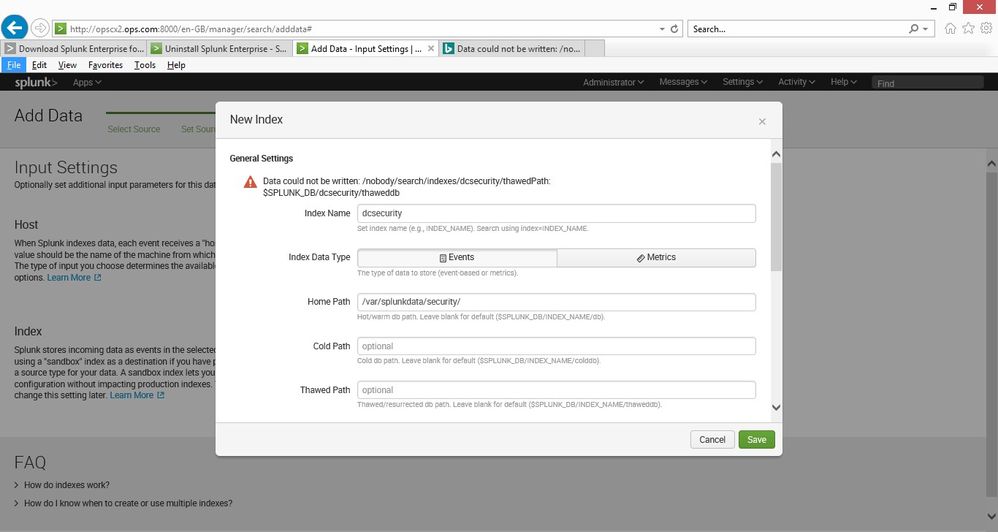
I have create my own log file for test purposes / learning (its like a syslog log) and I can see the data in splunk. But when I try to create an index for it I get the error below, does anyone know what could be causing this ?
ERROR MESSAGE:
Data could not be written: /nobody/search/indexes/testosboot/thawedPath: $SPLUNK_DB/testosboot/thaweddb
Rgds
Dee
- Mark as New
- Bookmark Message
- Subscribe to Message
- Mute Message
- Subscribe to RSS Feed
- Permalink
- Report Inappropriate Content

Does the path
/var/splunkdata/security
exist and is it writable by the splunk user?
- Mark as New
- Bookmark Message
- Subscribe to Message
- Mute Message
- Subscribe to RSS Feed
- Permalink
- Report Inappropriate Content
I should have rebooted after uninstalling version 7.0 and then perform a clean install of version 7.1
- Mark as New
- Bookmark Message
- Subscribe to Message
- Mute Message
- Subscribe to RSS Feed
- Permalink
- Report Inappropriate Content

Cold and Thawed paths aren't pointing to /var/splunkdata/security, at least the screenshot doesn't indicate it is. Those paths still make use of $SPLUNK_DB, which isn't discernible from what was posted.
You may need to define cold and thawed path explicity, unless $SPLUNK_DB is set to something that makes sense (has sufficient space and is writeable by the splunk user).
- Mark as New
- Bookmark Message
- Subscribe to Message
- Mute Message
- Subscribe to RSS Feed
- Permalink
- Report Inappropriate Content
thanks for the pointers, by uninstalling it and reinstalling, then checking the permissions, its working now
- Mark as New
- Bookmark Message
- Subscribe to Message
- Mute Message
- Subscribe to RSS Feed
- Permalink
- Report Inappropriate Content
Does the path
/var/splunkdata/security
exist and is it writable by the splunk user?
- Mark as New
- Bookmark Message
- Subscribe to Message
- Mute Message
- Subscribe to RSS Feed
- Permalink
- Report Inappropriate Content
thanks I did checked the permissions, and it was correct as I could write to the folder as the user , I uninstalled it all, rebooted, reinstalled 7.1 and after it was ok... (so I must have made a mistake somewhere and did have version 7.0 installed, which I uninstalled but did not reboot)
thanks for the pointers
Dee



Join the Splunk Community Slack to learn, troubleshoot, and make connections with fellow Splunk practitioners in real time!
Join Splunk User Groups to connect and learn in-person by region or remotely by topic or industry.
Data Management Digest – September 2026
Federated Search for CloudWatch Unified Data Store Is Generally Available
Announcing Modern Navigation: A New Era of Splunk User Experience
