
Are you a member of the Splunk Community?
- Find Answers
- :
- Splunk Administration
- :
- Admin Other
- :
- Installation
- :
- Cannot create Index
- Subscribe to RSS Feed
- Mark Topic as New
- Mark Topic as Read
- Float this Topic for Current User
- Bookmark Topic
- Subscribe to Topic
- Mute Topic
- Printer Friendly Page
- Mark as New
- Bookmark Message
- Subscribe to Message
- Mute Message
- Subscribe to RSS Feed
- Permalink
- Report Inappropriate Content

Hi
(I'm new to splunk )
Environment: Splunk 7.1 / RHEL6.5
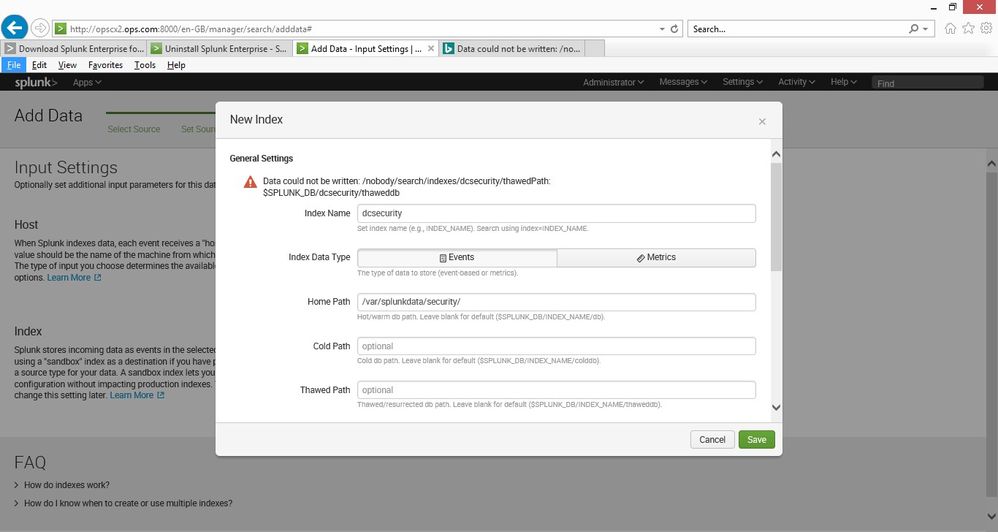
I have create my own log file for test purposes / learning (its like a syslog log) and I can see the data in splunk. But when I try to create an index for it I get the error below, does anyone know what could be causing this ?
ERROR MESSAGE:
Data could not be written: /nobody/search/indexes/testosboot/thawedPath: $SPLUNK_DB/testosboot/thaweddb
Rgds
Dee

- Mark as New
- Bookmark Message
- Subscribe to Message
- Mute Message
- Subscribe to RSS Feed
- Permalink
- Report Inappropriate Content

Does the path
/var/splunkdata/security
exist and is it writable by the splunk user?
- Mark as New
- Bookmark Message
- Subscribe to Message
- Mute Message
- Subscribe to RSS Feed
- Permalink
- Report Inappropriate Content
I should have rebooted after uninstalling version 7.0 and then perform a clean install of version 7.1
- Mark as New
- Bookmark Message
- Subscribe to Message
- Mute Message
- Subscribe to RSS Feed
- Permalink
- Report Inappropriate Content

Cold and Thawed paths aren't pointing to /var/splunkdata/security, at least the screenshot doesn't indicate it is. Those paths still make use of $SPLUNK_DB, which isn't discernible from what was posted.
You may need to define cold and thawed path explicity, unless $SPLUNK_DB is set to something that makes sense (has sufficient space and is writeable by the splunk user).
- Mark as New
- Bookmark Message
- Subscribe to Message
- Mute Message
- Subscribe to RSS Feed
- Permalink
- Report Inappropriate Content
thanks for the pointers, by uninstalling it and reinstalling, then checking the permissions, its working now
- Mark as New
- Bookmark Message
- Subscribe to Message
- Mute Message
- Subscribe to RSS Feed
- Permalink
- Report Inappropriate Content
Does the path
/var/splunkdata/security
exist and is it writable by the splunk user?
- Mark as New
- Bookmark Message
- Subscribe to Message
- Mute Message
- Subscribe to RSS Feed
- Permalink
- Report Inappropriate Content
thanks I did checked the permissions, and it was correct as I could write to the folder as the user , I uninstalled it all, rebooted, reinstalled 7.1 and after it was ok... (so I must have made a mistake somewhere and did have version 7.0 installed, which I uninstalled but did not reboot)
thanks for the pointers
Dee

Index This | Why did the turkey cross the road?
Enter the Agentic Era with Splunk AI Assistant for SPL 1.4
Feel the Splunk Love: Real Stories from Real Customers
