
Join the Conversation
- Find Answers
- :
- Splunk Administration
- :
- Getting Data In
- :
- Re: transforms.conf not working
- Subscribe to RSS Feed
- Mark Topic as New
- Mark Topic as Read
- Float this Topic for Current User
- Bookmark Topic
- Subscribe to Topic
- Mute Topic
- Printer Friendly Page
- Mark as New
- Bookmark Message
- Subscribe to Message
- Mute Message
- Subscribe to RSS Feed
- Permalink
- Report Inappropriate Content

I have events like this comin from Heavy forwarder
"geo": {"continent": "NA", "country": "UK", "city": "LONDON"}, "hostname": "xxxx xxx xxxx"
I have to override the host metadata with the hostname field from the event.
my transforms.conf
[hostoverride]
SOURCE_KEY = hostname
REGEX = (.*)
DEST_KEY = MetaData:Host
FORMAT = host::$1
props.conf
[sourcetypename]
.
.
.
TRANSFORMS-hostoverride = hostoverride
In some of the events I am still getting the Heavy forwarder name.
Thanks for the help in Advance
- Mark as New
- Bookmark Message
- Subscribe to Message
- Mute Message
- Subscribe to RSS Feed
- Permalink
- Report Inappropriate Content
Regex was right, due to the size of data the hostname at the end of the events greater than 4096 character were missed and HF name was showing up.
changes I made in transforms.conf:
[hostoverride]
REGEX = hostname\"\:\s\"(.*)\"
DEST_KEY = MetaData:Host
FORMAT = host::$1
LOOKAHEAD = 10000
and it worked!!!
- Mark as New
- Bookmark Message
- Subscribe to Message
- Mute Message
- Subscribe to RSS Feed
- Permalink
- Report Inappropriate Content

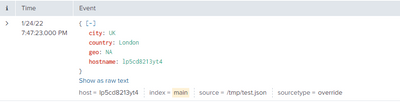
@prashant_kumar_ use this transforms
[hostoverride]
REGEX = hostname\"\:\"(.*)\"
DEST_KEY = MetaData:Host
FORMAT = host::$1
props.conf
[override]
TRANSFORMS-ooo = hostoverride
INDEXED_EXTRACTIONS = json
DATETIME_CONFIG = CURRENT
LINE_BREAKER = ([\r\n]+)
NO_BINARY_CHECK = true
disabled = false
pulldown_type = true
my test file
{"geo":"NA","city":"UK","country":"London","hostname":"lp5cd8213yt4"}
- Mark as New
- Bookmark Message
- Subscribe to Message
- Mute Message
- Subscribe to RSS Feed
- Permalink
- Report Inappropriate Content
Regex was right, due to the size of data the hostname at the end of the events greater than 4096 character were missed and HF name was showing up.
changes I made in transforms.conf:
[hostoverride]
REGEX = hostname\"\:\s\"(.*)\"
DEST_KEY = MetaData:Host
FORMAT = host::$1
LOOKAHEAD = 10000
and it worked!!!


Join the Splunk Community Slack to learn, troubleshoot, and make connections with fellow Splunk practitioners in real time!
Join Splunk User Groups to connect and learn in-person by region or remotely by topic or industry.
Ditch the Manual Grind: Building AI Agents with Splunk
Cisco Data Fabric from Architecture to Investigation, Better SOC Visibility, and More ...
The Trust Gap: Why a Data Foundation is Fundamental to an Agentic Enterprise
