
Join the Conversation
- Find Answers
- :
- Splunk Administration
- :
- Getting Data In
- :
- splitting multiple event and display data using ta...
- Subscribe to RSS Feed
- Mark Topic as New
- Mark Topic as Read
- Float this Topic for Current User
- Bookmark Topic
- Subscribe to Topic
- Mute Topic
- Printer Friendly Page
- Mark as New
- Bookmark Message
- Subscribe to Message
- Mute Message
- Subscribe to RSS Feed
- Permalink
- Report Inappropriate Content
splitting multiple event and display data using table

I have splitted my mixed log which contains both text and json to table .
For reference I have queried it as a table as shown below:
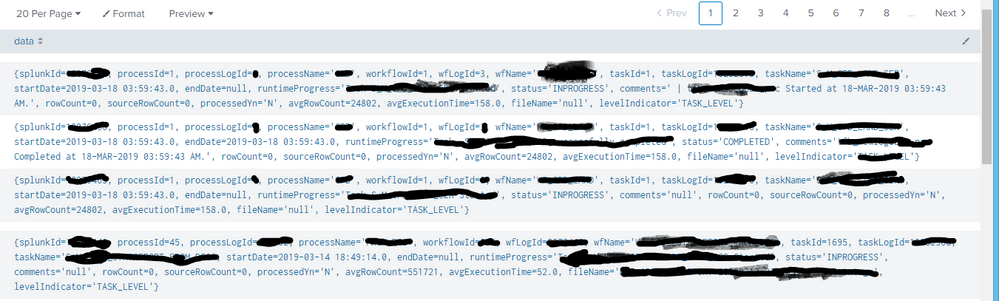
and used the below query to extract the fields like splunkId,processId, processLogId
index=****source=****  | sort -time | fields _time _raw
| eval data = replace(_raw,"}\n{","Processed SplunkLogger") | eval data = replace(data,"{"," ")
| eval data = replace(data,"}"," ")  | eval data = split(data,"Processed SplunkLogger")
| where like(data, "%levelIndicator='****'%") | mvexpand data  |  eval _raw=data | table splunkId,processId, processLogId
But it doesn't returns anything, Can anyone please help me out with it.
- Mark as New
- Bookmark Message
- Subscribe to Message
- Mute Message
- Subscribe to RSS Feed
- Permalink
- Report Inappropriate Content

So, where to start.. First of all, you started with a | fields _time _raw. Those fields are always included and cannot be exluced. Later however, you want to table fields that are not available anymore (splunkdId, processId, processLogId).
Secondly, why do you have text and JSON both in the same sourcetype (it sounds like you do)? Why don't you split the events into different sourcetypes? If you're extracting JSON data, you won't need to access _raw anymore because JSON will extract fields for you.
Skalli



Join the Splunk Community Slack to learn, troubleshoot, and make connections with fellow Splunk practitioners in real time!
Join Splunk User Groups to connect and learn in-person by region or remotely by topic or industry.
SOC4Kafka - New Kafka Connector Powered by OpenTelemetry
Event Series: Level up your SOC: Advancing with Splunk Enterprise Security
Announcing Modern Navigation: A New Era of Splunk User Experience
