
Join the Conversation
- Find Answers
- :
- Splunk Administration
- :
- Getting Data In
- :
- Re: how to solve Time difference issue?
- Subscribe to RSS Feed
- Mark Topic as New
- Mark Topic as Read
- Float this Topic for Current User
- Bookmark Topic
- Subscribe to Topic
- Mute Topic
- Printer Friendly Page
- Mark as New
- Bookmark Message
- Subscribe to Message
- Mute Message
- Subscribe to RSS Feed
- Permalink
- Report Inappropriate Content

Hi Guys,
I'm getting the time difference of events in splunk SH.
I've also tried to put TZ = UTC in props.conf of an APP at HF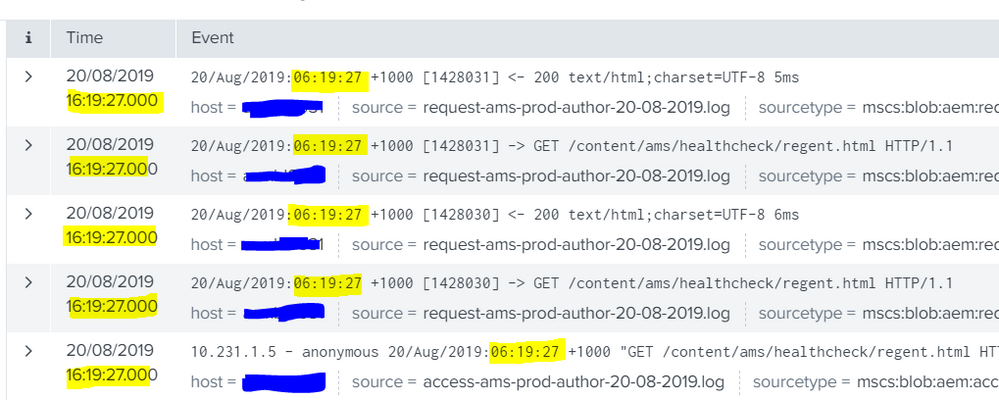
[sourcetype]
TZ = UTC
- Mark as New
- Bookmark Message
- Subscribe to Message
- Mute Message
- Subscribe to RSS Feed
- Permalink
- Report Inappropriate Content

TZ = <timezone identifier>
* The algorithm for determining the time zone for a particular event is as
  follows:
  * If the event has a timezone in its raw text (for example, UTC, -08:00),
  use that.
  * If TZ is set to a valid timezone string, use that.
Based on that, it will only use the TZ setting, if the TZ is not found in the event.
You event has a valid TZ of +1000, which Splunk is applying causing the time to 06:19:27 + 1000 = 16:19:27
If you want it to ignore the timezone set in the timestamp, I believe you will need to configure a custom timestamp extraction for this sourcetype in props.conf:
TIME_FORMAT = <strptime-style format>
* Specifies a "strptime" format string to extract the date.
Although the real fix, is to correct the time on the end device.
You could also have the device sent to a syslog server, that syslog server could apply the timestamp you want as it writes to file, and Splunk can monitor the syslog files.
As long as the latency between your endpoints and syslog servers are low, the timestamps should be close enough and all normalized your specified timezone.
- Mark as New
- Bookmark Message
- Subscribe to Message
- Mute Message
- Subscribe to RSS Feed
- Permalink
- Report Inappropriate Content
TZ = <timezone identifier>
* The algorithm for determining the time zone for a particular event is as
  follows:
  * If the event has a timezone in its raw text (for example, UTC, -08:00),
  use that.
  * If TZ is set to a valid timezone string, use that.
Based on that, it will only use the TZ setting, if the TZ is not found in the event.
You event has a valid TZ of +1000, which Splunk is applying causing the time to 06:19:27 + 1000 = 16:19:27
If you want it to ignore the timezone set in the timestamp, I believe you will need to configure a custom timestamp extraction for this sourcetype in props.conf:
TIME_FORMAT = <strptime-style format>
* Specifies a "strptime" format string to extract the date.
Although the real fix, is to correct the time on the end device.
You could also have the device sent to a syslog server, that syslog server could apply the timestamp you want as it writes to file, and Splunk can monitor the syslog files.
As long as the latency between your endpoints and syslog servers are low, the timestamps should be close enough and all normalized your specified timezone.
- Mark as New
- Bookmark Message
- Subscribe to Message
- Mute Message
- Subscribe to RSS Feed
- Permalink
- Report Inappropriate Content


What is the time zone of the data source? What is the time zone setting for the user who produced the output? What is the TIME_FORMAT setting for the sourcetype?
If this reply helps you, Karma would be appreciated.



Join the Splunk Community Slack to learn, troubleshoot, and make connections with fellow Splunk practitioners in real time!
Join Splunk User Groups to connect and learn in-person by region or remotely by topic or industry.
Your Path to AgenticOps: AI Experiences for Every Splunk Practitioner
Supercharging Windows Security Detection Performance: Introducing Hybrid Field ...
Ditch the Manual Grind: Building AI Agents with Splunk
