
Join the Conversation
- Find Answers
- :
- Splunk Administration
- :
- Getting Data In
- :
- Re: how to find time difference in below format?
- Subscribe to RSS Feed
- Mark Topic as New
- Mark Topic as Read
- Float this Topic for Current User
- Bookmark Topic
- Subscribe to Topic
- Mute Topic
- Printer Friendly Page
- Mark as New
- Bookmark Message
- Subscribe to Message
- Mute Message
- Subscribe to RSS Feed
- Permalink
- Report Inappropriate Content
how to find time difference in below format?

New_Time=2020-01-19T15:06:53.134000000Z
Previous_Time=2020-01-19T15:06:53.134396700Z
how to find the time difference of above times?
- Mark as New
- Bookmark Message
- Subscribe to Message
- Mute Message
- Subscribe to RSS Feed
- Permalink
- Report Inappropriate Content

Hi
Check this
| makeresults
| eval New_Time="2020-01-19T15:06:53.134000000Z",Previous_Time="2020-01-19T15:06:53.134396700Z"
| eval diff = strptime(Previous_Time, "%Y-%m-%dT%H:%M:%S.%9N%Z") -strptime(New_Time, "%Y-%m-%dT%H:%M:%S.%9N%Z")
| fieldformat diff = tostring(diff, "duration")
| table diff
- Mark as New
- Bookmark Message
- Subscribe to Message
- Mute Message
- Subscribe to RSS Feed
- Permalink
- Report Inappropriate Content

- Mark as New
- Bookmark Message
- Subscribe to Message
- Mute Message
- Subscribe to RSS Feed
- Permalink
- Report Inappropriate Content


Please consider changing your user name. We discourage the use of email addresses here to avoid spam.
If this reply helps you, Karma would be appreciated.
- Mark as New
- Bookmark Message
- Subscribe to Message
- Mute Message
- Subscribe to RSS Feed
- Permalink
- Report Inappropriate Content
To find the difference between times you must first convert them to epoch form.
... | eval nt = strptime(New_Time, "%Y-%m-%dT%H:%M:%S.%9N%Z"), pt= strptime(Previous_Time, "%Y-%m-%dT%H:%M:%S.%9N%Z")
| eval diff = nt - pt
| fieldformat diff = tostring(diff, "duration")
| table diff
If this reply helps you, Karma would be appreciated.
- Mark as New
- Bookmark Message
- Subscribe to Message
- Mute Message
- Subscribe to RSS Feed
- Permalink
- Report Inappropriate Content
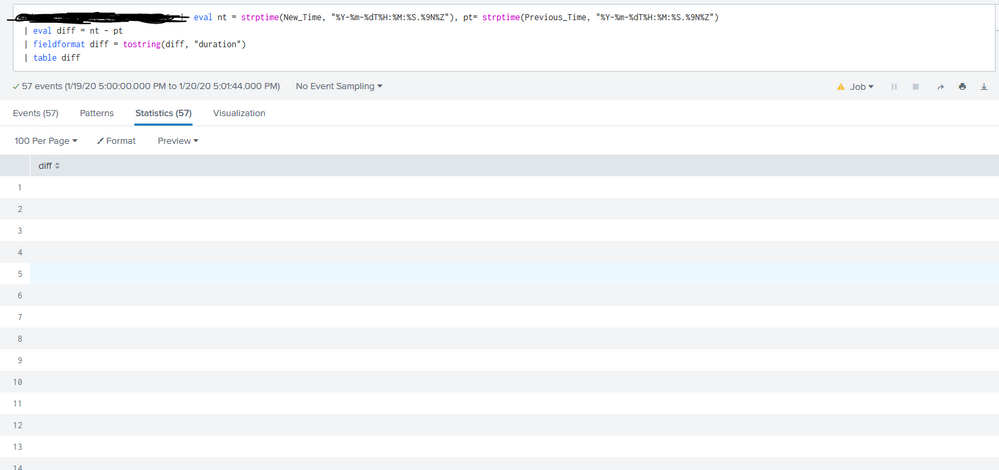
Getting blank result after query. Please advise.
- Mark as New
- Bookmark Message
- Subscribe to Message
- Mute Message
- Subscribe to RSS Feed
- Permalink
- Report Inappropriate Content

Hi @[email protected],
to find time differences, you have to convert your timestamps in epoch time using eval command and the strptime function, something like this:
your search
| eval diff=strptime(New_Time,"%Y-%m-%dT%H:%M:%S.%9N")-strptime(Previous_Time,"%Y-%m-%dT%H:%M:%S.%9N")
| ...
Ciao.
Giuseppe
- Mark as New
- Bookmark Message
- Subscribe to Message
- Mute Message
- Subscribe to RSS Feed
- Permalink
- Report Inappropriate Content
Am getting blank screen while executing query. (Please find above)
- Mark as New
- Bookmark Message
- Subscribe to Message
- Mute Message
- Subscribe to RSS Feed
- Permalink
- Report Inappropriate Content
Hi @[email protected],
I think that New_Time and Previous_Time are two field already extracted and present in you logs.
If you haven't them, you have to understand how to extract them from logs or from a correlation.
Can you share two events identifying the above fields?
ciao.
Giuseppe
- Mark as New
- Bookmark Message
- Subscribe to Message
- Mute Message
- Subscribe to RSS Feed
- Permalink
- Report Inappropriate Content
Both filelds are available already for each event. No issues with this I guess. Need some help 😞
- Mark as New
- Bookmark Message
- Subscribe to Message
- Mute Message
- Subscribe to RSS Feed
- Permalink
- Report Inappropriate Content
Hi @[email protected],
debug the situation in this way:
index=your_index New_Time=* Previous_Time=*
| table _time New_Time Previous_Time
in this way you can be sure that the fields are in each event
than continue in this way
index=your_index New_Time=* Previous_Time=*
| eval New_epoch_Time=strptime(New_Time,"%Y-%m-%dT%H:%M:%S.%9N"), Previous_epoch_Time=strptime(Previous_Time,"%Y-%m-%dT%H:%M:%S.%9N"), diff=strptime(New_Time,"%Y-%m-%dT%H:%M:%S.%9N")-strptime(Previous_Time,"%Y-%m-%dT%H:%M:%S.%9N")
| table _time New_Time Previous_Time New_epoch_Time Previous_epoch_Time diff
In this way you can see if the conversion in epoch time is correct.
Ciao.
Giuseppe

Join the Splunk Community Slack to learn, troubleshoot, and make connections with fellow Splunk practitioners in real time!
Join Splunk User Groups to connect and learn in-person by region or remotely by topic or industry.
Persistent Queue at TcpOut — One of Splunk's Most Practical Features
Catalog Is Now Generally Available on Splunk Cloud Platform
Your Path to AgenticOps: AI Experiences for Every Splunk Practitioner
