
Join the Conversation
- Find Answers
- :
- Splunk Administration
- :
- Getting Data In
- :
- Re: configuration_change.log is not enabled by def...
- Subscribe to RSS Feed
- Mark Topic as New
- Mark Topic as Read
- Float this Topic for Current User
- Bookmark Topic
- Subscribe to Topic
- Mute Topic
- Printer Friendly Page
- Mark as New
- Bookmark Message
- Subscribe to Message
- Mute Message
- Subscribe to RSS Feed
- Permalink
- Report Inappropriate Content

Hello everyone,
I have been reading about the way Splunk can audit the changes at the configuration files and I found this as a possibility
https://docs.splunk.com/Documentation/Splunk/8.2.2/Troubleshooting/WhatSplunklogsaboutitself
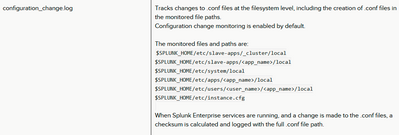
But even though the documentation said is enabled by default my Splunk instance is not logging anything into that log

Do you know what I should be doing to track it?
Current Version 8.2.2
Cluster environment
Linux
Thank you in advance.
- Mark as New
- Bookmark Message
- Subscribe to Message
- Mute Message
- Subscribe to RSS Feed
- Permalink
- Report Inappropriate Content

The default actually seems to be :
[config_change_audit]
disabled = true
mode = auto
in 8.2.2 from: https://docs.splunk.com/Documentation/Splunk/8.2.2/Admin/Serverconf#Configuration_Change_Audit
so you'll need to set that to false to enable it.
Thanks,
Jamie
- Mark as New
- Bookmark Message
- Subscribe to Message
- Mute Message
- Subscribe to RSS Feed
- Permalink
- Report Inappropriate Content
Thank you so much!
- Mark as New
- Bookmark Message
- Subscribe to Message
- Mute Message
- Subscribe to RSS Feed
- Permalink
- Report Inappropriate Content
The default actually seems to be :
[config_change_audit]
disabled = true
mode = auto
in 8.2.2 from: https://docs.splunk.com/Documentation/Splunk/8.2.2/Admin/Serverconf#Configuration_Change_Audit
so you'll need to set that to false to enable it.
Thanks,
Jamie


Join the Splunk Community Slack to learn, troubleshoot, and make connections with fellow Splunk practitioners in real time!
Join Splunk User Groups to connect and learn in-person by region or remotely by topic or industry.
SOC4Kafka - New Kafka Connector Powered by OpenTelemetry
Rounding off the Splunk Dashboard Contest
A Four Part Event Series: AI + Observability: AI Agents, LLMs, Apps, & Infrastructure
