
Join the Conversation
- Find Answers
- :
- Splunk Administration
- :
- Getting Data In
- :
- Why isn't my TIME_FORMAT working for this syslog d...
- Subscribe to RSS Feed
- Mark Topic as New
- Mark Topic as Read
- Float this Topic for Current User
- Bookmark Topic
- Subscribe to Topic
- Mute Topic
- Printer Friendly Page
- Mark as New
- Bookmark Message
- Subscribe to Message
- Mute Message
- Subscribe to RSS Feed
- Permalink
- Report Inappropriate Content

I just configured a new device to send data to a syslog server (w/universal forwarder), but when it shows up in Splunk, the time is incorrect. I have about 30 other devices from different vendors in the same configuration that are working fine.
Here's an example syslog entry:
2021-02-26T15:35:09-05:00 XYZ---Office-HQ edge[9076]: EDGE_NEW_DEVICE: New or updated client device b4:56:e3:a8:91:b5, ip 10.5.38.0
When this log entry shows up in Splunk, the _time is 3:35:09 PM (future) when it should be 10:35:09 AM. The Splunk server (single-node) and device are both in the same time zone with me and other devices on the same syslog server are working fine.
I've reviewed the following posts, but haven't had much luck
How time zones are processed by Splunk
Configure timestamp recognition
For example, I set the sourcetype to "velocloud:syslog" for the input and I tried editing the sourcetype so that the TIME_FORMAT=%Y-%m-%dT%H:%M:%S%:z
Unfortunately, this hasn't had any effect.

I feel like I'm missing something simple, but I've now spent hours going through everything twice with no luck. Any help would be appreciated.
- Mark as New
- Bookmark Message
- Subscribe to Message
- Mute Message
- Subscribe to RSS Feed
- Permalink
- Report Inappropriate Content

I would try explicitly declaring your time zones, as it seems like the time lines up too perfectly to be anything else. Is your timezone UTC -5 perhaps? (or perhaps UTC+5?) From my experience time zones between the time settings of the log source, sourcetype, forwarder, IDX/SH, and user settings the time zones can get quite messy. There's been more than once I assumed everything was properly configured for UTC only to find an error somewhere.
- Mark as New
- Bookmark Message
- Subscribe to Message
- Mute Message
- Subscribe to RSS Feed
- Permalink
- Report Inappropriate Content
I would try explicitly declaring your time zones, as it seems like the time lines up too perfectly to be anything else. Is your timezone UTC -5 perhaps? (or perhaps UTC+5?) From my experience time zones between the time settings of the log source, sourcetype, forwarder, IDX/SH, and user settings the time zones can get quite messy. There's been more than once I assumed everything was properly configured for UTC only to find an error somewhere.
- Mark as New
- Bookmark Message
- Subscribe to Message
- Mute Message
- Subscribe to RSS Feed
- Permalink
- Report Inappropriate Content
Thanks for the reply. All of my systems are located in the same time zone (GMT-5) and I have that set in my user preferences in the Splunk UI.
Per your suggestion, I tried setting the time zone for the sourcetype (via the UI) to +5 and also later to -5. Weirdly, neither setting made any difference in the _time of the log entries in Splunk. In both cases, the time still showed up in the future.
So I decided to change the timestamp format to exclude the -05:00 and also change the time zone and that worked.
Timestamp format: %Y-%m-%dT%H:%M:%S
Time Zone: GMT
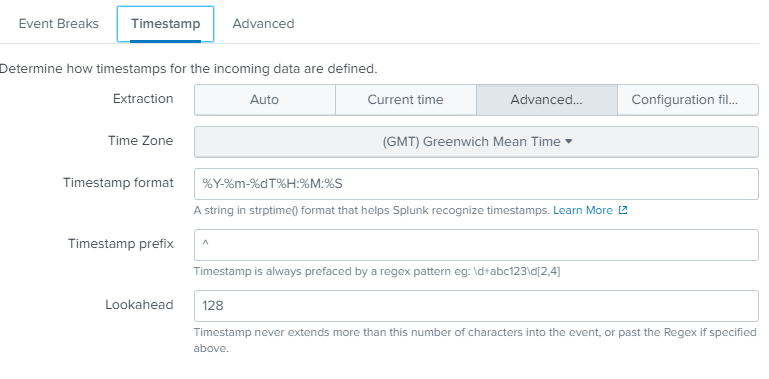
Thanks for the help!


Join the Splunk Community Slack to learn, troubleshoot, and make connections with fellow Splunk practitioners in real time!
Join Splunk User Groups to connect and learn in-person by region or remotely by topic or industry.
Developer Spotlight with Denis Gladkikh
Governing Enterprise AI, Bringing Cisco Telemetry Home, and More from Splunk Lantern
Agentic SOC Triage: Investigating Splunk ES Notables with MCP Server and a Local LLM
