
Join the Conversation
- Find Answers
- :
- Splunk Administration
- :
- Getting Data In
- :
- Re: Why is Splunk not showing full JSON data on se...
- Subscribe to RSS Feed
- Mark Topic as New
- Mark Topic as Read
- Float this Topic for Current User
- Bookmark Topic
- Subscribe to Topic
- Mute Topic
- Printer Friendly Page
- Mark as New
- Bookmark Message
- Subscribe to Message
- Mute Message
- Subscribe to RSS Feed
- Permalink
- Report Inappropriate Content
Why is Splunk not showing full JSON data on search?
I have a json file that contains 2000+ lines of data, it looks somewhat like this -
[
  {
    "line": 2,
    "elements": [
      {
        "before": [
          {
            "result": {
              "duration": 6692500639,
              "status": "passed"
            },
            "match": {
              "location": "some_value"
            }
          },
          {
            "result": {
              "duration": 112646517,
              "status": "passed"
            },
            "match": {
              "location": "some_value"
            }
          }
        ],
        "line": 21,
        "name": "random_name",
        "description": "",
        "id": "random_id",
        "after": [
          {
            "result": {
              "duration": 2054619875,
              "status": "passed"
            },
            "match": {
              "location": "some_value"
            }
          }
        ],
        "type": "scenario",
        "keyword": "Scenario Outline",
        "steps": [
          {
            "result": {
              "duration": 3627081999,
              "status": "passed"
            },
            "line": 5,
            "name": "random_name",
            "match": {
              "location": "some_value"
            },
            "keyword": "Given "
          },
          {
            "result": {
              "duration": 126013564303,
              "error_message": ""... more than 250 lines of stack trace over here ..."",
              "status": "failed"
            },
            "line": 9,
            "name": "random_name",
            "match": {
              "location": "some_value"
            },
            "keyword": "some_key"
          }
          }
-------- some more similar lines here ----------
        ],
        "tags": [
          {
            "line": 1,
            "name": "test_name"
          },
          {
            "line": 1,
            "name": "test_name"
          }
        ]
      }
    ],
    "name": "random_name",
    "description": "",
    "id": "random_id",
    "keyword": "Feature",
    "uri": "random_uri",
    "tags": [
      {
        "line": 1,
        "name": "test_name"
      },
      {
        "line": 1,
        "name": "test_name"
      }
    ]
  }
]
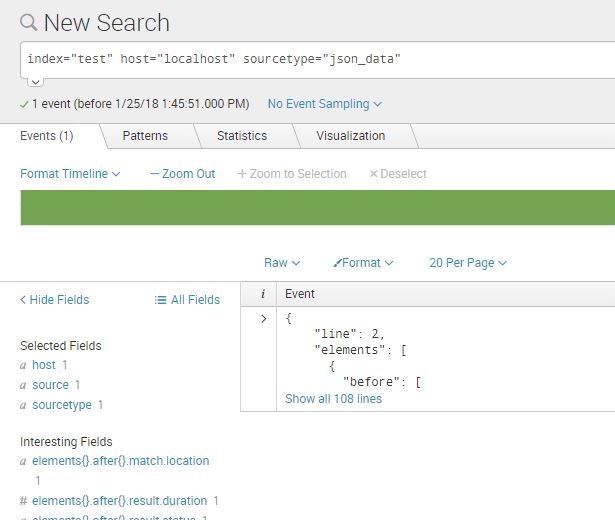
Howevere splunk is only showing the first 108 lines from the file and not the whole
The SPL I used is -
index="test" host="localhost" sourcetype="json_data"
The location json file is on the indexer as well as on the forwarder. but nothing works.
Here are my configs for props.conf -
[json_data]
SHOULD_LINEMERGE = true
MUST_BREAK_AFTER = ]
DATETIME_CONFIG =
INDEXED_EXTRACTIONS = json
KV_MODE = none
TRUNCATE = 0
NO_BINARY_CHECK = true
CHARSET = UTF-8
category = Structured
description = JavaScript Object Notation format. For more information, visit http://json.org/
disabled = false
pulldown_type = true
and what splunk displays -
Can someone please help.
Thanks!
If you need any other info please comment.
- Mark as New
- Bookmark Message
- Subscribe to Message
- Mute Message
- Subscribe to RSS Feed
- Permalink
- Report Inappropriate Content


Based on your sample JSON I think the issue is with your linebreaking. Your configuration is to linebreak after "]". There are those brackets within the inside of your event already so that isn't something that necessarily dictates being the end of the event. Is there a definitive pattern that shows up near the end of your event every time? Or is this just a single JSON event you are trying to ingest? If it is just a single event you can likely leave MUST_BREAK_AFTER empty as it defaults to empty.
- Mark as New
- Bookmark Message
- Subscribe to Message
- Mute Message
- Subscribe to RSS Feed
- Permalink
- Report Inappropriate Content
You may also want some timestamping settings included as well. TIME_PREFIX, MAX_TIMESTAMP_LOOKAHEAD, and TIME_FORMAT may be something that is useful to set. Please let me know if you have any questions on these!
- Mark as New
- Bookmark Message
- Subscribe to Message
- Mute Message
- Subscribe to RSS Feed
- Permalink
- Report Inappropriate Content
initially I kept the MUST_BREAK_AFTER as blank. Still it did not show the full data.



Join the Splunk Community Slack to learn, troubleshoot, and make connections with fellow Splunk practitioners in real time!
Join Splunk User Groups to connect and learn in-person by region or remotely by topic or industry.
SOC4Kafka - New Kafka Connector Powered by OpenTelemetry
Event Series: Level up your SOC: Advancing with Splunk Enterprise Security
Announcing Modern Navigation: A New Era of Splunk User Experience
