
Join the Conversation
- Find Answers
- :
- Splunk Administration
- :
- Getting Data In
- :
- Re: WARN LineBreakingProcessor
- Subscribe to RSS Feed
- Mark Topic as New
- Mark Topic as Read
- Float this Topic for Current User
- Bookmark Topic
- Subscribe to Topic
- Mute Topic
- Printer Friendly Page
- Mark as New
- Bookmark Message
- Subscribe to Message
- Mute Message
- Subscribe to RSS Feed
- Permalink
- Report Inappropriate Content

Hi All,
I have a log with 3 event inside of it, ( you can see it on the screenshot, I paste the sample logs here : https://regex101.com/r/EvmMeR/1
- 1st Event - Short event
- 2nd Event - Short event and multi-line
- 3rd Event - VERY LONG and multi-line, need to be dropped as per the client.
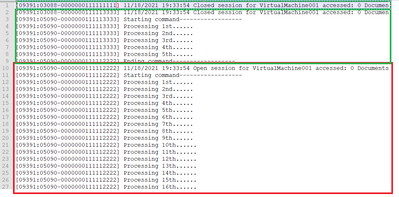
I manage to DROP the 3rd event by finding the LOGS that are greater than 2000 characters.
The problem is , I dropped the event but Splunk still raise the issue:
11-24-2021 08:02:57.049 +0000 WARN LineBreakingProcessor [6453 parsing] - Truncating line because limit of 2000 bytes has been exceeded with a line length >= 55179 - data_source="SAMPLETOSHARE.txt", data_host="5bfd55dbdcdd", data_sourcetype="sample"
Is there a way to stop splunk from flagging issue for those logs that was dropped ?
- Mark as New
- Bookmark Message
- Subscribe to Message
- Mute Message
- Subscribe to RSS Feed
- Permalink
- Report Inappropriate Content


Line breaking happens before any transforms that might discard events so the log message has already been written by the time the event is dropped. There's no way to avoid that, except by using a third-party tool like Cribl to discard events before they reach the indexer.
If this reply helps you, Karma would be appreciated.
- Mark as New
- Bookmark Message
- Subscribe to Message
- Mute Message
- Subscribe to RSS Feed
- Permalink
- Report Inappropriate Content
Line breaking happens before any transforms that might discard events so the log message has already been written by the time the event is dropped. There's no way to avoid that, except by using a third-party tool like Cribl to discard events before they reach the indexer.
If this reply helps you, Karma would be appreciated.
- Mark as New
- Bookmark Message
- Subscribe to Message
- Mute Message
- Subscribe to RSS Feed
- Permalink
- Report Inappropriate Content
Thanks @richgalloway

Join the Splunk Community Slack to learn, troubleshoot, and make connections with fellow Splunk practitioners in real time!
Join Splunk User Groups to connect and learn in-person by region or remotely by topic or industry.
Tuning Edge Processor in Hybrid Mode: What Limits Each Data Path
Best Practices: Splunk auto adjust pipeline queue
Request for Professional Development: Attending .conf26
