
Join the Conversation
- Find Answers
- :
- Splunk Administration
- :
- Getting Data In
- :
- Univesal Forwarder Windows 2003 Help
- Subscribe to RSS Feed
- Mark Topic as New
- Mark Topic as Read
- Float this Topic for Current User
- Bookmark Topic
- Subscribe to Topic
- Mute Topic
- Printer Friendly Page
- Mark as New
- Bookmark Message
- Subscribe to Message
- Mute Message
- Subscribe to RSS Feed
- Permalink
- Report Inappropriate Content

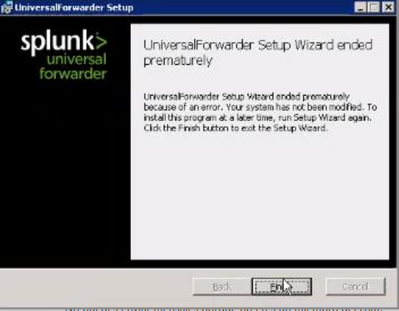
I have 3 machines with 32-bit windows 2003 but I can't find an agent (Universal Forwarder)
What I can do?
- Mark as New
- Bookmark Message
- Subscribe to Message
- Mute Message
- Subscribe to RSS Feed
- Permalink
- Report Inappropriate Content


Upgrade the 3 machines. Windows 2003 is not supported and neither is the version of UF that used to run on it. Even if you find a copy of the UF it won't be compatible with modern versions of Splunk.
Depending on what data you want to get off the machines, you may be able to use Windows Event Forwarding to send the event logs to a newer machine with a working UF.
If this reply helps you, Karma would be appreciated.
- Mark as New
- Bookmark Message
- Subscribe to Message
- Mute Message
- Subscribe to RSS Feed
- Permalink
- Report Inappropriate Content
Upgrade the 3 machines. Windows 2003 is not supported and neither is the version of UF that used to run on it. Even if you find a copy of the UF it won't be compatible with modern versions of Splunk.
Depending on what data you want to get off the machines, you may be able to use Windows Event Forwarding to send the event logs to a newer machine with a working UF.
If this reply helps you, Karma would be appreciated.

Join the Splunk Community Slack to learn, troubleshoot, and make connections with fellow Splunk practitioners in real time!
Join Splunk User Groups to connect and learn in-person by region or remotely by topic or industry.
Make your Splunk investment work harder with Optimization Advisor
How Splunk AI Assistant Is Transforming Investigations: Insights from .conf26
Make Your Machine Data AI-Ready in Splunk
