
Join the Conversation
- Find Answers
- :
- Splunk Administration
- :
- Getting Data In
- :
- Re: Splunkism Regex?
- Subscribe to RSS Feed
- Mark Topic as New
- Mark Topic as Read
- Float this Topic for Current User
- Bookmark Topic
- Subscribe to Topic
- Mute Topic
- Printer Friendly Page
- Mark as New
- Bookmark Message
- Subscribe to Message
- Mute Message
- Subscribe to RSS Feed
- Permalink
- Report Inappropriate Content
Splunkism Regex?

When using PCRE regex to split a field into components, I find it frustrating. I know my regex works as I've validated this in both regex101 and debuggex.
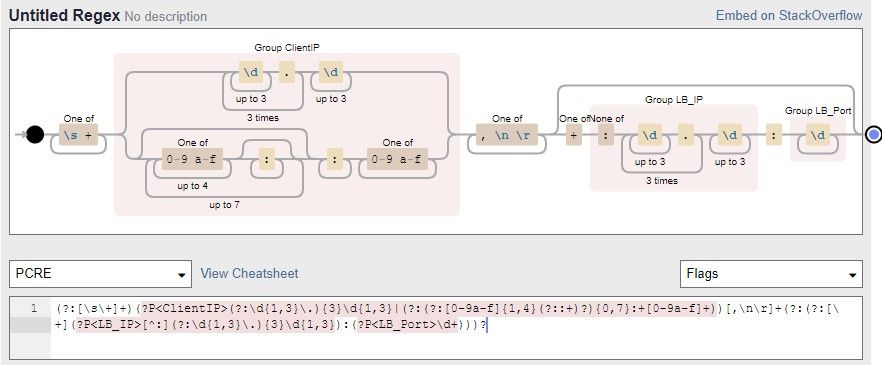
(?:.*?)(?P<ClientIP>(?:\d{1,3}\.){3}\d{1,3}|(?:(?:[0-9a-f]{1,4}(?::+)?){0,7}:+[0-9a-f]+))[,\n\r]+(?:(?:[\+](?P<LB_IP>[^:](?:\d{1,3}\.){3}\d{1,3}):(?P<LB_Port>\d+)))?
So this is extracting details from the IIS X_Forwarded_For field. The supplied log data that was parsed extracted perfectly on both platforms and even using "grep -P". But in Splunk, I only get a full extraction when the following format is observed.
123.123.123.123,+123.123.123.123,+123.123.123.123:12345
If the final ip:port is missing from the event, only the first IP is captured
123.123.123.123,+123.123.123.123
I've had similar experiences over the years with Splunk, so I'm wondering if my regex fu is rubbish, regex validators are wrong or splunk has a bug that's never been fixed.
TIA
Steve
- Mark as New
- Bookmark Message
- Subscribe to Message
- Mute Message
- Subscribe to RSS Feed
- Permalink
- Report Inappropriate Content


If you posted the regex as text rather than an image then we could test it ourselves to better help you.
Where did you define the regex in Splunk (props.conf, transforms.conf, Add Data Wizard, etc.)?
If this reply helps you, Karma would be appreciated.
- Mark as New
- Bookmark Message
- Subscribe to Message
- Mute Message
- Subscribe to RSS Feed
- Permalink
- Report Inappropriate Content
Hi Richard, The regex is defined in transforms and called by props.
Apologies, that would be useful 🙂 Added to the top
- Mark as New
- Bookmark Message
- Subscribe to Message
- Mute Message
- Subscribe to RSS Feed
- Permalink
- Report Inappropriate Content
In Splunk, the default behavior is to keep only the first match. To accept multiple matches, use the REPEAT_MATCH or MV_ADD settings.
If this reply helps you, Karma would be appreciated.
- Mark as New
- Bookmark Message
- Subscribe to Message
- Mute Message
- Subscribe to RSS Feed
- Permalink
- Report Inappropriate Content

Which version of splunk are you using as this may be a factor too?
- Mark as New
- Bookmark Message
- Subscribe to Message
- Mute Message
- Subscribe to RSS Feed
- Permalink
- Report Inappropriate Content
We're running 8.1.3 currently.

Join the Splunk Community Slack to learn, troubleshoot, and make connections with fellow Splunk practitioners in real time!
Join Splunk User Groups to connect and learn in-person by region or remotely by topic or industry.
[Puzzles] Solve, Learn, Repeat: Classic British Rock Bands
New to the Community? Join Us for an Exclusive Post .conf26 Welcome Session (Plus a ...
Accelerate Splunk App Development with AI
