
Join the Conversation
- Find Answers
- :
- Splunk Administration
- :
- Getting Data In
- :
- Re: Splunk indexer server run out of memory
- Subscribe to RSS Feed
- Mark Topic as New
- Mark Topic as Read
- Float this Topic for Current User
- Bookmark Topic
- Subscribe to Topic
- Mute Topic
- Printer Friendly Page
- Mark as New
- Bookmark Message
- Subscribe to Message
- Mute Message
- Subscribe to RSS Feed
- Permalink
- Report Inappropriate Content
Splunk indexer server run out of memory

Hi Experts,
My splunk indexer server are running out if memory, its main reason are
/opt/splunk/var/run/searchpeers
/opt/splunk/var/lib/splunk/_introspection
/opt/splunk/var/lib/splunk/_internaldb
/opt/splunk/var/lib/splunk/kvstore
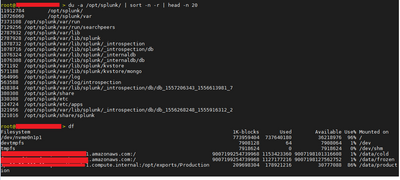
Indexer _introspection, _internaldb, kvstore have default setting, its data are not move in cold and frozen bucket.
Please suggest what can I do to create space at my server ?
- Mark as New
- Bookmark Message
- Subscribe to Message
- Mute Message
- Subscribe to RSS Feed
- Permalink
- Report Inappropriate Content


Your problem is disk space, not memory. Well, you may also have a memory problem, but the evidence in your posting screams disk space.
A related problem is Splunk and the operating system are sharing a file system (/). This can become an issue when Splunk uses up disk space and prevents the OS from doing any work. This is not called out in Splunk docs, but is a basic Linux admin matter. /, $SPLUNK_HOME, and $SPLUNK_DB should be separate file systems.
Don't touch anything in /opt/splunk/var/lib/splunk. That's where your data is stored and you risk data loss by manipulating files there.
You can safely delete files in /opt/splunk/var/log/splunk having names that end with a digit.
You really have two options: 1) add more storage; or 2) use the frozenTimePeriodInSeconds setting in indexes.conf to reduce the retention time of your indexed data. I recommend the former.
If this reply helps you, Karma would be appreciated.
- Mark as New
- Bookmark Message
- Subscribe to Message
- Mute Message
- Subscribe to RSS Feed
- Permalink
- Report Inappropriate Content

Your question is big vague
- Are you running out of memory or Disk space? the screenshot seems to show problem with disk-space
- Indexer needs quite lot of memory for powerful systems or large data. What's your spec for memory? How much RAM?
- What's your indexes.conf specifications (run a btool and put the output in your Question, so people could understand the issues)


Join the Splunk Community Slack to learn, troubleshoot, and make connections with fellow Splunk practitioners in real time!
Join Splunk User Groups to connect and learn in-person by region or remotely by topic or industry.
Vibe-coding, AI, and Splunkcraft: Highlights from the .conf26 Builder Bar
Thanks for the Memories: .conf26 Took Learning to New Heights
Best Practices: Splunk auto adjust pipeline queue
