
Join the Conversation
- Find Answers
- :
- Splunk Administration
- :
- Getting Data In
- :
- Splunk Add-on for Microsoft IIS - ms:iis:auto - No...
- Subscribe to RSS Feed
- Mark Topic as New
- Mark Topic as Read
- Float this Topic for Current User
- Bookmark Topic
- Subscribe to Topic
- Mute Topic
- Printer Friendly Page
- Mark as New
- Bookmark Message
- Subscribe to Message
- Mute Message
- Subscribe to RSS Feed
- Permalink
- Report Inappropriate Content

Hi All,
I've followed the instructions here (https://docs.splunk.com/Documentation/AddOns/latest/MSIIS/About) to ingest MS IIS logs into splunk. I have installed the universal forwarder on our test windows server, as well as the IIS Splunkbase app on the windows server and our heavy forwarder. (Our heavy forwarder is configured to forward upstream.)
For inputs on the test windows server, we have this configured:
C:\Program Files\SplunkUniversalForwarder\etc\apps\Splunk_TA_microsoft-iis\local\inputs.conf
[monitor://C:\inetpub\logs\LogFiles]
disabled = 0
index = test_index
sourcetype = ms:iis:auto
Example of the IIS log:
#Software: Microsoft Internet Information Services 8.5
#Version: 1.0
#Date: 2020-09-18 13:15:43
#Fields: date time s-ip cs-method cs-uri-stem cs-uri-query s-port cs-username c-ip cs(User-Agent) cs(Referer) sc-status sc-substatus sc-win32-status time-taken
2020-09-18 13:15:43 127.0.0.1 GET / - 80 - 127.0.0.1 Mozilla/5.0+(Windows+NT+6.3;+WOW64;+Trident/7.0;+rv:11.0)+like+Gecko - 304 0 0 171
2020-09-18 13:15:43 127.0.0.1 GET /iis-85.png - 80 - 127.0.0.1 Mozilla/5.0+(Windows+NT+6.3;+WOW64;+Trident/7.0;+rv:11.0)+like+Gecko http://localhost/ 304 0 0 0
2020-09-18 13:15:43 127.0.0.1 GET /favicon.ico - 80 - 127.0.0.1 Mozilla/5.0+(Windows+NT+6.3;+Win64;+x64;+Trident/7.0;+rv:11.0)+like+Gecko - 404 0 2 0
Data from Splunk Search:

Any idea on why fields aren't being extracted? Not even host is being extracted. Other logs from our windows servers work fine, this is the only app/log type we are currently having trouble with.
- Mark as New
- Bookmark Message
- Subscribe to Message
- Mute Message
- Subscribe to RSS Feed
- Permalink
- Report Inappropriate Content
- Mark as New
- Bookmark Message
- Subscribe to Message
- Mute Message
- Subscribe to RSS Feed
- Permalink
- Report Inappropriate Content
Issue was with the search itself - not the fields from the app.
- Mark as New
- Bookmark Message
- Subscribe to Message
- Mute Message
- Subscribe to RSS Feed
- Permalink
- Report Inappropriate Content


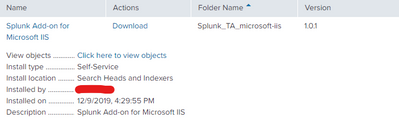
Try installing the IIS add-on on your search head(s).
If this reply helps you, Karma would be appreciated.
- Mark as New
- Bookmark Message
- Subscribe to Message
- Mute Message
- Subscribe to RSS Feed
- Permalink
- Report Inappropriate Content


Join the Splunk Community Slack to learn, troubleshoot, and make connections with fellow Splunk practitioners in real time!
Join Splunk User Groups to connect and learn in-person by region or remotely by topic or industry.
Data Management Digest – September 2026
Federated Search for CloudWatch Unified Data Store Is Generally Available
Announcing Modern Navigation: A New Era of Splunk User Experience
