
Join the Conversation
- Find Answers
- :
- Splunk Administration
- :
- Getting Data In
- :
- Re: REST API Modular Input - 401 Client Unauthoriz...
- Subscribe to RSS Feed
- Mark Topic as New
- Mark Topic as Read
- Float this Topic for Current User
- Bookmark Topic
- Subscribe to Topic
- Mute Topic
- Printer Friendly Page
- Mark as New
- Bookmark Message
- Subscribe to Message
- Mute Message
- Subscribe to RSS Feed
- Permalink
- Report Inappropriate Content

I am trying to access Carbon Black via The REST API. As expected, this works in Postman:
Console Output (keys and tokens changed):
GET
https://api-prod06.conferdeploy.net/integrationServices/v3/event/
Proxy:
host:"127.0.0.1"
port:9000
match:"http+https://*/*"
Request Headers:
x-auth-token:"CYLVZZZZZZZZZZZZZ/3IZNXXXX"
cache-control:"no-cache"
postman-token:"c092b323-fc8e-4c1d-9a6d-c6f042000000"
user-agent:"PostmanRuntime/7.2.0"
accept:"*/*"
host:"api-prod06.conferdeploy.net"
cookie:"__cfduid=ddfebf41ad8fce5ba32a3bd7b71e891e61535000000"
accept-encoding:"gzip, deflate"
Response Headers:
content-type:"application/json;charset=ISO-8859-1"
date:"Mon, 03 Sep 2018 09:21:47 GMT"
server:"Apache-Coyote/1.1"
content-length:"491061"
connection:"Close"
Response Body:
200
590 ms
It starts off OK
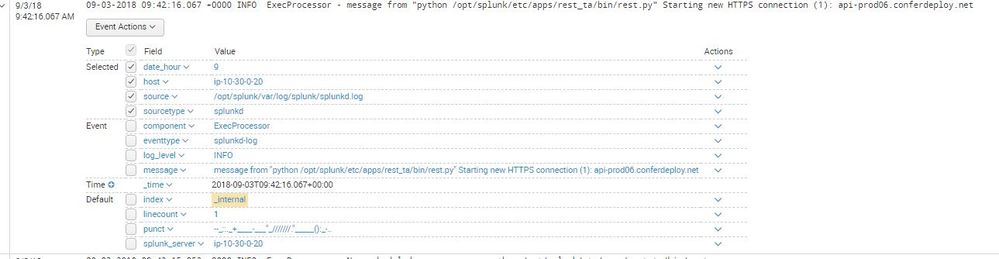
And then crashes out with a 401 error.
Any help would be appreciated.
Thanks in advance.
- Mark as New
- Bookmark Message
- Subscribe to Message
- Mute Message
- Subscribe to RSS Feed
- Permalink
- Report Inappropriate Content
I found it. In Carbon Black, the api key has its own whitelist. You have to have the Splunk server ip whitelisted in Carbon Black for the key to work.
- Mark as New
- Bookmark Message
- Subscribe to Message
- Mute Message
- Subscribe to RSS Feed
- Permalink
- Report Inappropriate Content
I found it. In Carbon Black, the api key has its own whitelist. You have to have the Splunk server ip whitelisted in Carbon Black for the key to work.
- Mark as New
- Bookmark Message
- Subscribe to Message
- Mute Message
- Subscribe to RSS Feed
- Permalink
- Report Inappropriate Content


@joseft, If your problem is resolved, please accept the answer to help future readers.
If this reply helps you, Karma would be appreciated.
- Mark as New
- Bookmark Message
- Subscribe to Message
- Mute Message
- Subscribe to RSS Feed
- Permalink
- Report Inappropriate Content
I found it. In Carbon Black, the api key has its own whitelist. You have to have the Splunk server ip whitelisted in Carbon Black for the key to work.



Join the Splunk Community Slack to learn, troubleshoot, and make connections with fellow Splunk practitioners in real time!
Join Splunk User Groups to connect and learn in-person by region or remotely by topic or industry.
Supercharging Windows Security Detection Performance: Introducing Hybrid Field ...
Ditch the Manual Grind: Building AI Agents with Splunk
Cisco Data Fabric from Architecture to Investigation, Better SOC Visibility, and More ...
