
Join the Conversation
- Find Answers
- :
- Splunk Administration
- :
- Getting Data In
- :
- Parsing - Chrome Log
- Subscribe to RSS Feed
- Mark Topic as New
- Mark Topic as Read
- Float this Topic for Current User
- Bookmark Topic
- Subscribe to Topic
- Mute Topic
- Printer Friendly Page
- Mark as New
- Bookmark Message
- Subscribe to Message
- Mute Message
- Subscribe to RSS Feed
- Permalink
- Report Inappropriate Content

Hi Community,
We have some issue with one of our cloud product and we need to collect our chrome browser log.
So we havea log file like this :
[2368:3448:0911/104129.306:INFO:CONSOLE(9006)] "Handling message type", source: https://dhqbrvplips7x.cloudfront.net/directory/5039/assets/web-directory-7ffa5c07600e16c16ba36787264... (9006)
[2368:3448:0911/104129.331:INFO:CONSOLE(9006)] "Handling message type", source: https://dhqbrvplips7x.cloudfront.net/directory/5039/assets/web-directory-7ffa5c07600e16c16ba36787264... (9006)
[2368:3448:0911/104129.353:INFO:CONSOLE(9006)] "Handling message type", source: https://dhqbrvplips7x.cloudfront.net/directory/5039/assets/web-directory-7ffa5c07600e16c16ba36787264... (9006)
[2368:3448:0911/104129.366:INFO:CONSOLE(9006)] "Handling message type", source: https://dhqbrvplips7x.cloudfront.net/directory/5039/assets/web-directory-7ffa5c07600e16c16ba36787264... (9006)
[2368:3448:0911/104140.068:INFO:CONSOLE(9013)] "STASH-LOGGER: sendLogTraces", source: https://dhqbrvplips7x.cloudfront.net/directory/5039/assets/web-directory-7ffa5c07600e16c16ba36787264... (9013)
[2368:3448:0911/104150.489:INFO:CONSOLE(372)] "Other topic:
{
    "topicName": "channel.metadata",
    "eventBody": {
        "message": "WebSocket Heartbeat"
    }
}", source: chrome-extension://bkmeadpinckobiapkihcoenmipobdaio/background/background.js (372)
[2368:3448:0911/104150.499:INFO:CONSOLE(312)] "Sending ping WS healthcheck", source: chrome-extension://bkmeadpinckobiapkihcoenmipobdaio/background/background.js (312)
[2368:3448:0911/104150.519:INFO:CONSOLE(372)] "Other topic:
{
    "topicName": "channel.metadata",
    "eventBody": {
        "message": "pong"
    }
}", source: chrome-extension://bkmeadpinckobiapkihcoenmipobdaio/background/background.js (372)
[2368:3448:0911/104150.519:INFO:CONSOLE(374)] "Pong WS healthcheck received.", source: chrome-extension://bkmeadpinckobiapkihcoenmipobdaio/background/background.js (374)
I made this props.conf but it's not correct in my search
My props.conf
[chrome:log]
LINE_BREAKER=^\[\d+.\d+:\d+\/\d+.
CHARSET=latin-1
SHOULD_LINEMERGE=true
TIME_FORMAT=%m%d/%H%M%S.%3N
category=Miscellaneous
description=A common log format with a predefined timestamp. Customize timestamp in "Timestamp" options
disabled=false
pulldown_type=true
TIME_PREFIX=\[\d+.\d+
But in my search i have again 2 or more line by events (like this) :
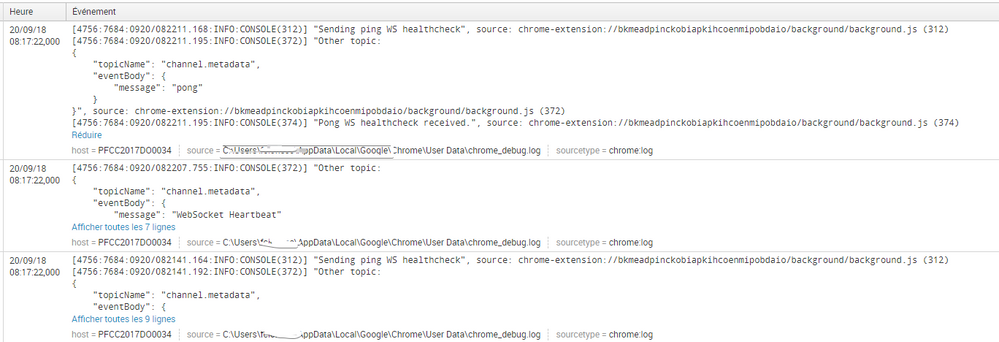
Can you help me 🙂
Many Thanks

- Mark as New
- Bookmark Message
- Subscribe to Message
- Mute Message
- Subscribe to RSS Feed
- Permalink
- Report Inappropriate Content


The LINE_BREAKER attribute requires a capture group. Also, I think the TIME_PREFIX setting doesn't match your events. Try these settings.
[chrome:log]
LINE_BREAKER=([\r\n]+)\[\d+.\d+:\d+\/\d+.
CHARSET=latin-1
SHOULD_LINEMERGE=false
TIME_FORMAT=%m%d/%H%M%S.%3N
disabled=false
TIME_PREFIX=\[\d+:\d+:
If this reply helps you, Karma would be appreciated.
- Mark as New
- Bookmark Message
- Subscribe to Message
- Mute Message
- Subscribe to RSS Feed
- Permalink
- Report Inappropriate Content
The LINE_BREAKER attribute requires a capture group. Also, I think the TIME_PREFIX setting doesn't match your events. Try these settings.
[chrome:log]
LINE_BREAKER=([\r\n]+)\[\d+.\d+:\d+\/\d+.
CHARSET=latin-1
SHOULD_LINEMERGE=false
TIME_FORMAT=%m%d/%H%M%S.%3N
disabled=false
TIME_PREFIX=\[\d+:\d+:
If this reply helps you, Karma would be appreciated.
- Mark as New
- Bookmark Message
- Subscribe to Message
- Mute Message
- Subscribe to RSS Feed
- Permalink
- Report Inappropriate Content
Hi richgalloway
Thanks for your help this is perfect !!!
So another issue in my side was a permission on my Splunk TA folder, so it was not replicated to the indexer.
All is ok now
- Mark as New
- Bookmark Message
- Subscribe to Message
- Mute Message
- Subscribe to RSS Feed
- Permalink
- Report Inappropriate Content
@serviceinfrastructure, If your problem is resolved, please accept the answer to help future readers.
If this reply helps you, Karma would be appreciated.

Join the Splunk Community Slack to learn, troubleshoot, and make connections with fellow Splunk practitioners in real time!
Join Splunk User Groups to connect and learn in-person by region or remotely by topic or industry.
Meet the .conf26 AI Agent Buildathon Winners
Trusted Autonomy in the SOC: A Maturity Journey
Supercharging Windows Security Detection Performance: Introducing Hybrid Field ...
