
Join the Conversation
- Find Answers
- :
- Splunk Administration
- :
- Getting Data In
- :
- Not receiving all windows logs from clients
- Subscribe to RSS Feed
- Mark Topic as New
- Mark Topic as Read
- Float this Topic for Current User
- Bookmark Topic
- Subscribe to Topic
- Mute Topic
- Printer Friendly Page
- Mark as New
- Bookmark Message
- Subscribe to Message
- Mute Message
- Subscribe to RSS Feed
- Permalink
- Report Inappropriate Content

Hello,
I'm trying to setup Splunk in a lab environment. I've got one windows client which I want to send logs over to my Splunk server via a UF.
I am managing the endpoint's splunk config via a deployment server. This works fine, the client checks in, my apps get pushed to it, all fine. For windows logs, I'm using the Splunk TA for Windows (https://splunkbase.splunk.com/app/742/#/overview) with an inputs.conf as below
[WinEventLog://Security]
disabled = 0
start_from = oldest
current_only = 0
renderXml=true
evt_resolve_ad_obj = 1
index = windows

[WinEventLog://System]
disabled = 0
renderXml=true
evt_resolve_ad_obj = 1
index = windows


[WinEventLog://Application]
disabled = 0
renderXml=true
evt_resolve_ad_obj = 1
index = windows
The app gets deployed correctly and I see the above inputs.conf in the %SPLUNK_HOME%/apps/Splunk_TA_windows/local/inputs.conf.
However, in Splunk, I don't seem to be getting all the logs. In fact, I'm only getting event id 6xxx logs and very few (43 events/15mins)
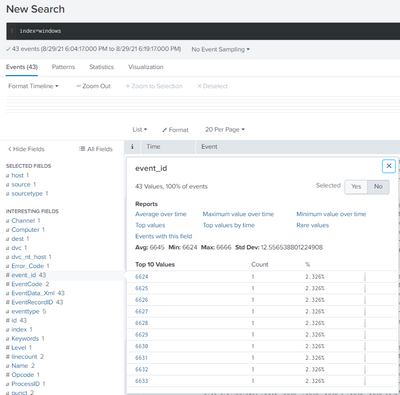
I can't figure out why all the logs aren't coming in but only a few irrelevant ones. Any help will be much appreciated. Thank you!
- Mark as New
- Bookmark Message
- Subscribe to Message
- Mute Message
- Subscribe to RSS Feed
- Permalink
- Report Inappropriate Content
Okay, fixed. It was the permission of the user. For some reason, a domain user who is part of the local admins group did not cut it and made Splunk respond in weird ways in terms of picking up logs. Redeployed UF with Local System and it works. Next time I try it with a non-local account, I'll manage it with gMSA. But for now, it works 🙂
Thank you
- Mark as New
- Bookmark Message
- Subscribe to Message
- Mute Message
- Subscribe to RSS Feed
- Permalink
- Report Inappropriate Content
Okay, fixed. It was the permission of the user. For some reason, a domain user who is part of the local admins group did not cut it and made Splunk respond in weird ways in terms of picking up logs. Redeployed UF with Local System and it works. Next time I try it with a non-local account, I'll manage it with gMSA. But for now, it works 🙂
Thank you
- Mark as New
- Bookmark Message
- Subscribe to Message
- Mute Message
- Subscribe to RSS Feed
- Permalink
- Report Inappropriate Content


Did you configure the DS to have the UF restart after downloading the app?
If this reply helps you, Karma would be appreciated.
- Mark as New
- Bookmark Message
- Subscribe to Message
- Mute Message
- Subscribe to RSS Feed
- Permalink
- Report Inappropriate Content
Yes I did. Restarted the deployment server so the apps would get distributed again too. No luck 😞



Join the Splunk Community Slack to learn, troubleshoot, and make connections with fellow Splunk practitioners in real time!
Join Splunk User Groups to connect and learn in-person by region or remotely by topic or industry.
Cisco Data Fabric from Architecture to Investigation, Better SOC Visibility, and More ...
The Trust Gap: Why a Data Foundation is Fundamental to an Agentic Enterprise
Data Management Digest – September 2026
