
Join the Conversation
- Find Answers
- :
- Splunk Administration
- :
- Getting Data In
- :
- Not able to authenticate Splunk REST API with Post...
- Subscribe to RSS Feed
- Mark Topic as New
- Mark Topic as Read
- Float this Topic for Current User
- Bookmark Topic
- Subscribe to Topic
- Mute Topic
- Printer Friendly Page
- Mark as New
- Bookmark Message
- Subscribe to Message
- Mute Message
- Subscribe to RSS Feed
- Permalink
- Report Inappropriate Content

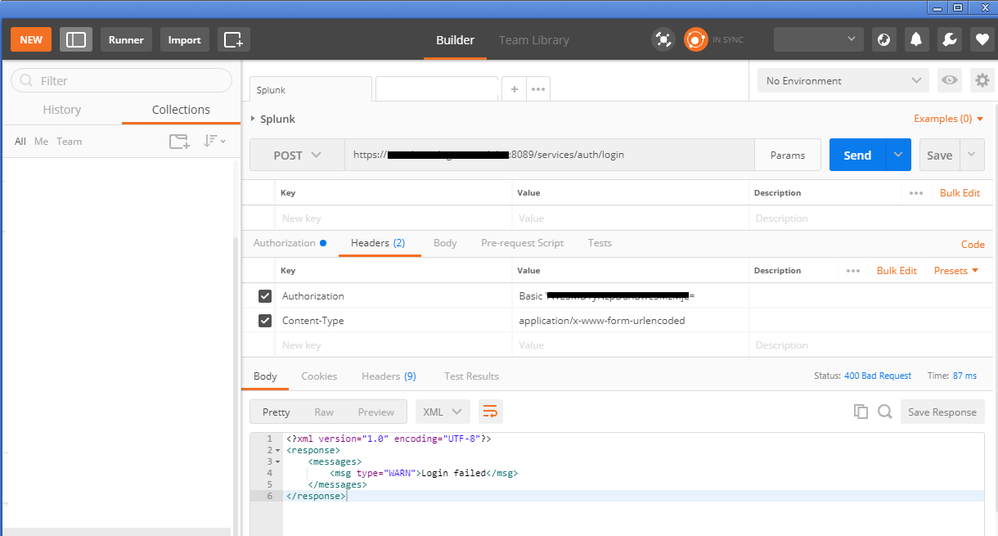
I'm able to confirm this works for me curl command is working for me. It returns a session ID.
curl -k https://splunkdomain.local:8089/services/auth/login --data-urlencode username={username} --data-urlencode password={password}
Using the same end point in Postman, it complains "Login failed". Can someone please assist?

- Mark as New
- Bookmark Message
- Subscribe to Message
- Mute Message
- Subscribe to RSS Feed
- Permalink
- Report Inappropriate Content
So this is what I did to solve it... I noticed that the cURL generated by postman was not working and getting the exact same error you are seeing on the UI, this cURL command looks something like:
So What I did was:
- Go into Postman and click IMPORT
- On the import Dialog go to the RAW Text tab and paste this:
- Spoilercurl -k https://{{host}}:8089/services/auth/login --data-urlencode username={{user}} --data-urlencode password={{pass}}
And hit IMPORT, this will generate a working request. If you look at the cURL generated by it the only difference is that it actually sets the Content-Type header which seems to so the trick. It now looks something like this:
--header 'Content-Type: application/x-www-form-urlencoded' \
--data-urlencode 'username={{user}}' \
--data-urlencode 'password={{pass}}'
Trying this curl command on the terminal will also work.
- Mark as New
- Bookmark Message
- Subscribe to Message
- Mute Message
- Subscribe to RSS Feed
- Permalink
- Report Inappropriate Content
Im stuck on the same issue, but if you look closely its not an AUTH falied, it is really a 400 Bad Request error, I'v been trying different ways to call the API on Postman but so far I haven't been able to get it working, but it works on cURL and using Requests on Python, so its definitively something related to the message formatting that is causing this.
- Mark as New
- Bookmark Message
- Subscribe to Message
- Mute Message
- Subscribe to RSS Feed
- Permalink
- Report Inappropriate Content
So this is what I did to solve it... I noticed that the cURL generated by postman was not working and getting the exact same error you are seeing on the UI, this cURL command looks something like:
So What I did was:
- Go into Postman and click IMPORT
- On the import Dialog go to the RAW Text tab and paste this:
- Spoilercurl -k https://{{host}}:8089/services/auth/login --data-urlencode username={{user}} --data-urlencode password={{pass}}
And hit IMPORT, this will generate a working request. If you look at the cURL generated by it the only difference is that it actually sets the Content-Type header which seems to so the trick. It now looks something like this:
--header 'Content-Type: application/x-www-form-urlencoded' \
--data-urlencode 'username={{user}}' \
--data-urlencode 'password={{pass}}'
Trying this curl command on the terminal will also work.
- Mark as New
- Bookmark Message
- Subscribe to Message
- Mute Message
- Subscribe to RSS Feed
- Permalink
- Report Inappropriate Content

@spammenot66, following is what I had tried for HEC using JSON Data packet. I had to use http on my local, however, https should work if cURL worked fine for you.
| makeresults | eval message= "Happy Splunking!!!"

Join the Splunk Community Slack to learn, troubleshoot, and make connections with fellow Splunk practitioners in real time!
Join Splunk User Groups to connect and learn in-person by region or remotely by topic or industry.
[Puzzles] Solve, Learn, Repeat: Classic British Rock Bands
New to the Community? Join Us for an Exclusive Post .conf26 Welcome Session (Plus a ...
Accelerate Splunk App Development with AI
