
Join the Conversation
- Find Answers
- :
- Splunk Administration
- :
- Getting Data In
- :
- Re: Multiple json events coming as one
- Subscribe to RSS Feed
- Mark Topic as New
- Mark Topic as Read
- Float this Topic for Current User
- Bookmark Topic
- Subscribe to Topic
- Mute Topic
- Printer Friendly Page
- Mark as New
- Bookmark Message
- Subscribe to Message
- Mute Message
- Subscribe to RSS Feed
- Permalink
- Report Inappropriate Content

I have multiple events which are coming as one
and I need to separate them into separate events in order to create a table and etc
Is there a way to do it in the search time?
{
"Timestamp": "2020-02-08T15:45:00.036Z",
"Query Parameters": "",
"RequestMethod": "POST",
"Request": "{tt}",
"Response": "{tt}",
"HTTPStatusCode": "200",
"TotalResponseTimeApprox.(ms)": "290.0",
"TargetResponseTime(ms)": "241.0"
}{
"Timestamp": "2020-02-08T15:45:00.334Z",
"Query Parameters": "",
"RequestMethod": "POST",
"Request": "{tt}",
"Response": "{tt}",
"HTTPStatusCode": "200",
"TotalResponseTimeApprox.(ms)": "290.0",
"TargetResponseTime(ms)": "241.0"
}
Thank you
- Mark as New
- Bookmark Message
- Subscribe to Message
- Mute Message
- Subscribe to RSS Feed
- Permalink
- Report Inappropriate Content

Hi @khalid7assan,
Your event can be parsed with the following SPL:
| rex field=_raw max_match=0 "(?ms)(?<split_raw>\{.+?\})(?=\{|\s*$)"
| mvexpand split_raw
You can replicate the behaviour by copying and pasting the following code in Splunk:
| makeresults
| eval _raw = "
    {
    \"Timestamp\": \"2020-02-08T15:45:00.036Z\",
    \"Query Parameters\": \"\",
    \"RequestMethod\": \"POST\",
    \"Request\": \"{tt}\",
    \"Response\": \"{tt}\",
    \"HTTPStatusCode\": \"200\",
    \"TotalResponseTimeApprox.(ms)\": \"290.0\",
    \"TargetResponseTime(ms)\": \"241.0\"
    }{
    \"Timestamp\": \"2020-02-08T15:45:00.334Z\",
    \"Query Parameters\": \"\",
    \"RequestMethod\": \"POST\",
    \"Request\": \"{tt}\",
    \"Response\": \"{tt}\",
    \"HTTPStatusCode\": \"200\",
    \"TotalResponseTimeApprox.(ms)\": \"290.0\",
    \"TargetResponseTime(ms)\": \"241.0\"
    }
"

| rex field=_raw max_match=0 "(?ms)(?<split_raw>\{.+?\})(?=\{|\s*$)"
| mvexpand split_raw
| fields - _raw, _time
Output:
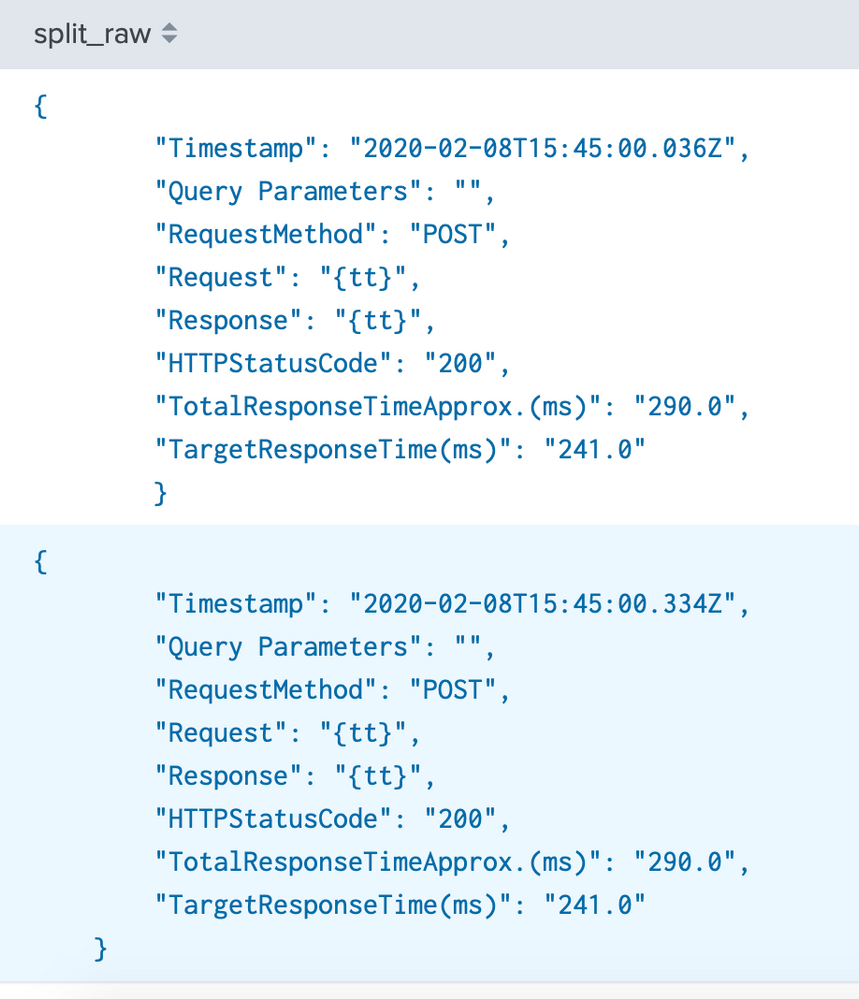
If you find any issues or your events are more complex than the one you included in your question, please post some more examples so that we can take a look.
Regards,
J

- Mark as New
- Bookmark Message
- Subscribe to Message
- Mute Message
- Subscribe to RSS Feed
- Permalink
- Report Inappropriate Content
Hi @khalid7assan,
Did any of the answers below help with your problem? If so please don't forget to accept one so that other users can benefit from this answer in the future.
Thanks,
J
- Mark as New
- Bookmark Message
- Subscribe to Message
- Mute Message
- Subscribe to RSS Feed
- Permalink
- Report Inappropriate Content

props.conf
[your_sourcetype]
SHOULD_LINEMERGE = false
LINE_BREAKER =(^){
make appropriate props.conf
- Mark as New
- Bookmark Message
- Subscribe to Message
- Mute Message
- Subscribe to RSS Feed
- Permalink
- Report Inappropriate Content
Hi @khalid7assan,
Your event can be parsed with the following SPL:
| rex field=_raw max_match=0 "(?ms)(?<split_raw>\{.+?\})(?=\{|\s*$)"
| mvexpand split_raw
You can replicate the behaviour by copying and pasting the following code in Splunk:
| makeresults
| eval _raw = "
    {
    \"Timestamp\": \"2020-02-08T15:45:00.036Z\",
    \"Query Parameters\": \"\",
    \"RequestMethod\": \"POST\",
    \"Request\": \"{tt}\",
    \"Response\": \"{tt}\",
    \"HTTPStatusCode\": \"200\",
    \"TotalResponseTimeApprox.(ms)\": \"290.0\",
    \"TargetResponseTime(ms)\": \"241.0\"
    }{
    \"Timestamp\": \"2020-02-08T15:45:00.334Z\",
    \"Query Parameters\": \"\",
    \"RequestMethod\": \"POST\",
    \"Request\": \"{tt}\",
    \"Response\": \"{tt}\",
    \"HTTPStatusCode\": \"200\",
    \"TotalResponseTimeApprox.(ms)\": \"290.0\",
    \"TargetResponseTime(ms)\": \"241.0\"
    }
"

| rex field=_raw max_match=0 "(?ms)(?<split_raw>\{.+?\})(?=\{|\s*$)"
| mvexpand split_raw
| fields - _raw, _time
Output:
If you find any issues or your events are more complex than the one you included in your question, please post some more examples so that we can take a look.
Regards,
J
- Mark as New
- Bookmark Message
- Subscribe to Message
- Mute Message
- Subscribe to RSS Feed
- Permalink
- Report Inappropriate Content
Thank you it worked

Join the Splunk Community Slack to learn, troubleshoot, and make connections with fellow Splunk practitioners in real time!
Join Splunk User Groups to connect and learn in-person by region or remotely by topic or industry.
Make Your Machine Data AI-Ready in Splunk
Splunk Asynchronous Forwarding Explained
How to Monitor AI Agents with Splunk Agent Observability
