
Join the Conversation
- Find Answers
- :
- Splunk Administration
- :
- Getting Data In
- :
- Monitored txt file keeps re-indexing events
- Subscribe to RSS Feed
- Mark Topic as New
- Mark Topic as Read
- Float this Topic for Current User
- Bookmark Topic
- Subscribe to Topic
- Mute Topic
- Printer Friendly Page
- Mark as New
- Bookmark Message
- Subscribe to Message
- Mute Message
- Subscribe to RSS Feed
- Permalink
- Report Inappropriate Content
Monitored txt file keeps re-indexing events

PLEASE HELP!
This has been driving me mad for days! Every time an event is added, its re-reading the text file from the start and re-indexing events. I am getting hundreds of duplicate events and have tried a variety of combos in the inputs.conf, but still cant solve it!
I am monitoring a series of text files. Each day a new .txt file is created and events are written into this text continuously throughout the day, until the beginning of the next, where again a new file is created. the files are named as follows.
Statistics_20211104_034330_840.txt
The contents of the file is as follows
QPS statistics: SW-Version:3.64 [UTC+00:00]
time,id,valid,invalid,mode,......[ETC ETC ETC]
2021-11-04T03:43:19+00:00,248559,1,0,A,....[ETC ETC ETC]
2021-11-04T03:43:19+00:00,248560,1,0,A,....[ETC ETC ETC]
This is what I currently have in the inputs.conf
[monitor://\\Lgwnasapp002\bsr$\]
disabled = false
index = idx_security_scanner
sourcetype = QPSdata
whitelist = .+Statistics_\d{8}_\d{6}_\d{1,5}\.txt
crcSalt = <SOURCE>
Any ideas?
- Mark as New
- Bookmark Message
- Subscribe to Message
- Mute Message
- Subscribe to RSS Feed
- Permalink
- Report Inappropriate Content


Have you tried adding crcSalt = <SOURCE> to the monitor stanza?
If this reply helps you, Karma would be appreciated.
- Mark as New
- Bookmark Message
- Subscribe to Message
- Mute Message
- Subscribe to RSS Feed
- Permalink
- Report Inappropriate Content
Yup, no joy.
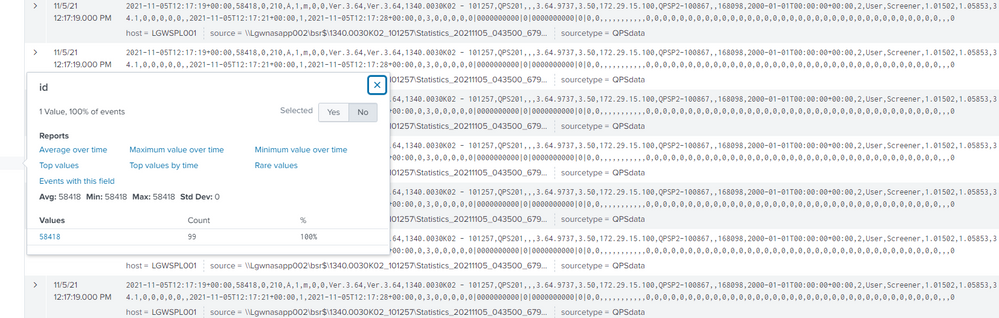
I've just been monitoring it more carefully. It actually looks like its indexing each event ~100 times in the first place. I ran a real time search to see each event come in live and this one for example indexed 99 times.


Join the Splunk Community Slack to learn, troubleshoot, and make connections with fellow Splunk practitioners in real time!
Join Splunk User Groups to connect and learn in-person by region or remotely by topic or industry.
SOC4Kafka - New Kafka Connector Powered by OpenTelemetry
Event Series: Level up your SOC: Advancing with Splunk Enterprise Security
Announcing Modern Navigation: A New Era of Splunk User Experience
