
Join the Conversation
- Find Answers
- :
- Splunk Administration
- :
- Getting Data In
- :
- How to split multiple lines in a table into separa...
- Subscribe to RSS Feed
- Mark Topic as New
- Mark Topic as Read
- Float this Topic for Current User
- Bookmark Topic
- Subscribe to Topic
- Mute Topic
- Printer Friendly Page
- Mark as New
- Bookmark Message
- Subscribe to Message
- Mute Message
- Subscribe to RSS Feed
- Permalink
- Report Inappropriate Content

I have some data from Tenable and I am trying to weed out the rows with multiple values into its own row.
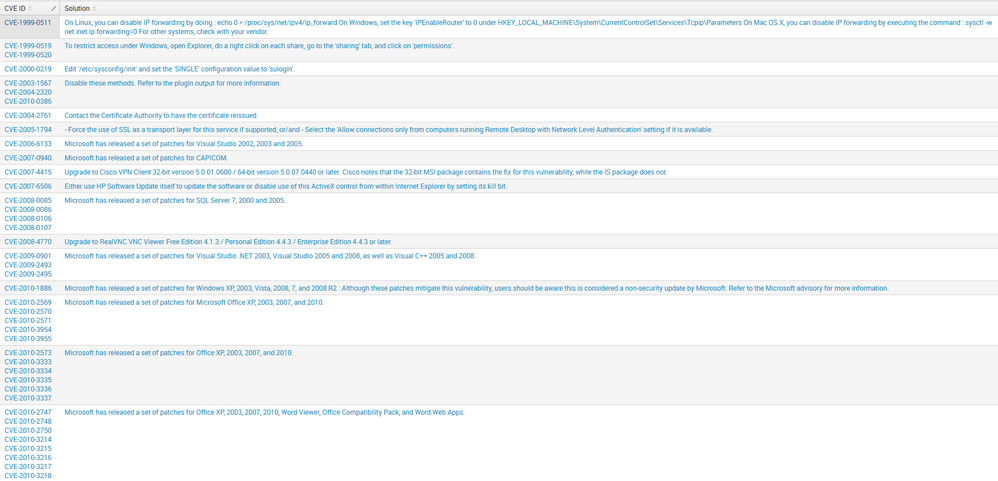
A good example would be is the 4th row with 3 CVE-IDs (CVE-2003-1567, CVE-2004-2320, and CVE-2010-0386).
Instead, I would like to break it out to look like this:
CVE-2003-1567 Disable these methods. Refer to the plugin output for more information.
CVE-2004-2320 Disable these methods. Refer to the plugin output for more information.
CVE-2010-0386 Disable these methods. Refer to the plugin output for more information.
Any ideas?
Thanks
- Mark as New
- Bookmark Message
- Subscribe to Message
- Mute Message
- Subscribe to RSS Feed
- Permalink
- Report Inappropriate Content

Sounds like a case for the mvexpand command: http://docs.splunk.com/Documentation/Splunk/latest/SearchReference/Mvexpand
Try:
...your base search that results in this data...
| mvexpand "CVE ID"
- Mark as New
- Bookmark Message
- Subscribe to Message
- Mute Message
- Subscribe to RSS Feed
- Permalink
- Report Inappropriate Content
Sounds like a case for the mvexpand command: http://docs.splunk.com/Documentation/Splunk/latest/SearchReference/Mvexpand
Try:
...your base search that results in this data...
| mvexpand "CVE ID"
- Mark as New
- Bookmark Message
- Subscribe to Message
- Mute Message
- Subscribe to RSS Feed
- Permalink
- Report Inappropriate Content
Frank,
index=tenable_data severity!="informational" hasBeenMitigated=0
| fields cve, solution
| dedup cve
| mvexpand cve
| rename cve as "CVE ID", solution as "Solution"
| table "CVE ID","Solution"
| sort "CVE ID"
It would have been more useful if I sent you guys my SPL, sorry for not doing that! But, | mvexpand "CVE-ID" would not work, I had to use | mvexpand cve. Could you explain why that is the case? Does | mvexpand not work if a field has been renamed?
Thanks for introducing me to the mvexpand command!!
- Mark as New
- Bookmark Message
- Subscribe to Message
- Mute Message
- Subscribe to RSS Feed
- Permalink
- Report Inappropriate Content
If you put the mvexpand command before the rename command, then of course you need to use the original name of the field 🙂
- Mark as New
- Bookmark Message
- Subscribe to Message
- Mute Message
- Subscribe to RSS Feed
- Permalink
- Report Inappropriate Content
I swear it didn't work after the rename command.. must have overlooked it or my brain was still asleep.. Anyways, thank you so much for the help! 🙂



Join the Splunk Community Slack to learn, troubleshoot, and make connections with fellow Splunk practitioners in real time!
Join Splunk User Groups to connect and learn in-person by region or remotely by topic or industry.
A Four-Part Event Series: Full Stack Observability For the AI Era
SOC4Kafka - New Kafka Connector Powered by OpenTelemetry
Event Series: Level up your SOC: Advancing with Splunk Enterprise Security
