
Join the Conversation
- Find Answers
- :
- Splunk Administration
- :
- Getting Data In
- :
- Re: How do I input data event and fields?
- Subscribe to RSS Feed
- Mark Topic as New
- Mark Topic as Read
- Float this Topic for Current User
- Bookmark Topic
- Subscribe to Topic
- Mute Topic
- Printer Friendly Page
- Mark as New
- Bookmark Message
- Subscribe to Message
- Mute Message
- Subscribe to RSS Feed
- Permalink
- Report Inappropriate Content
How do I input data event and fields?

Hello,
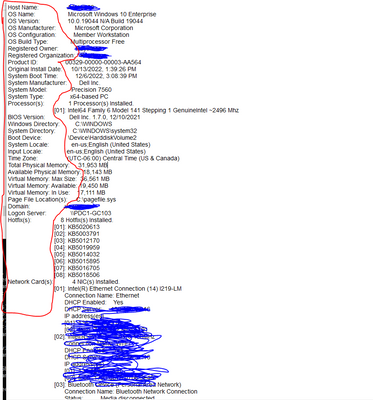
I am inputting a file into Splunk showing the computers system information extracted from the command prompt. The data file I am inputting input Splunk looks like the first photo below, where I want the fields to be set as the values in the first column (circled in red) and their field values equal to their corresponding output value.
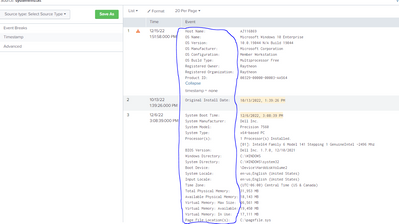
YETTT, when adding it to Splunk, it breaks down the system information file into three events (instead of 1), see image below.
How do I merge these three events into one (match the text file uploaded) and set the fields equal to the systems characteristics seen in the first column (circled in blue)?
- Mark as New
- Bookmark Message
- Subscribe to Message
- Mute Message
- Subscribe to RSS Feed
- Permalink
- Report Inappropriate Content


Welcome to the fun world of GDI (Getting Data In)!
If you're getting three events when you should be getting one then your line breaking needs to be adjusted. Try
LINE_BREAKER = ([\r\n])Host Name:Extracting fields from the input is fairly simple with a series of EXTRACT statements. Don't try to do the whole thing in one go because that will drive you mad and will break too easily. (Clever people with a transform that will do the extractions are welcome to chime in!)
EXTRACT-hostname = Host Name:\s+(?<HostName>\S+)
EXTRACT-osname = OS Name:\s+(?<OSName>.*$)
<<and so on>>
And to fix that warning about timestamp extraction, put this in props.conf
DATETIME_CONFIG = CURRENTIf this reply helps you, Karma would be appreciated.

Join the Splunk Community Slack to learn, troubleshoot, and make connections with fellow Splunk practitioners in real time!
Join Splunk User Groups to connect and learn in-person by region or remotely by topic or industry.
Persistent Queue at TcpOut — One of Splunk's Most Practical Features
Catalog Is Now Generally Available on Splunk Cloud Platform
Your Path to AgenticOps: AI Experiences for Every Splunk Practitioner
