
Join the Conversation
- Find Answers
- :
- Splunk Administration
- :
- Getting Data In
- :
- Re: How do I add a new role via REST API?
- Subscribe to RSS Feed
- Mark Topic as New
- Mark Topic as Read
- Float this Topic for Current User
- Bookmark Topic
- Subscribe to Topic
- Mute Topic
- Printer Friendly Page
- Mark as New
- Bookmark Message
- Subscribe to Message
- Mute Message
- Subscribe to RSS Feed
- Permalink
- Report Inappropriate Content
How do I add a new role via REST API?

Hi,
How could I add a new role via REST API ?
When I try to send the following HTTP POST via Postman:
URL: https://localhost:8089/services/authorization/roles?name=newrole
Method: POST
Authorization: Basic -credentials-, where -credentials- is
the base64 encoding of ID and password joined by a colon.
I got: Cannot perform action "POST" without a target name to act on.
<?xml version="1.0" encoding="UTF-8"?>
<response>
    <messages>
        <msg type="ERROR">Cannot perform action "POST" without a target name to act on.</msg>
    </messages>
</response>
What does target name refer to? And how could I set the value in order to get the HTTP POST request to work ?
- Mark as New
- Bookmark Message
- Subscribe to Message
- Mute Message
- Subscribe to RSS Feed
- Permalink
- Report Inappropriate Content

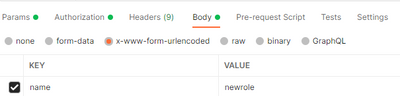
For anyone facing this issue and still looking for an answer, you need to use url encoded parameters to be passed to the request. The request was successful only after this change was made.
- Mark as New
- Bookmark Message
- Subscribe to Message
- Mute Message
- Subscribe to RSS Feed
- Permalink
- Report Inappropriate Content


@davidtrujillo - Can you please confirm that this resolves your issue?
If so can you please also accept the answer as solution by clicking on "Accept as Solution" button.
- Mark as New
- Bookmark Message
- Subscribe to Message
- Mute Message
- Subscribe to RSS Feed
- Permalink
- Report Inappropriate Content

Have you looked at this? (see the example on POST request)
https://docs.splunk.com/Documentation/Splunk/7.2.4/RESTREF/RESTaccess#authorization.2Froles


Join the Splunk Community Slack to learn, troubleshoot, and make connections with fellow Splunk practitioners in real time!
Join Splunk User Groups to connect and learn in-person by region or remotely by topic or industry.
Meet Splunk Observability Studio: AI-Assisted OpenTelemetry Instrumentation Without ...
Federated Search for Cisco Security and Analytics Logging (SAL) is now GA on Splunk ...
Your Path to AgenticOps: AI Experiences for Every Splunk Practitioner
