
Join the Conversation
- Find Answers
- :
- Splunk Administration
- :
- Getting Data In
- :
- Re: Eventgen Replay mode: all same timestamp
- Subscribe to RSS Feed
- Mark Topic as New
- Mark Topic as Read
- Float this Topic for Current User
- Bookmark Topic
- Subscribe to Topic
- Mute Topic
- Printer Friendly Page
- Mark as New
- Bookmark Message
- Subscribe to Message
- Mute Message
- Subscribe to RSS Feed
- Permalink
- Report Inappropriate Content
Eventgen Replay mode: all same timestamp

Hi, Please help me out.
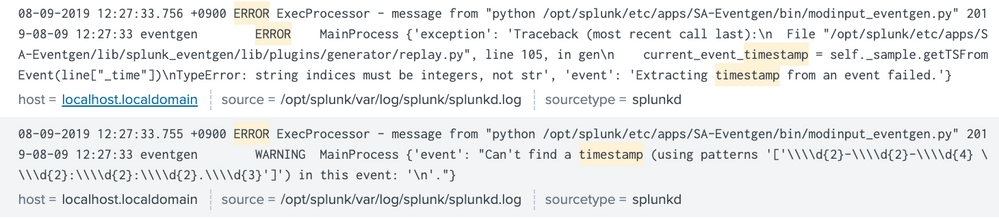
I try to generate events with replay mode, but it is not working properly. All timestamp is same. Of course original sample file is time series data, which means each event has different timestamp.
[sampledata1.log]
mode = replay
outputMode = splunkstream
token.0.token = \d{2}-\d{2}-\d{4} \d{2}:\d{2}:\d{2}.\d{3} token.0.replacementType = timestamp
token.0.replacement = %m-%d-%Y %H:%M:%S.%f
sampledata1.log
"08-07-2019 22:00:03.595 +0900 INFO loader - Running utility: ""validatedb"""
"08-07-2019 22:00:04.496 +0900 INFO loader - Getting configuration data from: /home/splunk/etc/myinstall/splunkd.xml"
"08-07-2019 22:00:05.586 +0900 INFO loader - SPLUNK_MODULE_PATH environment variable not found - defaulting to /home/splunk/etc/modules"
"08-07-2019 22:00:06.596 +0900 INFO loader - loading modules from /home/splunk/etc/modules"
"08-07-2019 22:00:07.597 +0900 INFO loader - Writing out composite configuration file: /home/splunk/var/run/splunk/composite.xml"
................
After restart splunk, I could see this view. Generated events have same timestamp.

What I have to do? What wrong with this?
- Mark as New
- Bookmark Message
- Subscribe to Message
- Mute Message
- Subscribe to RSS Feed
- Permalink
- Report Inappropriate Content

You are using the following line:
token.0.replacementType = timestamp
Instead you should use:
token.0.replacementType = replaytimestamp
This should fix your problem.
Tip: The replaytimestamp is based on the difference of the timestamps in your sample file. So you might want to increase the difference in your sample.
- Mark as New
- Bookmark Message
- Subscribe to Message
- Mute Message
- Subscribe to RSS Feed
- Permalink
- Report Inappropriate Content
Thank you for the answer. But I don't understand these combination below:
1. mode=reply / token.x.replacementType = replaytimestamp
2. mode=reply / token.x.replacementType = timestamp
3. mode=sample / token.x.replacementType = replaytimestamp
4. mode=sample / token.x.replacementType = timestamp
I tested 4 cases and got to know what' differences between them, but, I would like to get to know about each option based on cases. Could anybody please let me know about those cases?
- Mark as New
- Bookmark Message
- Subscribe to Message
- Mute Message
- Subscribe to RSS Feed
- Permalink
- Report Inappropriate Content




Join the Splunk Community Slack to learn, troubleshoot, and make connections with fellow Splunk practitioners in real time!
Join Splunk User Groups to connect and learn in-person by region or remotely by topic or industry.
A Four-Part Event Series: Full Stack Observability For the AI Era
SOC4Kafka - New Kafka Connector Powered by OpenTelemetry
Event Series: Level up your SOC: Advancing with Splunk Enterprise Security
