
Join the Conversation
- Find Answers
- :
- Splunk Administration
- :
- Getting Data In
- :
- Can you index images with Splunk?
- Subscribe to RSS Feed
- Mark Topic as New
- Mark Topic as Read
- Float this Topic for Current User
- Bookmark Topic
- Subscribe to Topic
- Mute Topic
- Printer Friendly Page
- Mark as New
- Bookmark Message
- Subscribe to Message
- Mute Message
- Subscribe to RSS Feed
- Permalink
- Report Inappropriate Content

Is it possible to index images in splunk?
I want to gather logs from a certain location, so I specified an index like this:
[monitor://\\path\to\monitor]
whitelist=LOGFILE
However, that location will contain multiple types of data, specifically, logs and images. I want to use those images in my splunk dashboards, so I changed my index.conf to look like this:
[monitor://\\path\to\monitor]
whitelist=(LOGFILE|screenshot\.png)
This doesn't seem to work. I looked into using fschange but it looks like you can't use monitor and fschange on the same directory (according to: http://docs.splunk.com/Documentation/Splunk/latest/Admin/Inputsconf?utm_source=answers&utm_medium=in...)
- Mark as New
- Bookmark Message
- Subscribe to Message
- Mute Message
- Subscribe to RSS Feed
- Permalink
- Report Inappropriate Content

A creative solution :
If you want to monitor the images using Splunk.
Create an active script which will update a text file whenever an image is added into a directory prefixing it with the timestamp(add size if you want) the image was put into the directory.
Then index this text file in Splunk 🙂
- Mark as New
- Bookmark Message
- Subscribe to Message
- Mute Message
- Subscribe to RSS Feed
- Permalink
- Report Inappropriate Content

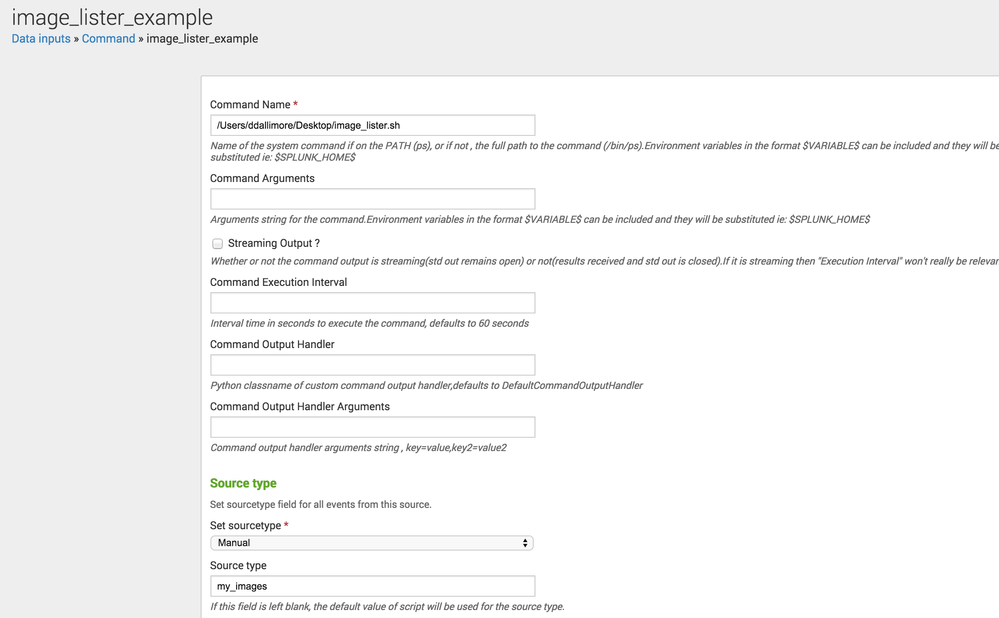
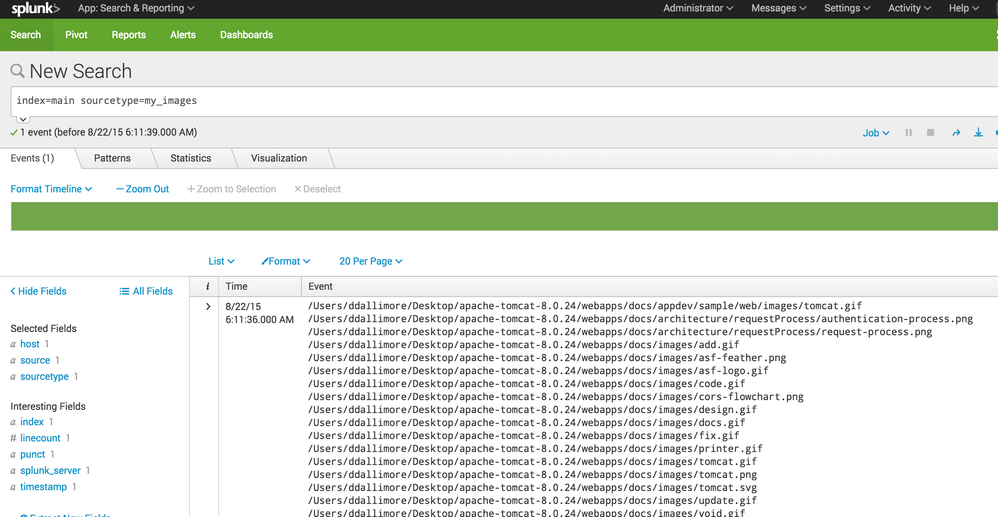
You could use the Command Modular Input to execute a command that looks in a directory , finds images files and indexes those image file paths/names in Splunk.
image_lister.sh
#!/bin/sh

find /Users/ddallimore/Desktop -type f -exec file {} \; | awk -F: '{ if ($2 ~/[Ii]mage|EPS/) print $1}'
Setup a Command Modular Input stanza to fire the image_lister.sh command
Search in Splunk


- Mark as New
- Bookmark Message
- Subscribe to Message
- Mute Message
- Subscribe to RSS Feed
- Permalink
- Report Inappropriate Content

Are you sure Splunk is the right tool for this situation? Whenever people are working with documents, I usually suggest MarkLogic which has tools to help you generate the metadata that you are describing. It is an incredible product and does things in a totally different way than Splunk and is better suited for non-plain-text data sources:
http://www.marklogic.com
P.S. These are the main guys that swooped in and made HealthCare.gov actually work; without them, it probably never would have.
- Mark as New
- Bookmark Message
- Subscribe to Message
- Mute Message
- Subscribe to RSS Feed
- Permalink
- Report Inappropriate Content


Fair point, but I think you mean MarkLogic, not Mark/Space. http://www.marklogic.com/customers/healthcare-gov/
- Mark as New
- Bookmark Message
- Subscribe to Message
- Mute Message
- Subscribe to RSS Feed
- Permalink
- Report Inappropriate Content
Thank you for the correction; I have updated my answer.
- Mark as New
- Bookmark Message
- Subscribe to Message
- Mute Message
- Subscribe to RSS Feed
- Permalink
- Report Inappropriate Content
A creative solution :
If you want to monitor the images using Splunk.
Create an active script which will update a text file whenever an image is added into a directory prefixing it with the timestamp(add size if you want) the image was put into the directory.
Then index this text file in Splunk 🙂
- Mark as New
- Bookmark Message
- Subscribe to Message
- Mute Message
- Subscribe to RSS Feed
- Permalink
- Report Inappropriate Content

I don't think so Splunk is a tool for this requirement (indexing image). I believe you'd need some bigdata solution to store that and then you can use Splunk HUNK to do image search.
- Mark as New
- Bookmark Message
- Subscribe to Message
- Mute Message
- Subscribe to RSS Feed
- Permalink
- Report Inappropriate Content
I really just wanted the file names so I can embed them in the dashboard. No need for bigdata solutions

Join the Splunk Community Slack to learn, troubleshoot, and make connections with fellow Splunk practitioners in real time!
Join Splunk User Groups to connect and learn in-person by region or remotely by topic or industry.
Make Your Machine Data AI-Ready in Splunk
Splunk Asynchronous Forwarding Explained
How to Monitor AI Agents with Splunk Agent Observability
