
Join the Conversation
- Find Answers
- :
- Splunk Administration
- :
- Deployment Architecture
- :
- Need Help Configuring my Indexes.conf to enforce 4...
- Subscribe to RSS Feed
- Mark Topic as New
- Mark Topic as Read
- Float this Topic for Current User
- Bookmark Topic
- Subscribe to Topic
- Mute Topic
- Printer Friendly Page
- Mark as New
- Bookmark Message
- Subscribe to Message
- Mute Message
- Subscribe to RSS Feed
- Permalink
- Report Inappropriate Content

Using Splunk Enterprise 6.4.1 on linux. Hot/warm/cold are all on the same partition. All data should be deleted after 45 days, but searchable for the entire 45 days. Is there a formula of some sort that I can apply to figure out the proper setting for each of my 3 indexes? The data is stored in 3 separate indexes to facilitate access control via splunk roles. The average event size is 1615 bytes.
Index 1 receives an average of 1.2 million events per day (1,200,000 * 1615 = 1848M/day)
Index 2 receives an average of 10-20 events per day. (10 * 1615 = .0154M/day)
Index 3 receives an average of 28,000 events per day (28,000 * 1615 = 44M/day)
I've got this to start, but I'm not sure how to get the warm buckets to roll to cold. It's my understanding that the frozenTimePeriodInSecs does not trigger unless the buckets are in cold state.
#receives  ~1.2 million events per day
[index1]
maxHotBuckets=10
maxDataSize=auto
frozenTimePeriodInSecs=3888000

# receives ~ 10-20 events per day
[index2]
maxHotBuckets=10
maxDataSize=auto
frozenTimePeriodInSecs=3888000
maxHotIdleSecs=86400

#Receives ~28K events per day
[index3]
maxHotBuckets=10
maxDataSize=auto
frozenTimePeriodInSecs=3888000
I've read the Wiki for Bucket Rotation and Wiki for Understanding Buckets and I'm still not clear. Any insight you can provide would be greatly appreciated!
- Mark as New
- Bookmark Message
- Subscribe to Message
- Mute Message
- Subscribe to RSS Feed
- Permalink
- Report Inappropriate Content
So, you are asking for the following, right?
-- All data should be deleted after 45 days, but searchable for the entire 45 days.
"Just" this should do it -
frozenTimePeriodInSecs=3888000
We had a cheerful related conversation recently at Is there a global setting for rolling of warm to cold and cold to frozen in an indexer cluster?
- Mark as New
- Bookmark Message
- Subscribe to Message
- Mute Message
- Subscribe to RSS Feed
- Permalink
- Report Inappropriate Content
So, you are asking for the following, right?
-- All data should be deleted after 45 days, but searchable for the entire 45 days.
"Just" this should do it -
frozenTimePeriodInSecs=3888000
We had a cheerful related conversation recently at Is there a global setting for rolling of warm to cold and cold to frozen in an indexer cluster?
- Mark as New
- Bookmark Message
- Subscribe to Message
- Mute Message
- Subscribe to RSS Feed
- Permalink
- Report Inappropriate Content
I feel like I need to do more than set the frozenTimePeriodInSecs, especially for the lower volume indexes. For instance, index 3 gets an average of 43M per day. So if I keep index3 set to maxDataSize=auto (750MB) it will take approximately 17 days to fill a bucket. So if one bucket rolls to warm after 17 days, then it will be another 45 days later that it is frozen. At that point, some of the data will be 62 days old, right?
So, if I change maxDataSize=43 that would put approximately 1 days worth of data in each bucket. right? Then I'd need to set the maxWarmDBCount=40 so that the older buckets would make it to cold state before the 45 day limit. At this point the frozenTimePeriodInSeconds will kick in.
Does that sound reasonable?
[index3]
maxHotBuckets=10
maxDataSize=43
maxWarmDBCount=40
frozenTimePeriodInSecs=3888000
- Mark as New
- Bookmark Message
- Subscribe to Message
- Mute Message
- Subscribe to RSS Feed
- Permalink
- Report Inappropriate Content
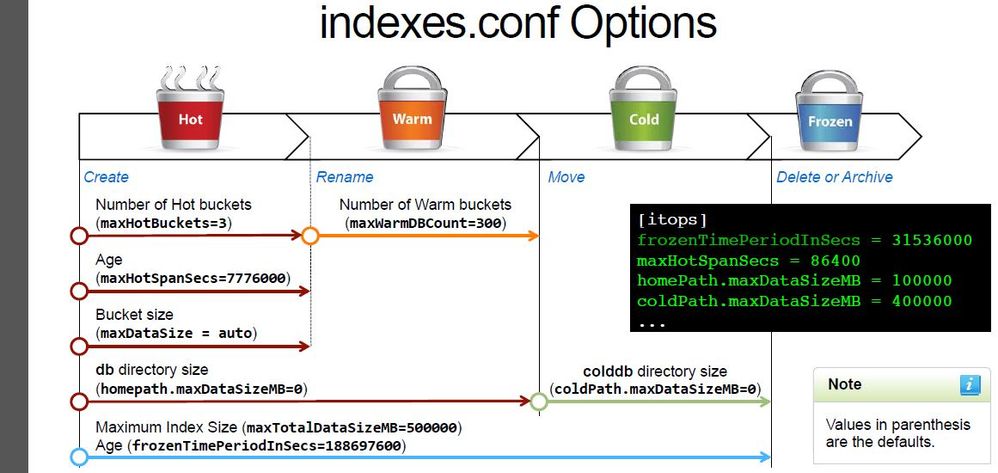
Right, I also asked myself a similar question ; -) However, I believe that frozenTimePeriodInSecs is completely independent of any other settings.
Actually in the Admin class, I'm taking this week, they made a big point about it as you can see below (all the way at the bottom) -
- Mark as New
- Bookmark Message
- Subscribe to Message
- Mute Message
- Subscribe to RSS Feed
- Permalink
- Report Inappropriate Content
can't see the text you added 😞
- Mark as New
- Bookmark Message
- Subscribe to Message
- Mute Message
- Subscribe to RSS Feed
- Permalink
- Report Inappropriate Content
I think the picture was removed ... as it's an admin class material. But it showed that the frozenTimePeriodInSecs count starts from the beginning.

Join the Splunk Community Slack to learn, troubleshoot, and make connections with fellow Splunk practitioners in real time!
Join Splunk User Groups to connect and learn in-person by region or remotely by topic or industry.
Index This | What travels the world but is also stuck in place?
Discover New Use Cases: Unlock Greater Value from Your Existing Splunk Data
Continue Your Journey: Join Session 2 of the Data Management and Federation Bootcamp ...
